搜索插件、代码仓与 APP 分类

flutter_persistent_keyboard_height 封面
插件详情v1.0.5

flutter_persistent_keyboard_height

获取键盘高度的 Flutter 包。可用于以正确高度显示贴纸/表情符号模态框。

AndroidiOS
近 30 天下载
52
喜欢数
33
Pub 分数
150

安装插件

flutter pub add flutter_persistent_keyboard_height

插件介绍

基于插件公开信息、社区数据与项目使用情况整理的选型参考。

一个 Flutter 包,可持久提供屏幕键盘的高度,从而实现准确的 UI 调整。它特别适用于将贴纸或表情符号模态框等元素相对于键盘进行定位。该包可在 Android 和 iOS 平台上正常工作,确保行为一致。它会监听键盘状态变化,并通过流暴露当前高度,便于集成到响应式布局中。

适合场景

  • 键盘弹出时调整UI布局
  • 将模态框置于键盘上方
  • 确保内容在输入期间保持可见
  • 创建具有动态输入区域的聊天界面
  • 使用实时键盘感知构建表单

主要特点

  • 实时键盘高度监控
  • 跨平台支持(Android 和 iOS)
  • 基于流的 API,用于响应式更新
  • 最小化设置和集成
  • 即使在动画过程中也能准确检测高度

适合对象

  • 聊天应用开发者
  • 表单构建器
  • 需要键盘感知的UI组件
  • 开发输入密集型界面的开发者
  • 靠近键盘的浮动操作按钮的应用

使用建议

  • 需要正确释放流以避免内存泄漏
  • 可能需要额外的逻辑来处理像分体键盘这样的边缘情况
  • 不适用于静态键盘高度场景
  • 依赖于平台特定的键盘事件
  • 应在多个设备和操作系统版本上进行测试

原始 README

以下为关联源码仓库的 README 原文快照,最新内容请访问源码仓库。

flutter_persistent_keyboard_height Pub version

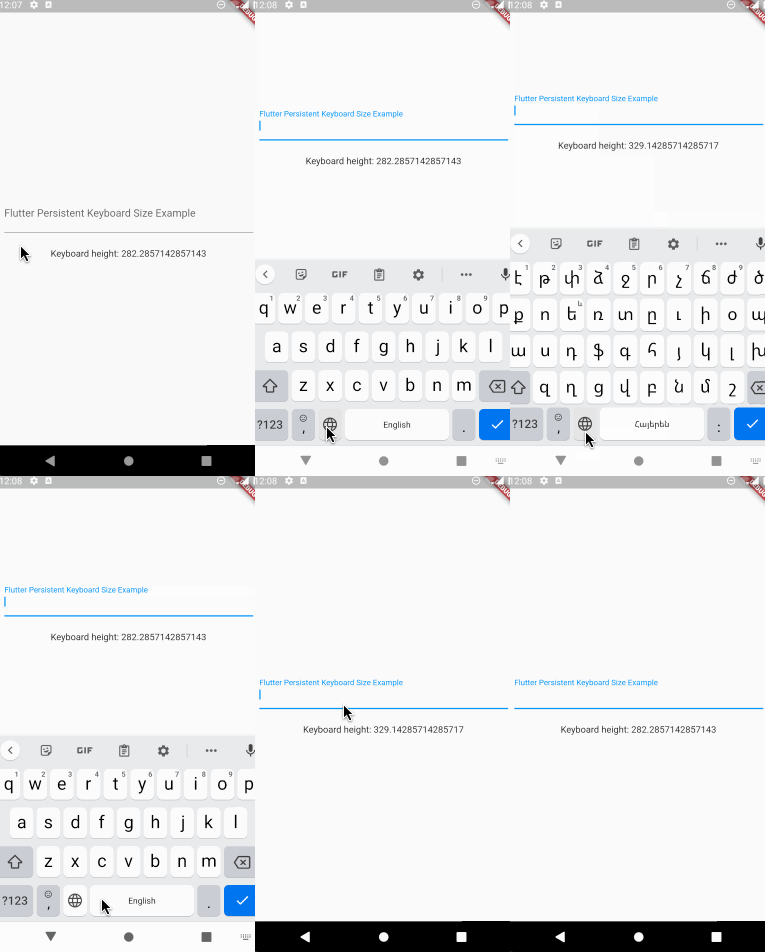
Flutter package to get keyboard height. The height is persisted during app sessions and keyboard states (you can use the height when keyboard is closed).

Usage

Registering the provider

First thing you need to do is wrap a widget from children of which you want to get the keyboard height with PersistentKeyboardHeightProvider. Add it to the builder of your app widget (perhaps MaterialApp) if you want to get keyboard height from all widgets.

class MyApp extends StatelessWidget {
  const MyApp({Key? key}) : super(key: key);

  @override
  Widget build(BuildContext context) {
    return MaterialApp(
      title: 'Flutter Persistent Keyboard Height Example',
      home: const FlutterPersistentKeyboardHeightExample(),
      builder: (context, child) => PersistentKeyboardHeightProvider(
        child: child!,
      ),
    );
  }
}
Getting the keyboard height

In order to get keyboard height use the PersistentKeyboardHeight inherited widget:

Widget build(BuildContext context) {
  final keyboardHeight = PersistentKeyboardHeight.of(context).keyboardHeight;

  return Scaffold(
    body: Column(
      mainAxisAlignment: MainAxisAlignment.center,
      children: [
        const Padding(
          padding: EdgeInsets.all(16.0),
          child: TextField(
            decoration: InputDecoration(
              labelText: 'Flutter Persistent Keyboard Size Example',
            ),
          ),
        ),
        const SizedBox(height: 8),
        Text('Keyboard height: $keyboardHeight'),
      ],
    ),
  );
}
Using a custom storage provider

By default, the package uses shared_preferences to preserve the keyboard height but if you want to use a custom solution for preserving the height you can do that by implementing the IPersistentKeyboardHeightStorageProvider interface and passing an instance of the class to PersistentKeyboardHeightProvider:

class CustomPersistentKeyboardHeightStorageProvider
    implements IPersistentKeyboardHeightStorageProvider {
  const CustomPersistentKeyboardHeightStorageProvider();

  @override
  Future<double> getHeight() {
    // read the height from storage
  }

  @override
  Future<void> setHeight(double height) {
    // save the height to storage
  }
}

class MyApp extends StatelessWidget {
  const MyApp({Key? key}) : super(key: key);

  @override
  Widget build(BuildContext context) {
    return MaterialApp(
      title: 'Flutter Persistent Keyboard Height Example',
      home: const FlutterPersistentKeyboardHeightExample(),
      builder: (context, child) => PersistentKeyboardHeightProvider(
        child: child!,
      ),
    );
  }
}

Check out the example directory for a complete example app.

The development process

The first version of this package was developed in two livestreams. Unfortunately, my voice disappeared at the middle of the first livestream but the second livestream is okay. In case you want to check them out, here are the links: Part 1, Part 2.

Thanks to

所属分类

依赖

依赖清单 2 项

源码仓库

使用此插件的项目

暂无相关数据。