

 v2.2.1
flutter_parsed_text
一个用于解析文本并将其转换为多个 Flutter Text 小部件的 Flutter 包。
270喜欢 25.8万近 30 天下载150Pub 分数
AndroidiOSWebmacOSWindowsLinux
一个用于解析文本并将其转换为可链接文本小部件的 Flutter 包

以下为英文项目原文快照,最新内容请访问 GitHub。
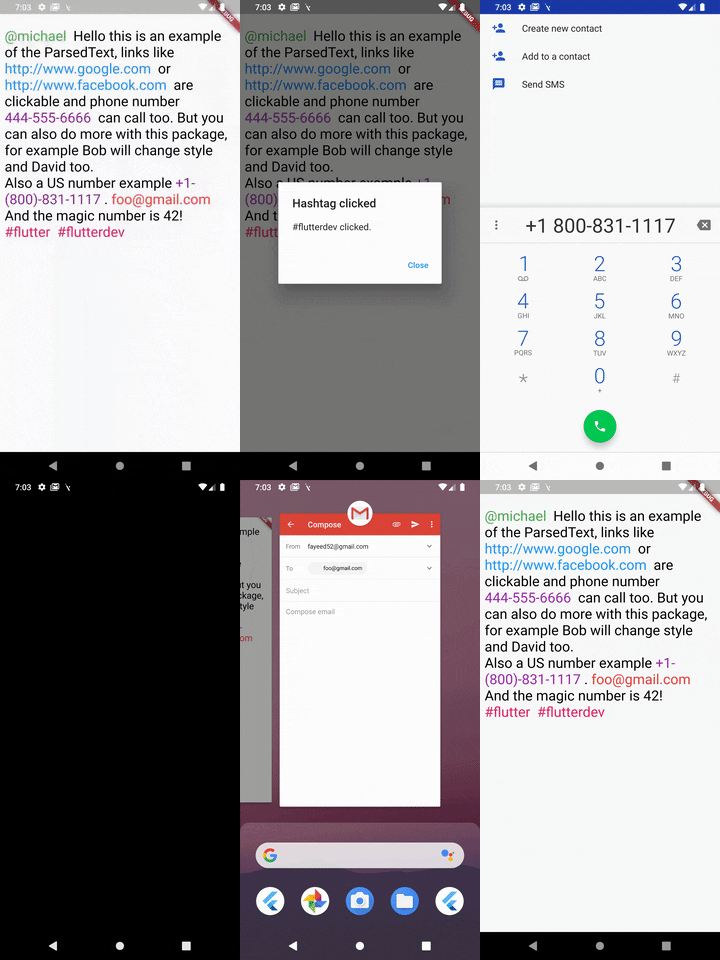
url, phone and email and also supports Regex.To use this package, add flutter_parsed_text as a dependency in your pubspec.yaml file.
import 'package:flutter_parsed_text/flutter_parsed_text.dart';
ParsedText can receive this paramters & all the RichText parameters:
text: Text that will be parsed and rendered.
style: It takes a TextStyle object as it's property to style all the non links text objects.
parse: Array of MatchText object - used for defining structure for pattern matching .
MatchText(
  type: ParsedType.EMAIL, // predefined type can be any of this ParsedTypes
  style: TextStyle(
    color: Colors.red,
    fontSize: 24,
  ), // custom style to be applied to this matched text
  onTap: (url) {
    // do something here with passed url
  }, // callback funtion when the text is tapped on
),
You can also define a custom pattern like this:
MatchText(
  pattern: r"\B#+([\w]+)\b", // a custom pattern to match
  style: TextStyle(
    color: Colors.pink,
    fontSize: 24,
  ), // custom style to be applied to this matched text
  onTap: (url) async {
  // do something here with passed url
  }, // callback funtion when the text is tapped on
)
You can also set RegexOption for the custom regex pattern like so:
MatchText(
  pattern: r"\B#+([\w]+)\b", // a custom pattern to match
  regexOptions: RegexOptions(
    multiLine : false,
    caseSensitive : false,
    unicode : false,
    dotAll : false
  ),
  style: TextStyle(
    color: Colors.pink,
    fontSize: 24,
  ), // custom style to be applied to this matched text
  onTap: (url) async {
  // do something here with passed url
  }, // callback funtion when the text is tapped on
)
A boolean that show a diffrent text and passes a diffrent text to the callback
eg: Your str is "Mention [@michel:5455345]" where 5455345 is ID of this user which will be passed as parameter to the callback funtion and @michel the value to display on interface. Your pattern for ID & username extraction : /\[(@[^:]+):([^\]]+)\]/i
Displayed text will be :
Mention ^^@michel^^
MatchText(
  pattern: r"\[(@[^:]+):([^\]]+)\]",
  style: TextStyle(
    color: Colors.green,
    fontSize: 24,
  ),
  // you must return a map with two keys
  // [display] - the text you want to show to the user
  // [value] - the value underneath it
  renderText: ({String str, String pattern}) {
    Map<String, String> map = Map<String, String>();
    RegExp customRegExp = RegExp(pattern);
    Match match = customRegExp.firstMatch(str);
    map['display'] = match.group(1);
    map['value'] = match.group(2);
    return map;
  },
  onTap: (url) {
    // do something here with passed url
  },
),
Find the complete example wiring in the Flutter_Parsed_Text example application.
A small example of the ParsedText widget.
ParsedText(
  text:
    "[@michael:51515151] Hello this is an example of the ParsedText, links like http://www.google.com or http://www.facebook.com are clickable and phone number 444-555-6666 can call too. But you can also do more with this package, for example Bob will change style and David too. foo@gmail.com And the magic number is 42! #react #react-native",
  parse: <MatchText>[
    MatchText(
      type: ParsedType.EMAIL,
      style: TextStyle(
        color: Colors.red,
        fontSize: 24,
      ),
      onTap: (url) {
        launch("mailto:" + url);
      },
    ),
  ],
)
If you found this project useful, then please consider giving it a ⭐️ on Github and sharing it with your friends via social media.
See the flutter_parsed_text.dart for more API details
If you have any suggestion for including a feature or if something doesn't work, feel free to open a Github issue for us to have a discussion on it.
依赖清单 2 项
{"sdk":"flutter"}{"sdk":"flutter"}先按使用场景筛选,再比较项目活跃情况,最后到原始仓库核对使用要求。
“A repository is the most basic element of GitHub.”
GitHub Docs — About repositories ↗