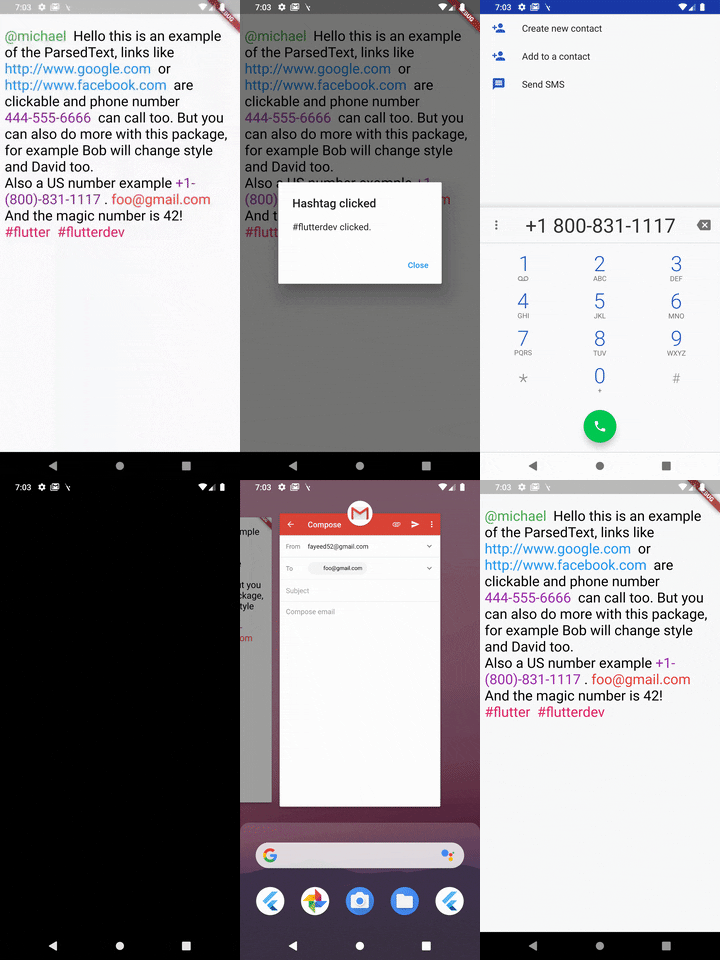
ParsedText can receive this paramters & all the RichText parameters:
text: Text that will be parsed and rendered.
style: It takes a TextStyle object as it's property to style all the non links text objects.
parse: Array of MatchText object - used for defining structure for pattern matching .
MatchText(
  type: ParsedType.EMAIL, // predefined type can be any of this ParsedTypes
  style: TextStyle(
    color: Colors.red,
    fontSize: 24,
  ), // custom style to be applied to this matched text
  onTap: (url) {
    // do something here with passed url
  }, // callback funtion when the text is tapped on
),
You can also define a custom pattern like this:
MatchText(
  pattern: r"\B#+([\w]+)\b", // a custom pattern to match
  style: TextStyle(
    color: Colors.pink,
    fontSize: 24,
  ), // custom style to be applied to this matched text
  onTap: (url) async {
  // do something here with passed url
  }, // callback funtion when the text is tapped on
)
You can also set RegexOption for the custom regex pattern like so:
MatchText(
  pattern: r"\B#+([\w]+)\b", // a custom pattern to match
  regexOptions: RegexOptions(
    multiLine : false,
    caseSensitive : false,
    unicode : false,
    dotAll : false
  ),
  style: TextStyle(
    color: Colors.pink,
    fontSize: 24,
  ), // custom style to be applied to this matched text
  onTap: (url) async {
  // do something here with passed url
  }, // callback funtion when the text is tapped on
)
A boolean that show a diffrent text and passes a diffrent text to the callback
eg: Your str is "Mention [@michel:5455345]" where 5455345 is ID of this user which will be passed as parameter to the callback funtion and @michel the value to display on interface. Your pattern for ID & username extraction : /\[(@[^:]+):([^\]]+)\]/i
Displayed text will be : Mention ^^@michel^^
MatchText(
pattern: r"\[(@[^:]+):([^\]]+)\]",
style: TextStyle(
color: Colors.green,
fontSize: 24,
),
// you must return a map with two keys// [display] - the text you want to show to the user// [value] - the value underneath it
renderText: ({String str, String pattern}) {
Map<String, String> map = Map<String, String>();
RegExp customRegExp = RegExp(pattern);
Match match = customRegExp.firstMatch(str);
map['display'] = match.group(1);
map['value'] = match.group(2);
return map;
},
onTap: (url) {
// do something here with passed url
},
),
ParsedText(
  text:
    "[@michael:51515151] Hello this is an example of the ParsedText, links like http://www.google.com or http://www.facebook.com are clickable and phone number 444-555-6666 can call too. But you can also do more with this package, for example Bob will change style and David too. foo@gmail.com And the magic number is 42! #react #react-native",
  parse: <MatchText>[
    MatchText(
      type: ParsedType.EMAIL,
      style: TextStyle(
        color: Colors.red,
        fontSize: 24,
      ),
      onTap: (url) {
        launch("mailto:" + url);
      },
    ),
  ],
)
Found this project useful? ❤️
If you found this project useful, then please consider giving it a ⭐️ on Github and sharing it with your friends via social media.