
 v2.0.1
flutter_alice
Alice 是一个 HTTP 检查工具,可帮助调试 HTTP 请求。它会捕获并存储 HTTP 请求和响应,可通过简单 UI 查看。
52喜欢 9700近 30 天下载125Pub 分数
AndroidiOSmacOSWindowsLinux
Flutter 应用程序的 HTTP 请求检查器

依赖清单 6 项
{"sdk":"flutter"}>=1.1.0>=5.1.1>=2.1.0>=9.0.0>=0.27.1以下为英文项目原文快照,最新内容请访问 GitHub。
pub package pub package pub package
Alice is an HTTP Inspector tool for Flutter which helps debugging http requests. It catches and stores http requests and responses, which can be viewed via simple UI. It is inspired from Chuck (https://github.com/jgilfelt/chuck) and Chucker (https://github.com/ChuckerTeam/chucker).
Overlay bubble version of Alice: https://github.com/jhomlala/alice
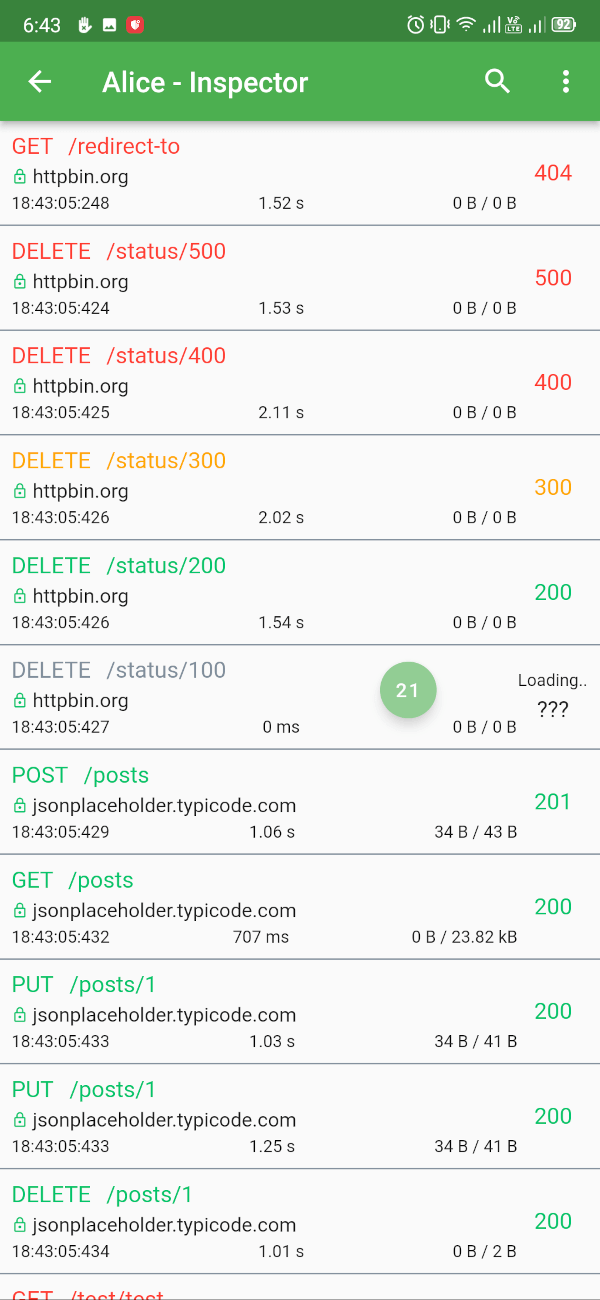
| https://raw.githubusercontent.com/hautvfami/flutter-alice/main/media/1.png | https://raw.githubusercontent.com/hautvfami/flutter-alice/main/media/2.png | https://raw.githubusercontent.com/hautvfami/flutter-alice/main/media/3.png | https://raw.githubusercontent.com/hautvfami/flutter-alice/main/media/4.png | https://raw.githubusercontent.com/hautvfami/flutter-alice/main/media/5.png | https://raw.githubusercontent.com/hautvfami/flutter-alice/main/media/6.png |
| https://raw.githubusercontent.com/hautvfami/flutter-alice/main/media/7.png | https://raw.githubusercontent.com/hautvfami/flutter-alice/main/media/8.png | https://raw.githubusercontent.com/hautvfami/flutter-alice/main/media/9.png | https://raw.githubusercontent.com/hautvfami/flutter-alice/main/media/10.png | https://raw.githubusercontent.com/hautvfami/flutter-alice/main/media/11.png | https://raw.githubusercontent.com/hautvfami/flutter-alice/main/media/12.png |
Supported Dart http client plugins:
Features:
✔️ Detailed logs for each HTTP calls (HTTP Request, HTTP Response)
✔️ Inspector UI for viewing HTTP calls
✔️ Statistics
✔️ Support for top used HTTP clients in Dart
✔️ Error handling
✔️ HTTP calls search
✔️ Bubble overlay entry
dependencies:
  flutter_alice: ^1.0.1
$ flutter pub get
import 'package:flutter_alice/alice.dart';
// Define a navigator key
final navigatorKey = GlobalKey<NavigatorState>();

// Create Alice with the navigator key
final alice = Alice(navigatorKey: navigatorKey);
MaterialApp(
  navigatorKey: navigatorKey,
  home: YourHomeWidget(),
)
You need to add this navigator key in order to show inspector UI.
// Don't forget to import overlay_support package
import 'package:overlay_support/overlay_support.dart';

OverlaySupport(
  child: MaterialApp(
    navigatorKey: navigatorKey,
    home: YourHomeWidget(),
  ),
)
Add interceptor to your Dio instance:
final dio = Dio();
dio.interceptors.add(alice.getDioInterceptor());
You can use extension methods for cleaner code:
// Import extensions
import 'package:flutter_alice/core/alice_http_extensions.dart';

// Use extension methods
http
  .get(Uri.parse('https://jsonplaceholder.typicode.com/posts'))
  .interceptWithAlice(alice);

// For POST requests with body
http
  .post(Uri.parse('https://jsonplaceholder.typicode.com/posts'), body: body)
  .interceptWithAlice(alice, body: body);
Or use the standard approach:
http.get(Uri.parse('https://jsonplaceholder.typicode.com/posts')).then((response) {
  alice.onHttpResponse(response);
});

// For POST requests with body
http.post(Uri.parse('https://jsonplaceholder.typicode.com/posts'), body: body).then((response) {
  alice.onHttpResponse(response, body: body);
});
You can use extension methods:
// Import extensions
import 'package:flutter_alice/core/alice_http_client_extensions.dart';

// Use extension methods
httpClient
  .getUrl(Uri.parse("https://jsonplaceholder.typicode.com/posts"))
  .interceptWithAlice(alice);

// For POST requests with body
httpClient
  .postUrl(Uri.parse("https://jsonplaceholder.typicode.com/posts"))
  .interceptWithAlice(alice, body: body, headers: Map());
Or use the standard approach:
httpClient
  .getUrl(Uri.parse("https://jsonplaceholder.typicode.com/posts"))
  .then((request) async {
    alice.onHttpClientRequest(request);
    var httpResponse = await request.close();
    var responseBody = await utf8.decoder.bind(httpResponse).join();
    alice.onHttpClientResponse(httpResponse, request, body: responseBody);
  });
### Opening the Inspector
You can open the inspector UI in different ways:

```dart
// Open directly
ElevatedButton(
  child: Text("Open Inspector"),
  onPressed: alice.showInspector,
)

// Or call from anywhere in your code
alice.showInspector();