
 v0.0.2
draw_on_path
一个用于沿给定路径绘制文本或图案的 Flutter 包。
46喜欢 1870近 30 天下载160Pub 分数
AndroidiOSWebmacOSWindowsLinux
一个用于沿给定路径绘制文本或图案的 Flutter 包。

{"sdk":"flutter"}{"sdk":"flutter"}^2.0.0以下为英文项目原文快照,最新内容请访问 GitHub。
A Flutter package that is used to draw text or patterm along the given path.
Demo Video: https://youtu.be/TZAKSanD73k
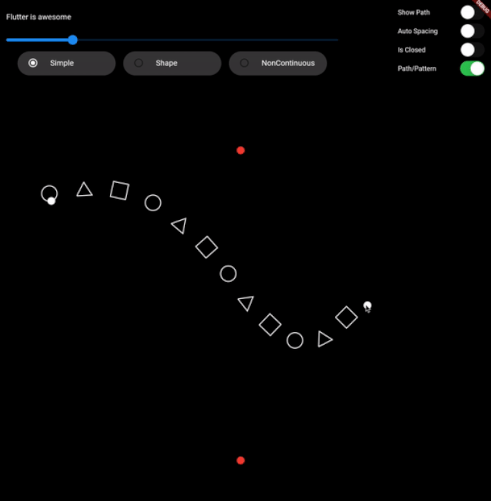
https://github.com/himanshugarg08/draw_on_path/blob/main/gifs/1.gif?raw=true https://github.com/himanshugarg08/draw_on_path/blob/main/gifs/2.gif?raw=true https://github.com/himanshugarg08/draw_on_path/blob/main/gifs/3.gif?raw=true https://github.com/himanshugarg08/draw_on_path/blob/main/gifs/4.gif?raw=true https://github.com/himanshugarg08/draw_on_path/blob/main/gifs/5.gif?raw=true https://github.com/himanshugarg08/draw_on_path/blob/main/gifs/6.gif?raw=true
drawTextOnPath function is used to draw text along path.
canvas.drawTextOnPath(text, path);
drawOnPath function is used to draw pattern along path. index can be used to draw different element at different position based on some logic. Use canvas to draw anything at position. The next position is calculated based on spacing provided.
spacing should be greater than 0. Ideally spacing is the sum of one element width and spacing between two elements (spacing between starting points of two consecutive elements)
canvas.drawOnPath(
    path,
    (int index, Canvas canvas, Offset position) {
      canvas.drawRect(
        Rect.fromCircle(center: position.translate(0, -16), radius: 16),
        Paint()
          ..color = Colors.white38
          ..strokeWidth = 2.0
          ..style = PaintingStyle.stroke,
      );
    },
    spacing: 70,
  );
text (for given textStyle) is larger than the path, then it will clip extra text.1. Fork it (<https://github.com/himanshugarg08/draw_on_path/fork>)
2. Create your feature branch (`git checkout -b feature/fooBar`)
3. Commit your changes (`git commit -am 'Add some fooBar'`)
4. Push to the branch (`git push origin feature/fooBar`)
5. Create a new Pull Request