
 v3.0.0
dotted_decoration
虚线装饰是一个方便的包,用于绘制虚线分隔线、矩形、圆形或圆角矩形的虚线边框。
152喜欢 7.3万近 30 天下载150Pub 分数
AndroidiOSWebmacOSWindowsLinux
mdalameen/dotted_decoration open-source repository details.

{"sdk":"flutter"}{"sdk":"flutter"}^1.25.0以下为英文项目原文快照,最新内容请访问 GitHub。
Dotted line decoration is custom decoration as simple as BoxDocoration can be used in Container widget to draw dotted divider, dotted border for rectangle, oval or circle.
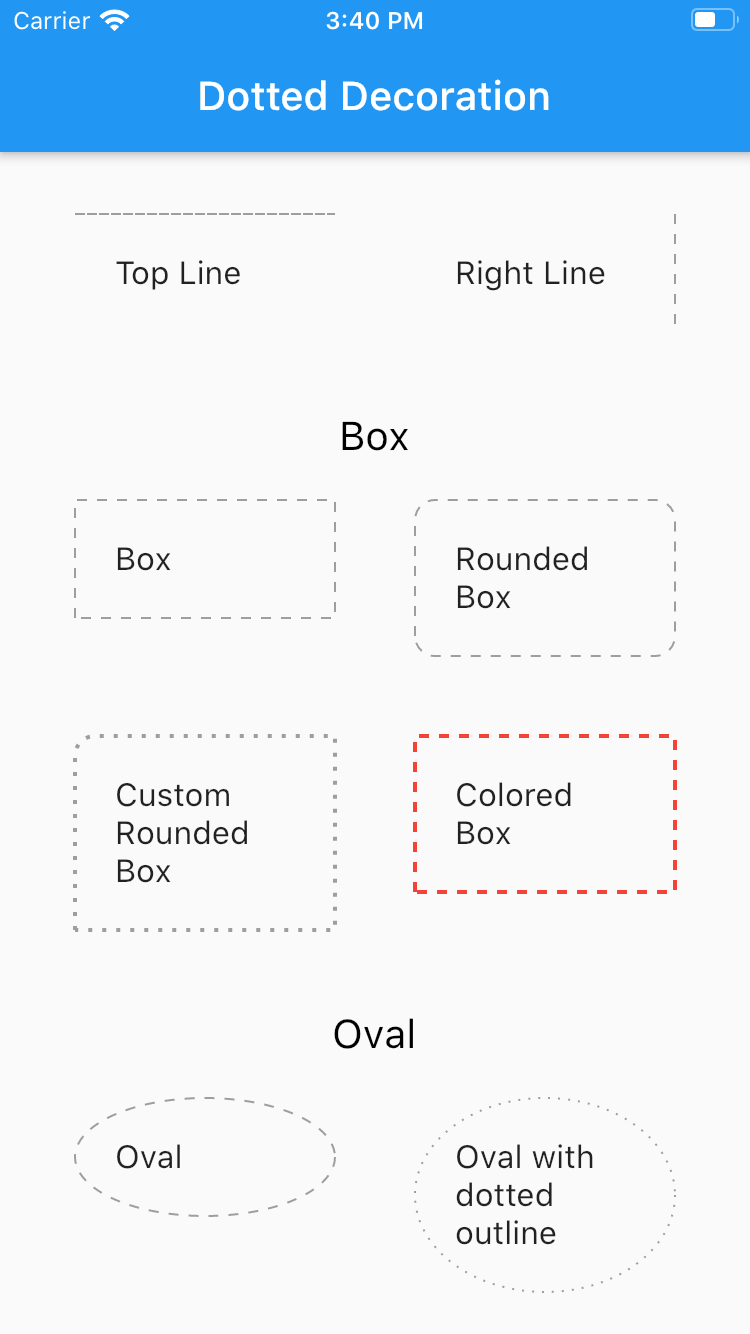
Flutter Dotted Decoration screenshot
To use this package, add dotted_decoration as a dependency in your pubspec.yaml file.
Create a container widget and assign DottedDecoration as decoration
Container(
    decoration: DottedDecoration()
    child: Text('Dotted Decoration')
)
Container(
    decoration: DottedDecoration()
    child: Text('Dotted Decoration')
)
To draw line
DottedDecoration(
  shape: Shape.line, linePosition: LinePosition.bottom),
To add rounded rection
DottedDecoration(
  shape: Shape.box,
  borderRadius: BorderRadius.circular(10), //remove this to get plane rectange
),
To add circle
//make sure width & height of container is same to get perfect circle or else it will end up in oval
DottedDecoration(shape: Shape.circle, dash: <int>[1, 4]);
Kind of outline shape, default shape is Shape.line.
shape: Shape.line
shape: Shape.box
shape: Shape.oval
Where line is located, default shape is LinePosition.bottom.
linePosition: LinePosition.bottom
linePosition: LinePosition.left
linePosition: LinePosition.right
linePosition: LinePosition.top
Border line order, first in dash and second is space.
dash: <int>[2, 5]
Line width.
strokeWidth: 2
Color of line, default shape is Colors.grey.
color: Colors.red