

 v0.9.0
cell_calendar
现代日历小部件,具备实用功能。可快速开发出设计精美的日历。灵感来自 Google 日历的用户界面。
104喜欢 1330近 30 天下载140Pub 分数
AndroidiOSWebmacOSWindowsLinux
现代日历小部件,具有实用功能。可让您立即开发出设计精美的日历。

以下为英文项目原文快照,最新内容请访问 GitHub。


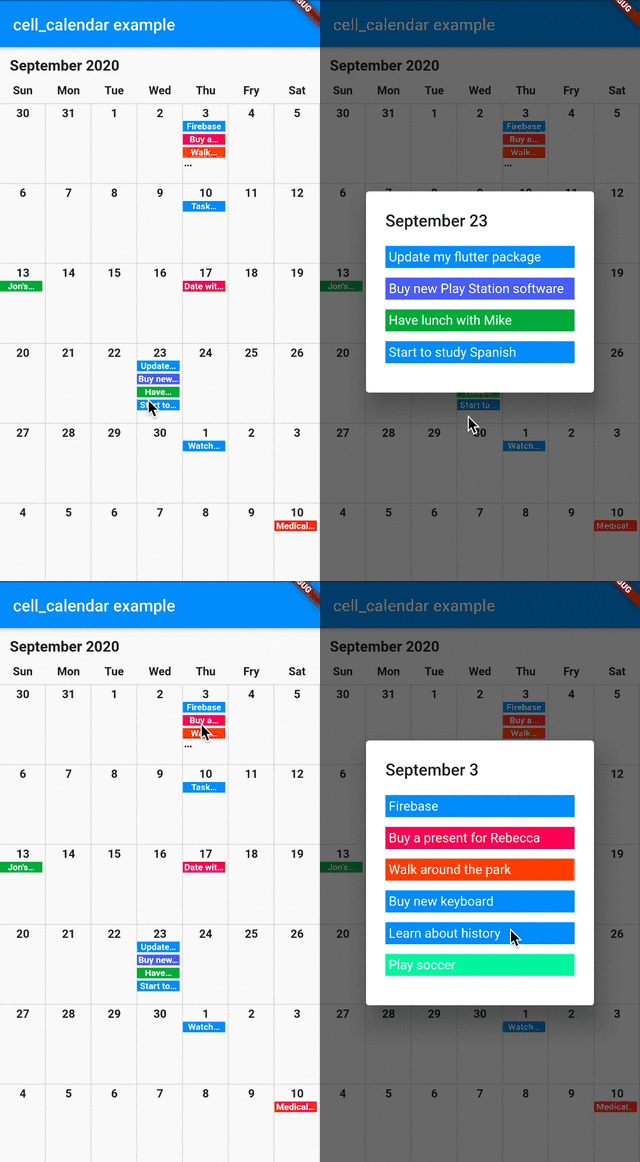
Modern calendar widget with useful features. Enables to develop well designed calendar in a moment.
Inspired by the UI of Google Calendar

You can show the events in the calendar by inserting the list of CalendarEvent as events
    CellCalendar(
      events: [
        CalendarEvent(eventName: "Event 1",eventDate: DateTime1),
        CalendarEvent(eventName: "Event 2",eventDate: DateTime2),
      ]
    );
If you need to customize the calendar more, the additional parameters like eventBackGroundColor, eventTextColor and eventID are helpful.
The callback onPageChanged is literally called when the current page is changed.
    CellCalendar(
      onPageChanged: (firstDate, lastDate) {
        print("This is the first date of the new page: $firstDate");
        print("This is the last date of the new page: $lastDate");
      }
    );
In this sample code, firstDate is the date in the very first cell of the new page, and its logic is same as lastDate.
The callback onCellTapped is called when user tapped a cell.
    CellCalendar(
      onCellTapped: (date) {
        print("$date is tapped !");
      }
    );
It is called with tapped DateTime, so you can get the events on the date if you want.
    CellCalendar(
      onCellTapped: (date){
        print("$date is tapped !");
        final eventsOnTheDate = sampleEvents().where((event) {
          final eventDate = event.eventDate;
          return eventDate.year == date.year &&
              eventDate.month == date.month &&
              eventDate.day == date.day;
        }).toList();
        /// ex) Show dialog or navigate to new page with [eventsOnTheDate]
      }
    );
If you don't want to use default labels on the calendar, you can use callbacks for customization.
    CellCalendar(
      daysOfTheWeekBuilder: (dayIndex) {
        /// dayIndex: 0 for Sunday, 6 for Saturday.
        final labels = ["S", "M", "T", "W", "T", "F", "S"];
        return Padding(
          padding: const EdgeInsets.only(bottom: 4.0),
          child: Text(
            labels[dayIndex],
            style: TextStyle(
              fontWeight: FontWeight.bold,
            ),
            textAlign: TextAlign.center,
          ),
        );
      },
      monthYearLabelBuilder: (datetime) {
        final year = datetime.year.toString();
        final month = datetime.month.toString();
        return Padding(
          padding: const EdgeInsets.all(16.0),
          child: Text(
            "$month, $year",
            style: TextStyle(
              fontSize: 24,
              fontWeight: FontWeight.bold,
            ),
          ),
        );
      },
    )
If you have any requests or questions, please feel free to ask on github.
Thanks goes to these wonderful people (emoji key):
 Santa Takahashi 💻 |
 Denis Filonov 💻 |
 HPanda 💻 |
This project follows the all-contributors specification. Contributions of any kind welcome!
依赖清单 3 项
{"sdk":"flutter"}^2.3.6{"sdk":"flutter"}先按使用场景筛选,再比较项目活跃情况,最后到原始仓库核对使用要求。
“A repository is the most basic element of GitHub.”
GitHub Docs — About repositories ↗