搜索插件、代码仓与 APP 分类

cell_calendar 封面
插件详情v0.9.0

cell_calendar

现代日历小部件,具备实用功能。可快速开发出设计精美的日历。灵感来自 Google 日历的用户界面。

AndroidiOSWebmacOSWindowsLinux
近 30 天下载
1460
喜欢数
104
Pub 分数
140

安装插件

flutter pub add cell_calendar

插件介绍

基于插件公开信息、社区数据与项目使用情况整理的选型参考。

一款现代且可定制的日历小部件,灵感来自 Google 日历的用户界面。它能够以最少的设置快速开发出视觉上吸引人的日历。该包支持多个平台,并包含直观的功能,如日期选择、导航和事件集成。专为寻求简洁、响应式日历解决方案而无需大量自定义编码的开发者设计。适用于需要日期管理且外观精致的应用程序。

适合场景

  • 调度应用程序
  • 活动策划工具
  • 任务管理接口
  • 预订系统
  • 每日计划应用
  • 基于日历的仪表板

主要特点

  • 简洁的、受 Google 日历启发的设计
  • 跨平台支持
  • 轻松选择日期
  • 内置导航控件
  • 可自定义外观
  • 事件集成功能

适合对象

  • 开发日历密集型应用的开发者
  • 希望快速实现UI的团队
  • 需要响应式日历组件的项目
  • 面向多个操作系统的应用
  • 以设计为重点的移动和Web应用

使用建议

  • 有限的内置事件管理
  • 需要手动处理复杂的调度逻辑
  • 可能需要为独特主题添加额外的样式
  • 依赖于Flutter在旧设备上的渲染性能
  • 不太适合高度专业化的日历工作流

原始 README

以下为关联源码仓库的 README 原文快照,最新内容请访问源码仓库。

cell_calendar

pub package License: MIT

Modern calendar widget with useful features. Enables to develop well designed calendar in a moment.

Inspired by the UI of Google Calendar

cell_calendar

Usage

  • Events

You can show the events in the calendar by inserting the list of CalendarEvent as events

    CellCalendar(
      events: [
        CalendarEvent(eventName: "Event 1",eventDate: DateTime1),
        CalendarEvent(eventName: "Event 2",eventDate: DateTime2),
      ]
    );

If you need to customize the calendar more, the additional parameters like eventBackGroundColor, eventTextColor and eventID are helpful.

  • onPageChanged

The callback onPageChanged is literally called when the current page is changed.

    CellCalendar(
      onPageChanged: (firstDate, lastDate) {
        print("This is the first date of the new page: $firstDate");
        print("This is the last date of the new page: $lastDate");
      }
    );

In this sample code, firstDate is the date in the very first cell of the new page, and its logic is same as lastDate.

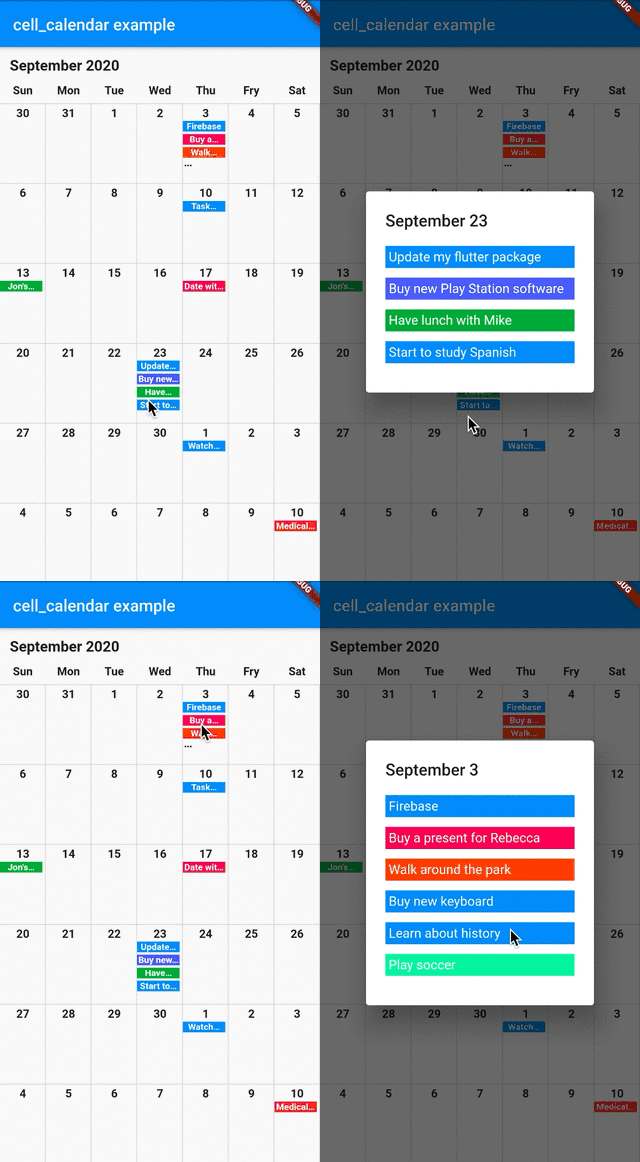
  • onCellTapped

The callback onCellTapped is called when user tapped a cell.

    CellCalendar(
      onCellTapped: (date) {
        print("$date is tapped !");
      }
    );

It is called with tapped DateTime, so you can get the events on the date if you want.

    CellCalendar(
      onCellTapped: (date){
        print("$date is tapped !");
        final eventsOnTheDate = sampleEvents().where((event) {
          final eventDate = event.eventDate;
          return eventDate.year == date.year &&
              eventDate.month == date.month &&
              eventDate.day == date.day;
        }).toList();
        /// ex) Show dialog or navigate to new page with [eventsOnTheDate]
      }
    );

  • daysOfTheWeekBuilder and monthYearLabelBuilder

If you don't want to use default labels on the calendar, you can use callbacks for customization.

    CellCalendar(
      daysOfTheWeekBuilder: (dayIndex) {
        /// dayIndex: 0 for Sunday, 6 for Saturday.
        final labels = ["S", "M", "T", "W", "T", "F", "S"];
        return Padding(
          padding: const EdgeInsets.only(bottom: 4.0),
          child: Text(
            labels[dayIndex],
            style: TextStyle(
              fontWeight: FontWeight.bold,
            ),
            textAlign: TextAlign.center,
          ),
        );
      },
      monthYearLabelBuilder: (datetime) {
        final year = datetime.year.toString();
        final month = datetime.month.toString();
        return Padding(
          padding: const EdgeInsets.all(16.0),
          child: Text(
            "$month, $year",
            style: TextStyle(
              fontSize: 24,
              fontWeight: FontWeight.bold,
            ),
          ),
        );
      },
    )

If you have any requests or questions, please feel free to ask on github.

Contributors ✨

Thanks goes to these wonderful people (emoji key):

Santa Takahashi
Santa Takahashi

💻
Denis Filonov
Denis Filonov

💻
HPanda
HPanda

💻

This project follows the all-contributors specification. Contributions of any kind welcome!

所属分类

依赖

依赖清单 1 项

源码仓库

使用此插件的项目

暂无相关数据。