
 v2.3.0+1
hashtagable
用于实现带标签装饰文本的组件和函数。将以 `#` 开头的单词像 Twitter 一样进行装饰。
136喜欢 110近 30 天下载70Pub 分数
平台暂无数据
用于实现 hashtag 样式文本的控件和函数。

{"sdk":"flutter"}{"sdk":"flutter"}以下为英文项目原文快照,最新内容请访问 GitHub。
Widgets and functions to implement hashTag decorated text.
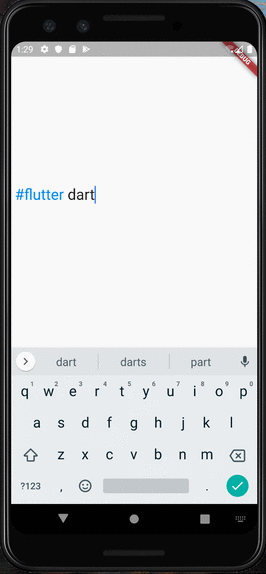
Detects the words start with # like a Twitter.
RPReplay_Final1599932903
You can use HashTagTextField to decorate input text.
    HashTagTextField(
    decoratedStyle: TextStyle(fontSize: 14, color: Colors.blue),
    basicStyle: TextStyle(fontSize: 14, color: Colors.black),
    ),
decoratedStyle is the textStyle of tagged text. basicStyle is for untagged text.
Other arguments are basically same as those of material TextField
If you want to decorate the text only to display, HashTagText will help you.
    HashTagText(
        text: "#Welcome to #hashtagable \n This is #ReadOnlyText",
        decoratedStyle: TextStyle(fontSize: 22,color:Colors.red),
        basicStyle: TextStyle(fontSize: 22,color:Colors.black),
        onTap: (text) {
          print(text);
        },
    )
The argument onTap(String) is called when user tapped a hashTag.
You can add some actions in this callback with the tapped hashTag.
https://user-images.githubusercontent.com/43510799/93002100-33f39d80-f56f-11ea-9855-83f2c095a1c4.jpg print(hasHashtags("Hello #World"));
// true
print(hasHashtags("Hello World"));
// false
   final List<String> hashTags = extractHashTags("#Hello World #Flutter Dart #Thank you");
   // ["#Hello", "#Flutter", "#Thank"]
DetectableTextField is published as a refinement of this package. hashtagale forces you to use hashtag, but this one allows you to detect anything you want.
If you also want to decorate At sign, you can do that by adding the argument decorateAtSign: true.
    HashTagText(
        text: "#Hello World @flutter_developers",
        decoratedStyle: TextStyle(fontSize: 14,color:Colors.red),
        basicStyle: TextStyle(fontSize: 14,color:Colors.black),
        onTap: (text) {
          print(text);
        },
        decorateAtSign: true,
    )
Then HashTagText and HashtagTextField come to decorate the words start with # or @.
# (or @) to decorate.If you have any requests or questions, please feel free to ask on github.
Contributors: Santa Takahashi, Matheus Perez, Marcel Schneider, Ho Kim, Burak
Thanks goes to these wonderful people (emoji key):
| JorisObert JorisObert 💻 |
This project follows the all-contributors specification. Contributions of any kind welcome!