搜索插件、代码仓与 APP 分类

hashtagable 封面
插件详情v2.3.0+1

hashtagable

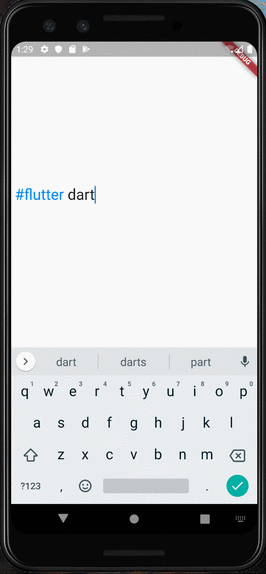
用于实现带标签装饰文本的组件和函数。将以 `#` 开头的单词像 Twitter 一样进行装饰。

近 30 天下载
151
喜欢数
136
Pub 分数
70

安装插件

flutter pub add hashtagable

插件介绍

基于插件公开信息、社区数据与项目使用情况整理的选型参考。

一个 Flutter 包,可实现类似 Twitter 的标签装饰文本。它提供小部件和实用函数,可自动检测并格式化以 '#' 符号开头的单词,增强社交媒体风格的文本显示效果。适用于需要在用户生成内容中展示交互式或视觉上突出的标签的应用程序。该包可通过简单命令轻松集成,且为开源项目,托管于 GitHub。目前无平台特定限制,但高级样式需求可能需要额外自定义。

适合场景

  • 社交媒体应用动态
  • 用户评论区
  • 话题跟踪接口
  • 交互式文本输入字段
  • 内容标记系统

主要特点

  • 自动话题标签检测
  • Twitter风格的标签样式
  • 可自定义的装饰选项
  • 通过 pub 的简单集成
  • 开源代码库

适合对象

  • 开发社交平台的开发者
  • 用户生成内容的应用程序
  • 带元数据高亮的文本渲染
  • 需要视觉上区分标签的界面
  • 使用轻量级文本装饰的项目

使用建议

  • 仅限基础标签样式
  • 轻触无内置导航
  • 可能需要为边缘情况定制处理
  • 依赖外部 GitHub 仓库
  • 除了源代码外,没有官方文档

原始 README

以下为关联源码仓库的 README 原文快照,最新内容请访问源码仓库。

All Contributors

hashtagable

test pub package License: MIT

Widgets and functions to implement hashTag decorated text.

Detects the words start with # like a Twitter.

RPReplay_Final1599932903

Usage

  • As TextField

You can use HashTagTextField to decorate input text.

    HashTagTextField(
    decoratedStyle: TextStyle(fontSize: 14, color: Colors.blue),
    basicStyle: TextStyle(fontSize: 14, color: Colors.black),
    ),

decoratedStyle is the textStyle of tagged text. basicStyle is for untagged text.

Other arguments are basically same as those of material TextField

  • As ReadOnlyText

If you want to decorate the text only to display, HashTagText will help you.

    HashTagText(
        text: "#Welcome to #hashtagable \n This is #ReadOnlyText",
        decoratedStyle: TextStyle(fontSize: 22,color:Colors.red),
        basicStyle: TextStyle(fontSize: 22,color:Colors.black),
        onTap: (text) {
          print(text);
        },
    )

The argument onTap(String) is called when user tapped a hashTag.

You can add some actions in this callback with the tapped hashTag.

Customize with useful functions

  • Check if the text has hashTags
   print(hasHashtags("Hello #World")); 
   // true
   
   print(hasHashtags("Hello World"));
   // false
   
  • Extract hashTags from text
   final List<String> hashTags = extractHashTags("#Hello World #Flutter Dart #Thank you");
   // ["#Hello", "#Flutter", "#Thank"]

Tips

  • DetectableTextField is published as a refinement of this package. hashtagale forces you to use hashtag, but this one allows you to detect anything you want.

  • If you also want to decorate At sign, you can do that by adding the argument decorateAtSign: true.

    HashTagText(
        text: "#Hello World @flutter_developers",
        decoratedStyle: TextStyle(fontSize: 14,color:Colors.red),
        basicStyle: TextStyle(fontSize: 14,color:Colors.black),
        onTap: (text) {
          print(text);
        },
        decorateAtSign: true,
    )

Then HashTagText and HashtagTextField come to decorate the words start with # or @.

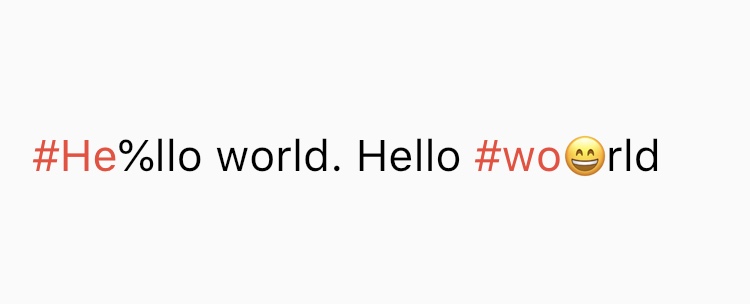
  • The decoration rules are almost same as twitter. It does not decorate the tags which contain emoji or symbol. It needs space before # (or @) to decorate.
  • Supported Languages are English, Japanese, Korean, Spanish, Arabic, Thai, Norwegian and German.

If you have any requests or questions, please feel free to ask on github.


Contributors: Santa Takahashi, Matheus Perez, Marcel Schneider, Ho Kim, Burak

Contributors ✨

Thanks goes to these wonderful people (emoji key):

JorisObert
JorisObert

💻

This project follows the all-contributors specification. Contributions of any kind welcome!

所属分类

源码仓库

使用此插件的项目

暂无相关数据。