
 v1.2.0
dropdown_textfield
下拉文本框是一种材料设计文本框。下拉按钮是一个我们可以用来从一组值中选择一个唯一值或多值的组件。
181喜欢 3800近 30 天下载150Pub 分数
AndroidiOSWebmacOSWindowsLinux
自定义下拉菜单

{"sdk":"flutter"}^1.18.0^2.0.5{"sdk":"flutter"}^4.0.0以下为英文项目原文快照,最新内容请访问 GitHub。
A DropdownTextfield is a Material Design TextField. The DropDownButton is a widget that can be used to select one unique value or multiple values from a set of options.
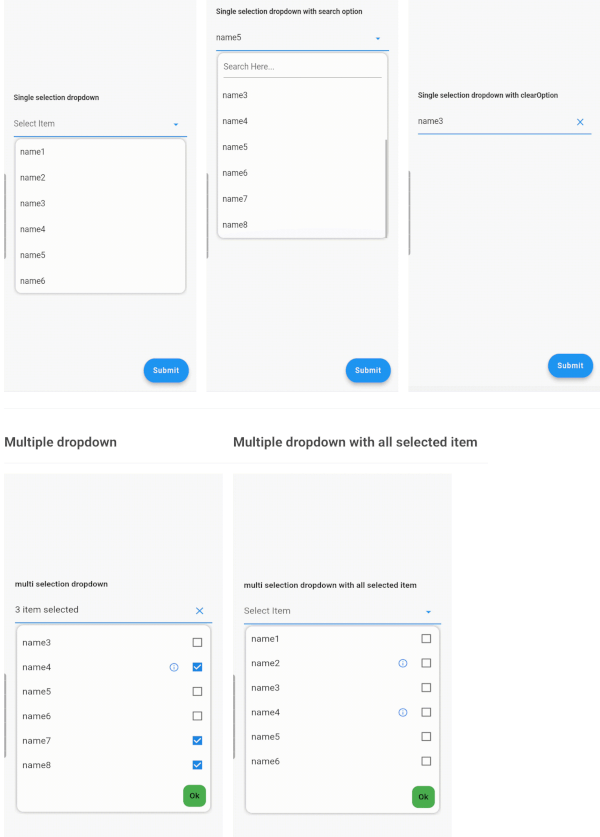
StatelessWidget| Single Dropdown | Single Dropdown with Search Option | Single Dropdown with Clear Option |
|---|---|---|
| Single Dropdown | Single Dropdown with Search Option | Single Dropdown with Clear Option |
| Multiple Dropdown | Multiple Dropdown with All Selected Items |
|---|---|
| Multiple Dropdown | Multiple Dropdown with All Selected Items |
You need to use SingleValueDropDownController for single dropdown and MultiValueDropDownController for multiple dropdown.
dropDownList, it will not display any value.<DropDownValueModel>.DropDownValueModel object for single selection dropdown, and a list of DropDownValueModel objects for multi-selection dropdown.false to disable the text field. Default value is true.true to enable the search option in the dropdown. Currently available only for single selection dropdown.true to display the complete list of selected items in the text field. Otherwise, it will display as "number_of_items selected".enableSearch=true.true to autofocus the search text field. Applicable only if enableSearch=true. Default value is false.false to hide the cursor from the search text field. Applicable only if enableSearch=true.false to hide the clear suffix icon button from the text field.Seeking contributions to improve the DropdownTextfield! If you have ideas for new features, optimizations, or bug fixes, please feel free to open a pull request or issue on our GitHub repository. Your contributions are greatly appreciated and will help make this package even better.