face_camera
A Flutter camera plugin that detects face in real-time.
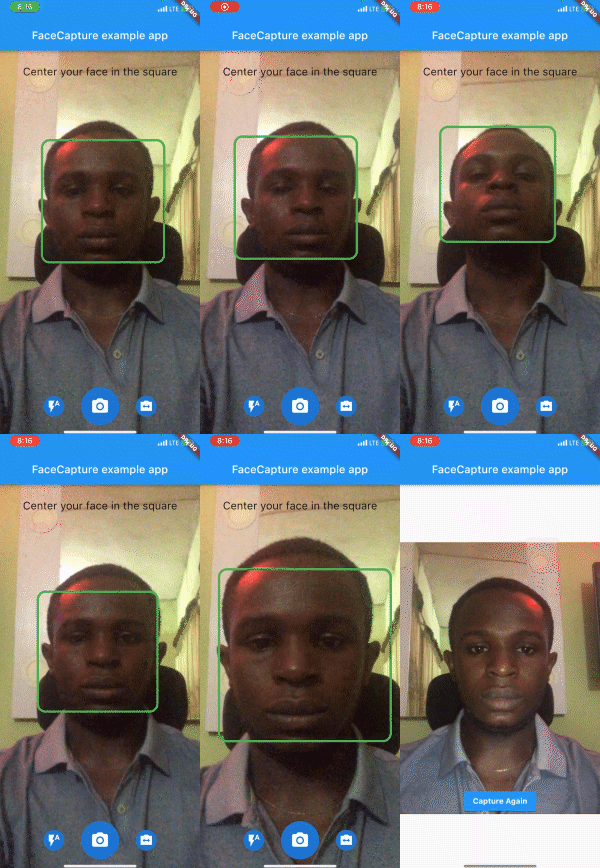
Preview
Installation
First, add face_camera as a dependency in your pubspec.yaml file.
face_camera: ^<latest-version>
iOS
- Minimum iOS Deployment Target: 15.5.0
- Follow this link and setup
ML Kit this is required for face_camera to function properly on iOS
Add two rows to the ios/Runner/Info.plist:
- one with the key
Privacy - Camera Usage Description and a usage description.
- and one with the key
Privacy - Microphone Usage Description and a usage description.
If editing Info.plist as text, add:
<key>NSCameraUsageDescription</key>
<string>your usage description here</string>
<key>NSMicrophoneUsageDescription</key>
<string>your usage description here</string>
Android
- Change the minimum Android sdk version to 21 (or higher) in your
android/app/build.gradle file.
minSdkVersion 21
Usage
- The first step is to initialize
face_camera in main.dart
void main() async{
WidgetsFlutterBinding.ensureInitialized();
await FaceCamera.initialize();
runApp(const MyApp());
}
- Create a new
FaceCameraController controller, setting the onCapture callback.
  late FaceCameraController controller;

  @override
  void initState() {
    controller = FaceCameraController(
      autoCapture: true,
      defaultCameraLens: CameraLens.front,
      onCapture: (File? image) {

      },
    );
  super.initState();
}
- Then render the component in your application using the required options.
  @override
  Widget build(BuildContext context) {
    return Scaffold(
        body: SmartFaceCamera(
          controller: controller,
          message: 'Center your face in the square',
        )
    );
  }
Customization
Here is a list of properties available to customize your widget:
| Name |
Type |
Description |
| controller |
FaceCameraController |
The controller for the [SmartFaceCamera] widget |
| showControls |
bool |
set false to hide all controls |
| showCaptureControl |
bool |
set false to hide capture control icon |
| showFlashControl |
bool |
set false to hide flash control control icon |
| showCameraLensControl |
bool |
set false to hide camera lens control icon |
| message |
String |
use this pass a message above the camera |
| messageStyle |
TextStyle |
style applied to the message widget |
| lensControlIcon |
Widget |
use this to render a custom widget for camera lens control |
| flashControlBuilder |
FlashControlBuilder |
use this to build custom widgets for flash control based on camera flash mode |
| messageBuilder |
MessageBuilder |
use this to build custom messages based on face position |
| indicatorShape |
IndicatorShape |
use this to change the shape of the face indicator |
| indicatorAssetImage |
String |
use this to pass an asset image when IndicatorShape is set to image |
| indicatorBuilder |
IndicatorBuilder |
use this to build custom widgets for the face indicator |
| captureControlBuilder |
CaptureControlBuilder |
use this to build custom widgets for capture control |
| autoDisableCaptureControl |
bool |
set true to disable capture control widget when no face is detected |
Here is a list of properties available to customize your widget from the controller:
| Name |
Type |
Description |
| onCapture |
Function(File?) |
callback invoked when camera captures image |
| onFaceDetected |
Function(DetectedFace?) |
callback invoked when camera detects face |
| imageResolution |
ImageResolution |
use this to set image resolution |
| defaultCameraLens |
CameraLens |
use this to set initial camera lens direction |
| defaultFlashMode |
CameraFlashMode |
use this to set initial flash mode |
| enableAudio |
bool |
set false to disable capture sound |
| autoCapture |
bool |
set true to capture image on face detected |
| ignoreFacePositioning |
bool |
set true to trigger onCapture even when the face is not well positioned |
| orientation |
CameraOrientation |
use this to lock camera orientation |
| performanceMode |
FaceDetectorMode |
Use this to set your preferred performance mode |
Contributions
Contributions of any kind are more than welcome! Feel free to fork and improve face_camera in any way you want, make a pull request, or open an issue.
Support the Library
You can support the library by donating, liking it on Pub, starring it on GitHub, and reporting any bugs you encounter.


