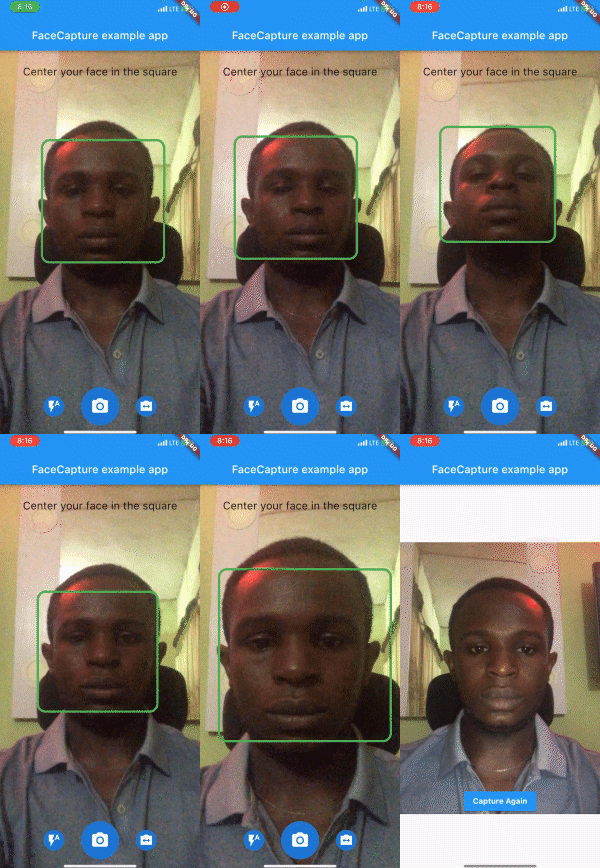
एक फ्लटर कैमरा प्लगइन जो वास्तविक समय में चेहरे का पता लगाता है। इसके अलावा, एक चेहरा पहचाने जाने पर यह स्वचालित रूप से कैप्चर कर सकता है, जो केवीसी के दौरान सेल्फी लेने के लिए उपयोगी हो सकता है।
सार्वजनिक जानकारी से बना चयन मार्गदर्शन। केवल संदर्भ हेतु।
face_camera पैकेज डिवाइस के कैमरा का उपयोग करके रियल-टाइम चेहरा डिटेक्शन के लिए डिज़ाइन किया गया एक Flutter प्लगइन है। जब किसी चेहरे का पता लगता है, तो यह स्वचालित रूप से छवि कैप्चर करता है, जिससे यह KYC प्रक्रियाओं में सेल्फी के उपयोग के लिए आदर्श है। मशीन लर्निंग के साथ बनाया गया, यह Android और iOS प्लेटफॉर्म्स के साथ बेहतरीन तरीके से एकीकृत होता है, जिससे डेवलपर्स को जटिल सेटअप के बिना चेहरा-आधारित कैमरा कार्यक्षमता को लागू करने का एक कुशल तरीका मिलता है। प्लगइन चेहरे की उपस्थिति से ट्रिगर होने वाली छवि कैप्चर को सरल बनाता है, जिससे पहचान पुष्टि के कार्यप्रवाह में उपयोगकर्ता अनुभव को बढ़ाया जाता है।
उपयोग
KYC पहचान सत्यापन
स्वचालित सेल्फी कैप्चर
एप्लिकेशन में रियल-टाइम चेहरा डिटेक्शन
चेहरे के माध्यम से उपयोगकर्ता प्रमाणीकरण
मोबाइल ओनबोर्डिंग फ्लो
मुख्य विशेषताएँ
रियल-टाइम चेहरा पता लगाना
चेहरे के निर्धारण पर स्वचालित फोटो कैप्चर
क्रॉस-प्लेटफ़ॉर्म समर्थन (Android & iOS)
Flutter के साथ हल्का एकीकरण
चेहरे-द्वारा ट्रिगर की गई कैप्चर के लिए सरल API
इनके लिए उपयुक्त
KYC ऐप बना रहे विकासकर्ता
स्वचालित सेल्फी की आवश्यकता वाले ऐप्स
पहचान सत्यापन प्रणाली
चेहरे-आधारित इंटरैक्शन वाले मोबाइल एप्लिकेशन
लो-कोड चेहरा पहचान की आवश्यकता वाले प्रोजेक्ट
विचार योग्य बातें
कैमरा की अनुमति की आवश्यकता है
पुराने उपकरणों पर प्रदर्शन में भिन्नता हो सकती है
सटीकता प्रकाश और चेहरे की दृश्यता पर निर्भर करती है
उच्च सुरक्षा जैविक पहचान के लिए उपयुक्त नहीं
चेहरा पहचान के लिए सीमित, पहचान या ट्रैकिंग नहीं
मूल README
संबंधित सोर्स रिपॉज़िटरी के मूल README का स्नैपशॉट। नवीनतम सामग्री के लिए रिपॉज़िटरी देखें।
face_camera
A Flutter camera plugin that detects face in real-time.
Preview
Installation
First, add face_camera as a dependency in your pubspec.yaml file.
face_camera:^<latest-version>
iOS
Minimum iOS Deployment Target: 15.5.0
Follow this link and setup ML Kit this is required for face_camera to function properly on iOS
Add two rows to the ios/Runner/Info.plist:
one with the key Privacy - Camera Usage Description and a usage description.
and one with the key Privacy - Microphone Usage Description and a usage description.
Then render the component in your application using the required options.
@overrideWidgetbuild(BuildContext context) {
returnScaffold(
body: SmartFaceCamera(
controller: controller,
message: 'Center your face in the square',
)
);
}
Customization
Here is a list of properties available to customize your widget:
Name
Type
Description
controller
FaceCameraController
The controller for the [SmartFaceCamera] widget
showControls
bool
set false to hide all controls
showCaptureControl
bool
set false to hide capture control icon
showFlashControl
bool
set false to hide flash control control icon
showCameraLensControl
bool
set false to hide camera lens control icon
message
String
use this pass a message above the camera
messageStyle
TextStyle
style applied to the message widget
lensControlIcon
Widget
use this to render a custom widget for camera lens control
flashControlBuilder
FlashControlBuilder
use this to build custom widgets for flash control based on camera flash mode
messageBuilder
MessageBuilder
use this to build custom messages based on face position
indicatorShape
IndicatorShape
use this to change the shape of the face indicator
indicatorAssetImage
String
use this to pass an asset image when IndicatorShape is set to image
indicatorBuilder
IndicatorBuilder
use this to build custom widgets for the face indicator
captureControlBuilder
CaptureControlBuilder
use this to build custom widgets for capture control
autoDisableCaptureControl
bool
set true to disable capture control widget when no face is detected
Here is a list of properties available to customize your widget from the controller:
Name
Type
Description
onCapture
Function(File?)
callback invoked when camera captures image
onFaceDetected
Function(DetectedFace?)
callback invoked when camera detects face
imageResolution
ImageResolution
use this to set image resolution
defaultCameraLens
CameraLens
use this to set initial camera lens direction
defaultFlashMode
CameraFlashMode
use this to set initial flash mode
enableAudio
bool
set false to disable capture sound
autoCapture
bool
set true to capture image on face detected
ignoreFacePositioning
bool
set true to trigger onCapture even when the face is not well positioned
orientation
CameraOrientation
use this to lock camera orientation
performanceMode
FaceDetectorMode
Use this to set your preferred performance mode
Contributions
Contributions of any kind are more than welcome! Feel free to fork and improve face_camera in any way you want, make a pull request, or open an issue.
Support the Library
You can support the library by donating, liking it on Pub, starring it on GitHub, and reporting any bugs you encounter.