

 v1.0.0
animated_button_bar
चयनित आइटम पर एनीमेशन के साथ एक अत्यधिक कस्टमाइज़ करने योग्य बटन बार।
82लाइक 60430-दिन डाउनलोड150Pub अंक
AndroidiOSWebmacOSWindowsLinux
एनिमेशन के साथ एक कस्टमाइज़ेबल बटन बार

यह अंग्रेज़ी मूल स्नैपशॉट है। नवीनतम सामग्री GitHub पर देखें।
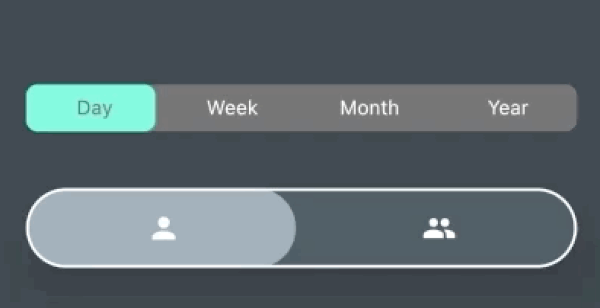
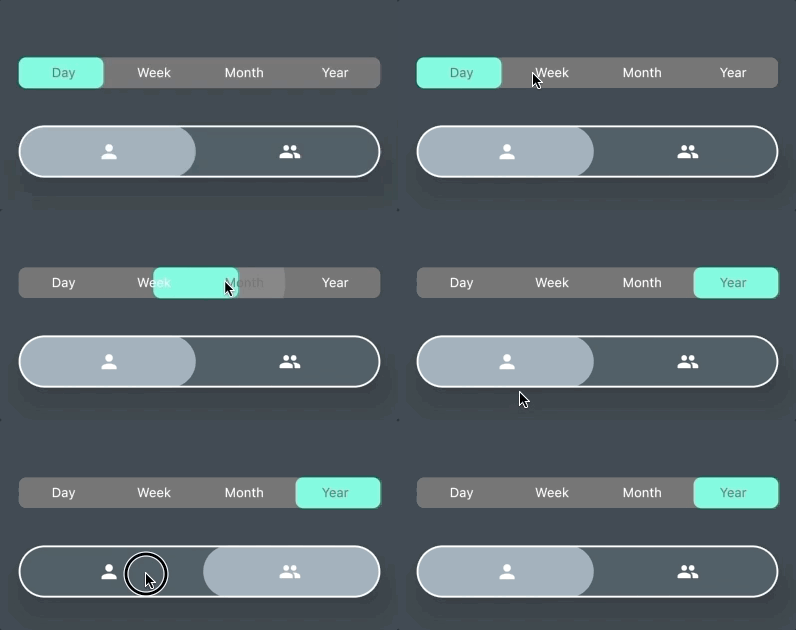
AnimatedButtonBar is a flutter library that allows you to create a row of buttons with an animation on selection.
Add this to your app's pubspec.yaml file:
dependencies:
  animated_button_bar: ^0.0.2
Then you have to import the package with:
import 'package:animated_button_bar/animated_button_bar.dart';
And use an AnimatedBarButton like this:
  Column(
          mainAxisAlignment: MainAxisAlignment.center,
          children: [
            //inverted selection button bar
            AnimatedButtonBar(
              radius: 8.0,
              padding: const EdgeInsets.all(16.0),
              invertedSelection: true,
              children: [
                ButtonBarEntry(onTap: () => print('First item tapped'), child: Text('Day')),
                ButtonBarEntry(onTap: () => print('Second item tapped'), child: Text('Week')),
                ButtonBarEntry(onTap: () => print('Third item tapped'), child: Text('Month')),
                ButtonBarEntry(onTap: () => print('Fourth item tapped'), child: Text('Year'))
              ],
            ),
            //You can populate it with different types of widgets like Icon
            AnimatedButtonBar(
              radius: 32.0,
              padding: const EdgeInsets.all(16.0),
              backgroundColor: Colors.blueGrey.shade800,
              foregroundColor: Colors.blueGrey.shade300,
              elevation: 24,
              borderColor: Colors.white,
              borderWidth: 2,
              innerVerticalPadding: 16,
              children: [
                ButtonBarEntry(onTap: () => print('First item tapped'), child: Icon(Icons.person)),
                ButtonBarEntry(onTap: () => print('Second item tapped'), child: Icon(Icons.people)),
              ],
            ),
          ],
        ),
| parameter | description | default |
|---|---|---|
| animationDuration | animation duration when tap | const Duration(milliseconds: 200) |
| backgroundColor | main color of the widget | Theme.of(context).backgroundColor |
| borderColor | color of the border | null |
| borderWidth | width of the border | borderColor != null ? 1.0 : 0.0; |
| children | A list of ButtonBarEntry to display | required |
| curve | the curve for the animation | Curves.fastOutSlowIn |
| elevation | double | 0 |
| foregroundColor | color for the selection | Theme.of(context).accentColor |
| invertedSelection | bool | false |
| radius | double | 0.0 |
| verticalPadding | double | 8.0 |
निर्भरता सूची 3 आइटम
{"sdk":"flutter"}^6.0.5{"sdk":"flutter"}उपयोग के अनुसार छाँटें, गतिविधि की तुलना करें और अपनाने से पहले मूल प्रोजेक्ट की आवश्यकताएँ जाँचें।
“A repository is the most basic element of GitHub.”
GitHub Docs — About repositories ↗