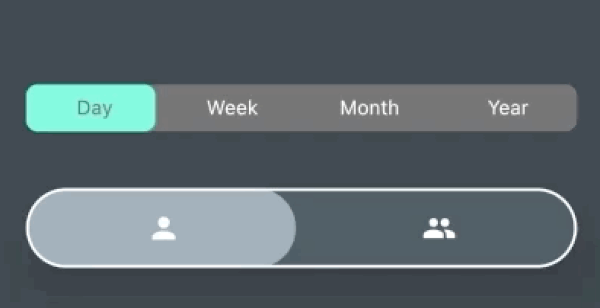
पैकेज, रिपॉज़िटरी और ऐप श्रेणियाँ खोजें

animated_button_bar कवर
पैकेज विवरणv1.0.0

animated_button_bar

चयनित आइटम पर एनीमेशन के साथ एक अत्यधिक कस्टमाइज़ करने योग्य बटन बार।

AndroidiOSWebmacOSWindowsLinux
30-दिन डाउनलोड
604
लाइक
82
Pub अंक
150

पैकेज इंस्टॉल करें

flutter pub add animated_button_bar

पैकेज अवलोकन

सार्वजनिक जानकारी से बना चयन मार्गदर्शन। केवल संदर्भ हेतु।

एक कस्टमाइज़ेबल बटन बार जो एक आइटम के चयन के समय चिकनी एनीमेशन प्रदर्शित करता है। यह विकासकर्ताओं को एनीमेटेड ट्रांज़िशन के साथ इंटरैक्टिव, दृश्य रूप से आकर्षक नेविगेशन बार बनाने की अनुमति देता है। पैकेज कई प्लेटफॉर्मों का समर्थन करता है और रंग, आकृति और एनीमेशन अवधि के लिए व्यापक स्टाइलिंग विकल्प प्रदान करता है। डायनामिक फीडबैक के साथ इंट्यूटिव टैब-जैसी नेविगेशन की आवश्यकता वाले ऐप्स के लिए आदर्श है।

उपयोग

  • इंटरैक्टिव नेविगेशन बार
  • टैब आधारित इंटरफेस
  • एनिमेटेड यूजर इंटरफेस ट्रांजीशन
  • कस्टमाइज़ करने योग्य बॉटम नेविगेशन
  • चयन पर उपयोगकर्ता प्रतिक्रिया
  • मोबाइल और वेब ऐप डैशबोर्ड

मुख्य विशेषताएँ

  • स्मूथ चयन एनीमेशन
  • उच्च रूप से कस्टमाइज़ किया गया दिखावट
  • क्रॉस-प्लेटफ़ॉर्म समर्थन
  • कॉन्फ़िगरेबल एनीमेशन अवधि
  • लचीले लेआउट विकल्प
  • टैप गेस्चर का समर्थन करता है

इनके लिए उपयुक्त

  • मॉडर्न यूआई बनाने वाले Flutter डेवलपर्स
  • एनिमेटेड नेविगेशन की आवश्यकता वाले ऐप्स
  • उपयोगकर्ता अनुभव पर ध्यान केंद्रित डिज़ाइनर
  • कई प्लेटफॉर्म के लिए लक्षित प्रोजेक्ट
  • पुनर्उपयोगी घटक चाहने वाले विकासकर्ता

विचार योग्य बातें

  • बहुत सारे आइटम के साथ प्रदर्शन प्रभावित हो सकता है
  • एनीमेशन की गति को सावधानी से समायोजित करने की आवश्यकता है
  • सीमित आंतरिक थीम
  • सरल स्थिर बटन के लिए उपयुक्त नहीं
  • सही अवस्था प्रबंधन पर निर्भर करता है
  • प्रतिक्रियाशील डिज़ाइन पैटर्न के साथ सबसे अच्छा उपयोग किया जाता है
मूल README

संबंधित सोर्स रिपॉज़िटरी के मूल README का स्नैपशॉट। नवीनतम सामग्री के लिए रिपॉज़िटरी देखें।

animated_button_bar

AnimatedButtonBar is a flutter library that allows you to create a row of buttons with an animation on selection.

Getting started

Add this to your app's pubspec.yaml file:

dependencies:  
  animated_button_bar: ^0.0.2

Usage

Then you have to import the package with:

import 'package:animated_button_bar/animated_button_bar.dart';  

And use an AnimatedBarButton like this:

  Column(  
          mainAxisAlignment: MainAxisAlignment.center,  
          children: [  
            //inverted selection button bar  
            AnimatedButtonBar(  
              radius: 8.0,  
              padding: const EdgeInsets.all(16.0),  
              invertedSelection: true,  
              children: [  
                ButtonBarEntry(onTap: () => print('First item tapped'), child: Text('Day')),  
                ButtonBarEntry(onTap: () => print('Second item tapped'), child: Text('Week')),  
                ButtonBarEntry(onTap: () => print('Third item tapped'), child: Text('Month')),  
                ButtonBarEntry(onTap: () => print('Fourth item tapped'), child: Text('Year'))  
              ],  
            ),  
            //You can populate it with different types of widgets like Icon  
            AnimatedButtonBar(  
              radius: 32.0,  
              padding: const EdgeInsets.all(16.0),  
              backgroundColor: Colors.blueGrey.shade800,  
              foregroundColor: Colors.blueGrey.shade300,  
              elevation: 24,  
              borderColor: Colors.white,  
              borderWidth: 2,  
              innerVerticalPadding: 16,  
              children: [  
                ButtonBarEntry(onTap: () => print('First item tapped'), child: Icon(Icons.person)),  
                ButtonBarEntry(onTap: () => print('Second item tapped'), child: Icon(Icons.people)),  
              ],  
            ),  
          ],  
        ),  

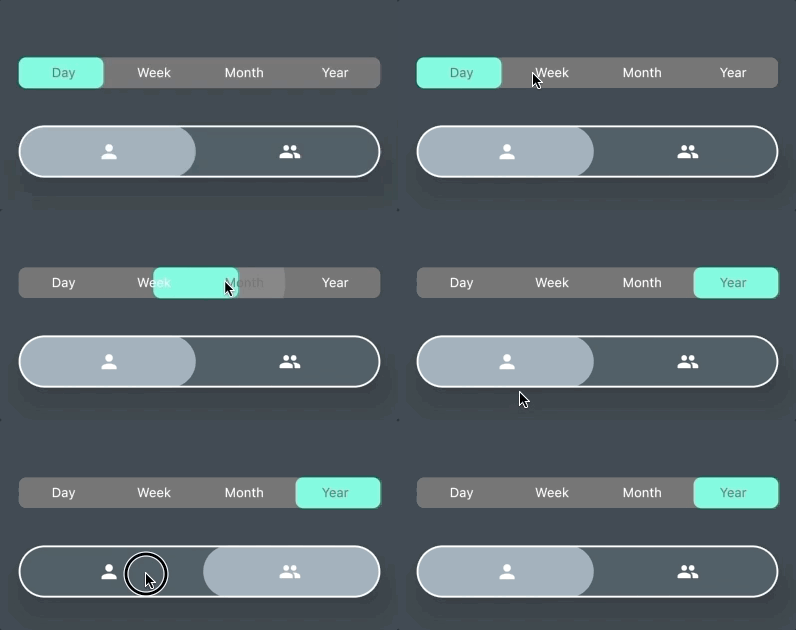
Result

parameters

parameter description default
animationDuration animation duration when tap const Duration(milliseconds: 200)
backgroundColor main color of the widget Theme.of(context).backgroundColor
borderColor color of the border null
borderWidth width of the border borderColor != null ? 1.0 : 0.0;
children A list of ButtonBarEntry to display required
curve the curve for the animation Curves.fastOutSlowIn
elevation double 0
foregroundColor color for the selection Theme.of(context).accentColor
invertedSelection bool false
radius double 0.0
verticalPadding double 8.0

श्रेणियाँ

निर्भरताएँ

निर्भरता सूची 1 आइटम

सोर्स रिपॉज़िटरी

इस पैकेज का उपयोग करने वाले प्रोजेक्ट