

 v3.0.0
connectivity_widget
एक विजेट जो उपयोगकर्ता को दिखाता है कि मोबाइल इंटरनेट से जुड़ा है या नहीं
88लाइक 32430-दिन डाउनलोड140Pub अंक
AndroidiOSWebmacOSWindowsLinux
एक विजेट जो उपयोगकर्ता को दिखाता है कि मोबाइल इंटरनेट से जुड़ा है या नहीं

यह अंग्रेज़ी मूल स्नैपशॉट है। नवीनतम सामग्री GitHub पर देखें।
A widget that shows the user if the phone is connected to the internet or not
This is accomplished not only by verifying the status of the mobile network and/or wifi, but also by pinging a remote server and verifying its response.
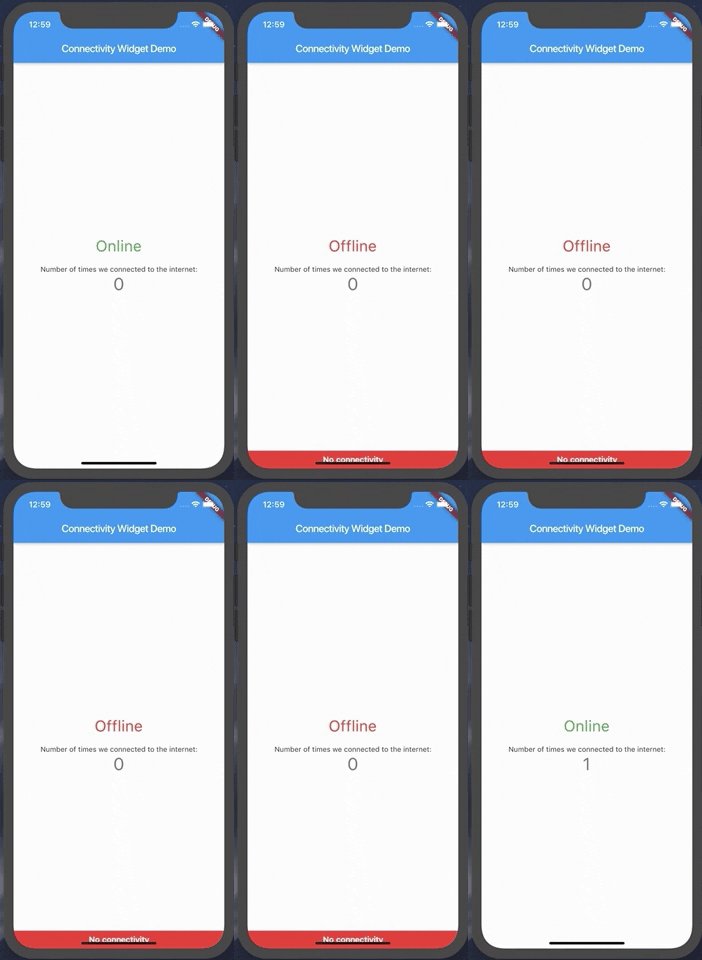
The ConnectivityWidget uses a builder function that provides you a isOnline flag to build different screens for offline or online mode.
 ConnectivityWidget(
        builder: (context, isOnline) => Center(
          child: Column(
            mainAxisAlignment: MainAxisAlignment.center,
            children: <Widget>[
              Text("${isOnline ? 'Online' : 'Offline'}", style: TextStyle(fontSize: 30, color: isOnline ? Colors.green : Colors.red),),
              SizedBox(height: 20,),
              Text(
                'Number of times we connected to the internet:',
              ),
              Text(
                '$_counter',
                style: Theme.of(context).textTheme.display1,
              ),
            ],
          ),
        )
It also provides both a onlineCallback and a offlineCallback that are called when the phone changes the connection state to online and offline, respectively.
 ConnectivityWidget(
        onlineCallback: _incrementCounter,
        builder: //...,
        )
If there is a need to change the default offline banner, a Widget can be provided to the offlineBanner parameter. Additionally, its visibility can be enabled or disabled by using the showOfflineBanner parameter.
serverToPing;timeoutDuration;debounceDuration;verifyResponseCallback;By default, the Connectivity Widget checks if there is a connection to http://www.google.com. If you want to check the availability of a custom endpoint, you can set a new endpoint to ping and a callback to verify the response.
ConnectivityUtils.instance.setCallback((response) => response.contains("This is a test!"));
ConnectivityUtils.instance.setServerToPing("https://gist.githubusercontent.com/Vanethos/dccc4b4605fc5c5aa4b9153dacc7391c/raw/355ccc0e06d0f84fdbdc83f5b8106065539d9781/gistfile1.txt");
This library also provides access to the ConnectivityUtils class in which you can verify the status of the network.
Stream<bool> ConnectivityUtils.instance.isPhoneConnectedStream // gets the current status of the network
Future<bool> ConnectivityUtils.instance.isPhoneConnected() // future that determines network status
Although we can verify the status of the connection in web, what happens is that browsers will cache a request to a specific endpoint, so we cannot verify for certain if the connection is down or if we are using cache, using the methods presented in this package.
निर्भरता सूची 8 आइटम
{"sdk":"flutter"}^0.27.7^6.0.3^2.0.0^1.2.1^3.1.2{"sdk":"flutter"}^1.0.3उपयोग के अनुसार छाँटें, गतिविधि की तुलना करें और अपनाने से पहले मूल प्रोजेक्ट की आवश्यकताएँ जाँचें।
“A repository is the most basic element of GitHub.”
GitHub Docs — About repositories ↗