पैकेज, रिपॉज़िटरी और ऐप श्रेणियाँ खोजें

connectivity_widget कवर
पैकेज विवरणv3.0.0

connectivity_widget

एक विजेट जो उपयोगकर्ता को दिखाता है कि मोबाइल इंटरनेट से जुड़ा है या नहीं

AndroidiOSWebmacOSWindowsLinux
30-दिन डाउनलोड
324
लाइक
88
Pub अंक
140

पैकेज इंस्टॉल करें

flutter pub add connectivity_widget

पैकेज अवलोकन

सार्वजनिक जानकारी से बना चयन मार्गदर्शन। केवल संदर्भ हेतु।

connectivity_widget पैकेज एक सरल, प्रतिक्रियाशील विजेट प्रदान करता है जो उपकरण के वर्तमान इंटरनेट कनेक्टिविटी स्थिति को दिखाता है। यह Android, iOS, Web, macOS, Windows और Linux प्लेटफॉर्म पर नेटवर्क उपलब्धता की निगरानी करता है और कनेक्टिविटी में परिवर्तन आने पर UI को वास्तविक समय में अपडेट करता है। एक सुगम एकीकरण के लिए डिज़ाइन किया गया, यह विकासकर्ताओं को उपयोगकर्ताओं को ऑनलाइन या ऑफलाइन होने के बारे में सूचित करने के लिए आइकन या पाठ जैसे दृश्य संकेत दिखाने की अनुमति देता है। संदेश प्रेषण, मीडिया स्ट्रीमिंग या डेटा सिंक्रनाइजेशन सेवाओं जैसे ऐप्स के लिए आदर्श है जिन्हें नेटवर्क स्थिति के तुरंत प्रतिक्रिया की आवश्यकता होती है।

उपयोग

  • रियल-टाइम नेटवर्क स्थिति प्रदर्शन
  • ऑफलाइन मोड संकेतक
  • कनेक्टिविटी परिवर्तन के दौरान उपयोगकर्ता अनुभव में सुधार
  • नेटवर्क स्थिति के आधार पर ऐप कार्यक्षमता का अनुकूलन
  • खराब कनेक्टिविटी के दौरान स्थिति प्रबंधन लोड कर रहा है

मुख्य विशेषताएँ

  • प्लेटफॉर्म के अनुकूल समर्थन
  • प्रतिक्रियाशील UI अद्यतन
  • न्यूनतम सेटअप के साथ सरल एकीकरण
  • कस्टमाइज़ेबल दिखावट
  • कनेक्शन परिवर्तनों का स्वचालित निर्धारण

इनके लिए उपयुक्त

  • वास्तविक समय नेटवर्क जागरूकता की आवश्यकता वाले ऐप्स
  • हल्के जुड़ाव मॉनिटरिंग की तलाश कर रहे विकासकर्ता
  • गतिशील नेटवर्क प्रतिक्रिया की आवश्यकता वाले UI घटक
  • कई प्लेटफॉर्म के लिए प्रोजेक्ट
  • तत्काल ऑनलाइन/ऑफलाइन स्थिति संकेतक चाहने वाले उपयोगकर्ता

विचार योग्य बातें

  • मोबाइल प्लेटफॉर्म पर उचित अनुमतियाँ आवश्यक हैं
  • अस्थायी नेटवर्क स्थितियों के प्रबंधन के लिए अतिरिक्त तर्क की आवश्यकता हो सकती है
  • विशिष्ट नेटवर्क प्रकारों (उदाहरण के लिए, Wi-Fi बनाम सेलुलर) का समर्थन नहीं करता है
  • केवल कनेक्टिविटी स्थिति तक सीमित, बैंडविड्थ या गुणवत्ता नहीं
  • सटीकता के लिए मूल प्लेटफ़ॉर्म एपीआई पर निर्भर करता है
मूल README

संबंधित सोर्स रिपॉज़िटरी के मूल README का स्नैपशॉट। नवीनतम सामग्री के लिए रिपॉज़िटरी देखें।

connectivity_widget

A widget that shows the user if the phone is connected to the internet or not

This is accomplished not only by verifying the status of the mobile network and/or wifi, but also by pinging a remote server and verifying its response.

Example

Using the ConnectivityWidget

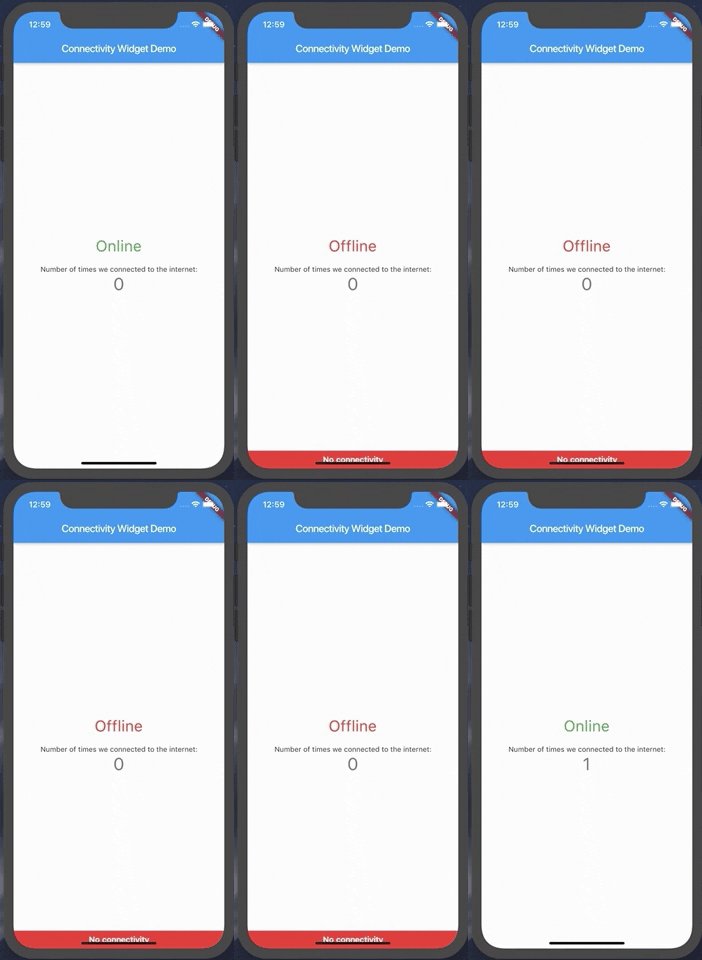
The ConnectivityWidget uses a builder function that provides you a isOnline flag to build different screens for offline or online mode.

 ConnectivityWidget(
        builder: (context, isOnline) => Center(
          child: Column(
            mainAxisAlignment: MainAxisAlignment.center,
            children: <Widget>[
              Text("${isOnline ? 'Online' : 'Offline'}", style: TextStyle(fontSize: 30, color: isOnline ? Colors.green : Colors.red),),
              SizedBox(height: 20,),
              Text(
                'Number of times we connected to the internet:',
              ),
              Text(
                '$_counter',
                style: Theme.of(context).textTheme.display1,
              ),
            ],
          ),
        )

It also provides both a onlineCallback and a offlineCallback that are called when the phone changes the connection state to online and offline, respectively.

 ConnectivityWidget(
        onlineCallback: _incrementCounter,
        builder: //...,
        )

If there is a need to change the default offline banner, a Widget can be provided to the offlineBanner parameter. Additionally, its visibility can be enabled or disabled by using the showOfflineBanner parameter.

Configurable Parameters:

  • serverToPing;
  • timeoutDuration;
  • debounceDuration;
  • verifyResponseCallback;

Changing the server to ping and the response verification

By default, the Connectivity Widget checks if there is a connection to http://www.google.com. If you want to check the availability of a custom endpoint, you can set a new endpoint to ping and a callback to verify the response.

ConnectivityUtils.instance.setCallback((response) => response.contains("This is a test!"));
ConnectivityUtils.instance.setServerToPing("https://gist.githubusercontent.com/Vanethos/dccc4b4605fc5c5aa4b9153dacc7391c/raw/355ccc0e06d0f84fdbdc83f5b8106065539d9781/gistfile1.txt");
Using ConnectivityUtils to Listen to Network Changes

This library also provides access to the ConnectivityUtils class in which you can verify the status of the network.

Stream<bool> ConnectivityUtils.instance.isPhoneConnectedStream // gets the current status of the network
Future<bool> ConnectivityUtils.instance.isPhoneConnected() // future that determines network status
Note on Web:

Although we can verify the status of the connection in web, what happens is that browsers will cache a request to a specific endpoint, so we cannot verify for certain if the connection is down or if we are using cache, using the methods presented in this package.

श्रेणियाँ

निर्भरताएँ

निर्भरता सूची 5 आइटम

सोर्स रिपॉज़िटरी

इस पैकेज का उपयोग करने वाले प्रोजेक्ट

अभी कोई डेटा उपलब्ध नहीं है।