playing_cards
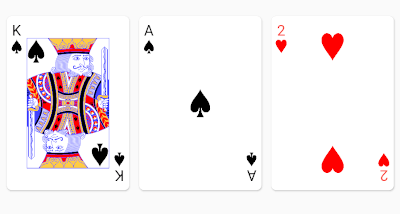
The playing_cards package for Flutter allows you to easily render playing cards from a standard 52 card deck. Good defaults are provided out of box, but full customization is possible if a style object is provided.
Getting Started
https://raw.githubusercontent.com/bedardjo/playing_cards/master/readme_images/default_cards.png
Here's a quick video overview if you don't like reading :-) https://www.youtube.com/watch?v=f9tOu972nhI
To import:
import 'package:playing_cards/playing_cards.dart';
And here is a simple usage to render a nine of clubs:
PlayingCardView(card: PlayingCard(Suit.clubs, CardValue.nine))
https://raw.githubusercontent.com/bedardjo/playing_cards/master/readme_images/nine_of_clubs.png
Here is an example of a fully styled deck:
// This style object overrides the styles for spades.
PlayingCardViewStyle myCardStyles = PlayingCardViewStyle(suitStyles: {
  Suit.spades: SuitStyle(
    builder: (context) => FittedBox(
          fit: BoxFit.fitHeight,
          child: Text(
            "💩",
            style: TextStyle(fontSize: 500),
          ),
        ),
    style: TextStyle(color: Colors.brown),
    cardContentBuilders: {
      CardValue.jack: (context) =>
          Image.asset("assets/jack_of_spades.png"),
      CardValue.queen: (context) =>
          Image.asset("assets/queen_of_spades.png"),
      CardValue.king: (context) =>
          Image.asset("assets/king_of_spades.png"),
    })
});
List<PlayingCard> deck = standardFiftyTwoCardDeck();
Container(
  height: 150,
  child: SingleChildScrollView(
    scrollDirection: Axis.horizontal,
    child: Row(
      children: deck.map((e) => PlayingCardView(card: e, style: myCardStyles)).toList(),
    ),
  ),
),
https://raw.githubusercontent.com/bedardjo/playing_cards/master/readme_images/customized_cards.png
PlayingCardViewStyle also accepts a suitBesideLabel: true option to render the suit next to the rank, instead of below:
https://raw.githubusercontent.com/bedardjo/playing_cards/master/readme_images/suit_beside_label.png
A flat fan widget is also provided for the common use cases of fanning cards out horizontally:
ShapeBorder shape = RoundedRectangleBorder(
  borderRadius: BorderRadius.circular(8),
  side: BorderSide(color: Colors.black, width: 1));
FlatCardFan(children: [
  PlayingCardView(
    card: PlayingCard(Suit.hearts, CardValue.ace),
    showBack: true,
    elevation: 3.0,
    shape: shape),
  PlayingCardView(
      card: PlayingCard(Suit.hearts, CardValue.ace),
      showBack: true,
      elevation: 3.0,
      shape: shape),
  PlayingCardView(
      card: PlayingCard(Suit.hearts, CardValue.ace),
      showBack: true,
      elevation: 3.0,
      shape: shape),
  PlayingCardView(
      card: PlayingCard(Suit.hearts, CardValue.ace),
      elevation: 3.0,
      shape: shape)
])
https://raw.githubusercontent.com/bedardjo/playing_cards/master/readme_images/flat_stack.png
Jokers
Jokers are modelled as two joker CardValues (joker_1, joker_2) in a single joker Suit.
You can use the standardFiftyFourCardDeck() function in deck.dart to create a deck with two Jokers.


 v0.4.1+11