
 v0.1.8
awesome_snackbar_content
विभिन्न चेतावनी संदेशों के साथ अपने snackbar अनुभव को उत्कृष्ट बनाएं, जैसे सफलता, विफलता, मदद या चेतावनी, जिसमें अद्वितीय UI डिज़ाइन है।
1 हज़ारलाइक 10.9 हज़ार30-दिन डाउनलोड160Pub अंक
AndroidiOSWebmacOSWindowsLinux
एप्लिकेशन में आपके SnackBar अनुभव को बढ़ाने के लिए एक सुंदर डार्ट पैकेज

^2.0.4{"sdk":"flutter"}{"sdk":"flutter"}{"sdk":"flutter"}^6.0.0यह अंग्रेज़ी मूल स्नैपशॉट है। नवीनतम सामग्री GitHub पर देखें।
A package that lets you uplift your SnackBar or MaterialBanner experience in the app.
https://user-images.githubusercontent.com/43790152/169776704-cc6ac8d8-ebd7-4cf1-8239-5d4678b65bc4.pngtitle: Top label that will be shown in the bodymessage: Body message reflecting some error message, success message etc.color: Color of SnackBar bodycontentType: ContentType class reflecting failure, success, help or warning.inMaterialBanner: Simply configure the working according to showMaterialBannerhttps://user-images.githubusercontent.com/43790152/200166529-51927c9d-66a6-4f76-b8f7-990680db2eba.mov
To use the package:
dependencies:
  flutter:
      sdk: flutter

  awesome_snackbar_content: <latest-package>
Then import it in your flutter project:
import 'package:awesome_snackbar_content/awesome_snackbar_content.dart';
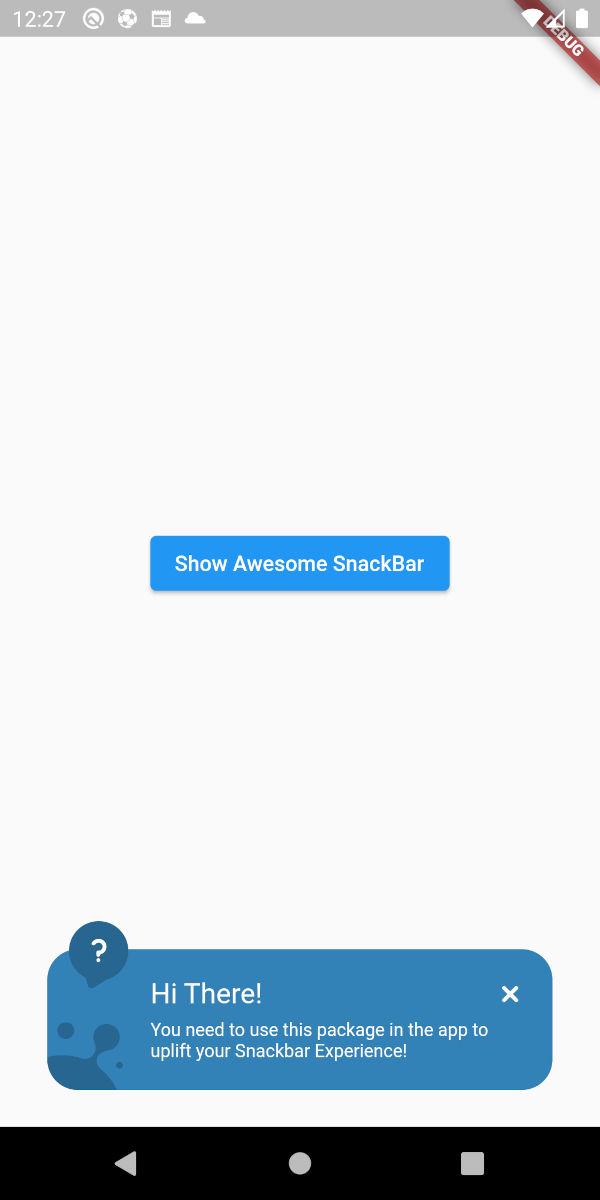
Below are the looks of various types in package used as Snackbar
Below are the looks of various types in package used as Snackbar
Below is a basic example usage of the awesome_snackbar_content
import 'package:flutter/material.dart';
import 'package:awesome_snackbar_content/awesome_snackbar_content.dart';

class AweseomSnackBarExample extends StatelessWidget {
  const AweseomSnackBarExample({Key? key}) : super(key: key);

  @override
  Widget build(BuildContext context) {
    return Scaffold(
      body: Center(
        child: Column(
          mainAxisSize: MainAxisSize.min,
          children: [
            ElevatedButton(
              child: const Text('Show Awesome SnackBar'),
              onPressed: () {
                final snackBar = SnackBar(
                  /// need to set following properties for best effect of awesome_snackbar_content
                  elevation: 0,
                  behavior: SnackBarBehavior.floating,
                  backgroundColor: Colors.transparent,
                  content: AwesomeSnackbarContent(
                    title: 'On Snap!',
                    message:
                        'This is an example error message that will be shown in the body of snackbar!',

                    /// change contentType to ContentType.success, ContentType.warning or ContentType.help for variants
                    contentType: ContentType.failure,
                  ),
                );

                ScaffoldMessenger.of(context)
                  ..hideCurrentSnackBar()
                  ..showSnackBar(snackBar);
              },
            ),
            const SizedBox(height: 10),
            ElevatedButton(
              child: const Text('Show Awesome Material Banner'),
              onPressed: () {
                final materialBanner = MaterialBanner(
                  /// need to set following properties for best effect of awesome_snackbar_content
                  elevation: 0,
                  backgroundColor: Colors.transparent,
                  forceActionsBelow: true,
                  content: AwesomeSnackbarContent(
                    title: 'Oh Hey!!',
                    message:
                        'This is an example error message that will be shown in the body of materialBanner!',

                    /// change contentType to ContentType.success, ContentType.warning or ContentType.help for variants
                    contentType: ContentType.success,
                    // to configure for material banner
                    inMaterialBanner: true,
                  ),
                  actions: const [SizedBox.shrink()],
                );

                ScaffoldMessenger.of(context)
                  ..hideCurrentMaterialBanner()
                  ..showMaterialBanner(materialBanner);
              },
            ),
          ],
        ),
      ),
    );
  }
}
This packages has been created in reference to Abu Anwar (GDE Flutter) YouTube video. So, make sure to check his work!