पैकेज, रिपॉज़िटरी और ऐप श्रेणियाँ खोजें

awesome_snackbar_content कवर
पैकेज विवरणv0.1.8

awesome_snackbar_content

विभिन्न चेतावनी संदेशों के साथ अपने snackbar अनुभव को उत्कृष्ट बनाएं, जैसे सफलता, विफलता, मदद या चेतावनी, जिसमें अद्वितीय UI डिज़ाइन है।

AndroidiOSWebmacOSWindowsLinux
30-दिन डाउनलोड
15 हज़ार
लाइक
1.1 हज़ार
Pub अंक
160

पैकेज इंस्टॉल करें

flutter pub add awesome_snackbar_content

पैकेज अवलोकन

सार्वजनिक जानकारी से बना चयन मार्गदर्शन। केवल संदर्भ हेतु।

एक फ्लटर पैकेज जो सफलता, विफलता, चेतावनी और सहायता स्थितियों के लिए दिखाई देने वाले विषय-आधारित चेतावनी संदेशों के साथ स्नैकबार को बढ़ावा देता है। यह आधुनिक, कस्टमाइज़ करने योग्य उपयोगकर्ता इंटरफेस प्रदान करता है जो प्लेटफॉर्म के बीच उपयोगकर्ता प्रतिक्रिया को सुधारता है। यह पैकेज एंड्रॉइड, आईओएस, वेब, मैकओएस, विंडोज और लिनक्स सहित कई प्लेटफॉर्म का समर्थन करता है, जिससे एक समान क्रॉस-प्लेटफॉर्म अनुभव के लिए आदर्श है। pub add के माध्यम से सरल एकीकरण के साथ, विकासकर्ता बिना अन्यथा डिफ़ॉल्ट स्नैकबार डिज़ाइन से अलग दिखने वाली आकर्षक नोटिफिकेशन त्वरित रूप से लागू कर सकते हैं।

उपयोग

  • फॉर्म सबमिशन के बाद सफलता संदेश प्रदर्शित करें
  • API विफलताओं के दौरान त्रुटि चेतावनियां दिखाएं
  • उपयोगी सुझाव या मार्गदर्शन प्रदान करना
  • प्रणाली स्थिति परिवर्तनों के बारे में उपयोगकर्ताओं को सूचित करना
  • आकर्षक प्रतिक्रिया के साथ उपयोगकर्ता अनुभव में सुधार करना
  • स्थिर नोटिफिकेशन स्टाइल बनाएं

मुख्य विशेषताएँ

  • थीम वाले चेतावनी प्रकार: सफलता, विफलता, चेतावनी, सहायता
  • निर्देशित रंग और प्रतीक
  • प्रतिक्रियाशील और प्लेटफॉर्म-अनुकूल डिज़ाइन
  • Flutter के Scaffold के साथ आसान एकीकरण
  • कई प्लेटफॉर्म के लिए समर्थन
  • निर्मित एनीमेशन और संक्रमण

इनके लिए उपयुक्त

  • मोबाइल और वेब ऐप डेवलपर्स
  • यूएक्स-केंद्रित परियोजनाएँ
  • स्पष्ट उपयोगकर्ता प्रतिक्रिया की आवश्यकता वाले ऐप
  • चिकन नोटिफिकेशन चाहने वाले डेवलपर्स
  • दृश्य सुसंगतता को निर्धारित करने वाली टीमें
  • क्रॉस-प्लेटफ़ॉर्म आवश्यकताओं वाले प्रोजेक्ट

विचार योग्य बातें

  • Flutter 2.5 या उच्चतर की आवश्यकता है
  • मूल एसनबार कार्यक्षमता तक सीमित
  • जटिल लेआउट के लिए अतिरिक्त स्टाइलिंग की आवश्यकता हो सकती है
  • सरल, तत्काल प्रतिक्रिया के लिए सबसे उपयुक्त
  • लंबित नोटिफिकेशन के लिए नहीं बनाया गया
  • पूर्ण कस्टमाइजेशन के लिए बाहरी निर्भरताओं पर निर्भर करता है

मूल README

संबंधित सोर्स रिपॉज़िटरी के मूल README का स्नैपशॉट। नवीनतम सामग्री के लिए रिपॉज़िटरी देखें।

A package that lets you uplift your SnackBar or MaterialBanner experience in the app.

🛠 Attributes

  • title: Top label that will be shown in the body
  • message: Body message reflecting some error message, success message etc.
  • color: Color of SnackBar body
  • contentType: ContentType class reflecting failure, success, help or warning.
  • inMaterialBanner: Simply configure the working according to showMaterialBanner

Overall Look'n Feel

https://user-images.githubusercontent.com/43790152/200166529-51927c9d-66a6-4f76-b8f7-990680db2eba.mov

📱 Usage

To use the package:

  • add the dependency to your pubspec.yaml file
dependencies:
  flutter:
      sdk: flutter

  awesome_snackbar_content: <latest-package>

Then import it in your flutter project:

import 'package:awesome_snackbar_content/awesome_snackbar_content.dart';

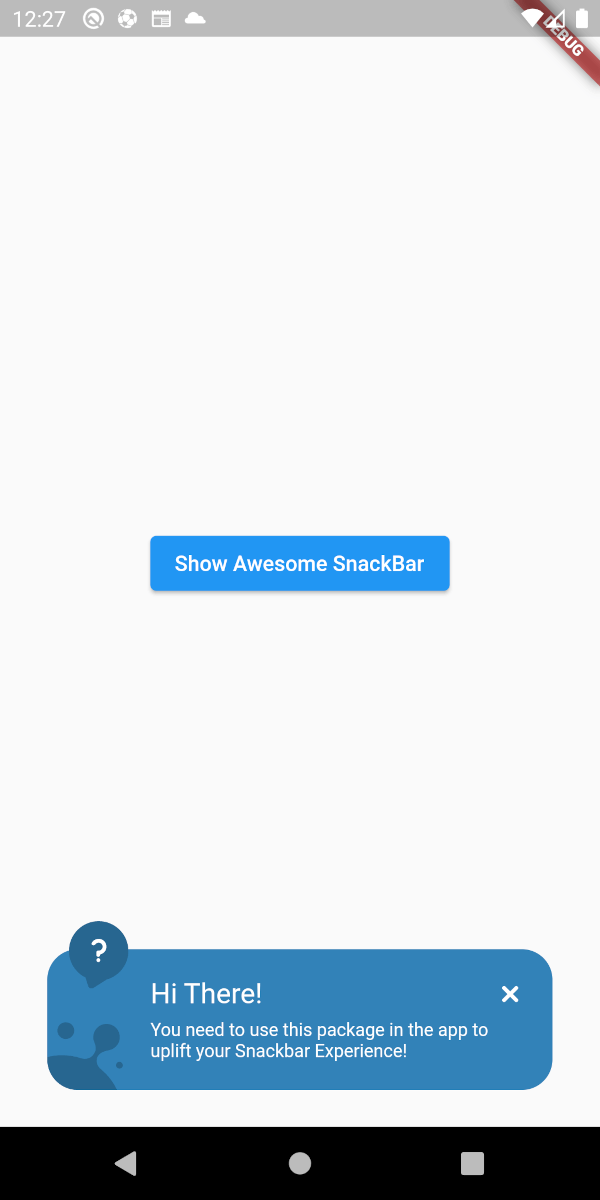
👀 SnackBar Looks

Below are the looks of various types in package used as Snackbar

🔴 Failure
✅ Success
❔ Help
⚠ Warning

👀 Material Banner Looks

Below are the looks of various types in package used as Snackbar

🔴 Failure
✅ Success
❔ Help
⚠ Warning
💻 Example

Below is a basic example usage of the awesome_snackbar_content

import 'package:flutter/material.dart';
import 'package:awesome_snackbar_content/awesome_snackbar_content.dart';

class AweseomSnackBarExample extends StatelessWidget {
  const AweseomSnackBarExample({Key? key}) : super(key: key);

  @override
  Widget build(BuildContext context) {
    return Scaffold(
      body: Center(
        child: Column(
          mainAxisSize: MainAxisSize.min,
          children: [
            ElevatedButton(
              child: const Text('Show Awesome SnackBar'),
              onPressed: () {
                final snackBar = SnackBar(
                  /// need to set following properties for best effect of awesome_snackbar_content
                  elevation: 0,
                  behavior: SnackBarBehavior.floating,
                  backgroundColor: Colors.transparent,
                  content: AwesomeSnackbarContent(
                    title: 'On Snap!',
                    message:
                        'This is an example error message that will be shown in the body of snackbar!',

                    /// change contentType to ContentType.success, ContentType.warning or ContentType.help for variants
                    contentType: ContentType.failure,
                  ),
                );

                ScaffoldMessenger.of(context)
                  ..hideCurrentSnackBar()
                  ..showSnackBar(snackBar);
              },
            ),
            const SizedBox(height: 10),
            ElevatedButton(
              child: const Text('Show Awesome Material Banner'),
              onPressed: () {
                final materialBanner = MaterialBanner(
                  /// need to set following properties for best effect of awesome_snackbar_content
                  elevation: 0,
                  backgroundColor: Colors.transparent,
                  forceActionsBelow: true,
                  content: AwesomeSnackbarContent(
                    title: 'Oh Hey!!',
                    message:
                        'This is an example error message that will be shown in the body of materialBanner!',

                    /// change contentType to ContentType.success, ContentType.warning or ContentType.help for variants
                    contentType: ContentType.success,
                    // to configure for material banner
                    inMaterialBanner: true,
                  ),
                  actions: const [SizedBox.shrink()],
                );

                ScaffoldMessenger.of(context)
                  ..hideCurrentMaterialBanner()
                  ..showMaterialBanner(materialBanner);
              },
            ),
          ],
        ),
      ),
    );
  }
}

🧑 Credits

This packages has been created in reference to Abu Anwar (GDE Flutter) YouTube video. So, make sure to check his work!

श्रेणियाँ

निर्भरताएँ

निर्भरता सूची 1 आइटम

सोर्स रिपॉज़िटरी

इस पैकेज का उपयोग करने वाले प्रोजेक्ट