

v0.4.0
background_task
एप्लिकेशन बैकग्राउंड में स्थानांतरित होने के बाद स्थान अद्यतन का प्रसंस्करण किया जा सकता है।
40लाइक 9730-दिन डाउनलोड160Pub अंक
AndroidiOS
बैकग्राउंड कार्य

यह अंग्रेज़ी मूल स्नैपशॉट है। नवीनतम सामग्री GitHub पर देखें।

Developed with 💙 by Never inc.
Enable developers to continue processing even when the application transitions to the background, we have created a package that allows processing to continue using location updates.This package was created with reference to background_location.
Can be used when you want to run the program periodically in the background.
// Monitor notifications of background processes.
// However, Cannot be used while the app is in task kill.
BackgroundTask.instance.stream.listen((event) {
  // Implement the process you want to run in the background.
  // ex) Check health data.
});

// Start background processing with location updates.
await BackgroundTask.instance.start();

// Stop background processing and location updates.
await BackgroundTask.instance.stop();
This is an implementation for receiving updates even when the task is task-killed. In this package, iOS uses startMonitoringSignificantLocationChanges and Android uses ForegroundService.
// Define callback handler at the top level.
@pragma('vm:entry-point')
void backgroundHandler(Location data) {
  // Implement the process you want to run in the background.
  // ex) Check health data.
}

void main() {
  WidgetsFlutterBinding.ensureInitialized();
  BackgroundTask.instance.setBackgroundHandler(backgroundHandler); // 👈 Set callback handler.
  runApp(const MyApp());
}
To get the latest location information in a task-killed status, set the app to Always.
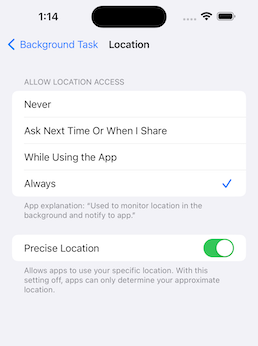

This is an implementation for when you want to stop using the application when it is killed.
await BackgroundTask.instance.start(
  isEnabledEvenIfKilled: false,
);
Recommended to use with permission_handler.
final status = await Permission.location.request();
final statusAlways = await Permission.locationAlways.request();

if (status.isGranted && statusAlways.isGranted) {
  await BackgroundTask.instance.start();
}
pubspec.yaml
dependencies:
  background_task:
iOS: Info.plist
<key>NSLocationAlwaysAndWhenInUseUsageDescription</key>
<string>Used to monitor location in the background and notify to app.</string>
<key>NSLocationAlwaysUsageDescription</key>
<string>Used to monitor location in the background and notify to app.</string>
<key>NSLocationWhenInUseUsageDescription</key>
<string>Used to monitor location in the background and notify to app.</string>
<key>UIBackgroundModes</key>
<array>
    <string>fetch</string>
    <string>location</string>
</array>
To use an external package (shared_preference etc..) in callback handler, register DispatchEngine in AppDelegate.
iOS: AppDelegate.swift
import UIKit
import Flutter
import background_task // 👈 Add

@main
@objc class AppDelegate: FlutterAppDelegate, FlutterImplicitEngineDelegate {
  override func application(
    _ application: UIApplication,
    didFinishLaunchingWithOptions launchOptions: [UIApplication.LaunchOptionsKey: Any]?
  ) -> Bool {
      GeneratedPluginRegistrant.register(with: self)
      // 👇 Add
      BackgroundTaskPlugin.onRegisterDispatchEngine = {
          GeneratedPluginRegistrant.register(with: BackgroundTaskPlugin.dispatchEngine)
      }
      return super.application(application, didFinishLaunchingWithOptions: launchOptions)
  }

  func didInitializeImplicitFlutterEngine(_ engineBridge: FlutterImplicitEngineBridge) {
    GeneratedPluginRegistrant.register(with: engineBridge.pluginRegistry)
  }
}
Android: AndroidManifest.xml
<uses-permission android:name="android.permission.ACCESS_COARSE_LOCATION" />
<uses-permission android:name="android.permission.ACCESS_FINE_LOCATION" />
<uses-permission android:name="android.permission.ACCESS_BACKGROUND_LOCATION"/>
<uses-permission android:name="android.permission.POST_NOTIFICATIONS"/>
निर्भरता सूची 3 आइटम
{"sdk":"flutter"}{"sdk":"flutter"}—उपयोग के अनुसार छाँटें, गतिविधि की तुलना करें और अपनाने से पहले मूल प्रोजेक्ट की आवश्यकताएँ जाँचें।
“A repository is the most basic element of GitHub.”
GitHub Docs — About repositories ↗