सार्वजनिक जानकारी से बना चयन मार्गदर्शन। केवल संदर्भ हेतु।
background_task पैकेज फ्लटर एप्लिकेशन को ऐसे ऑपरेशन करने की अनुमति देता है, विशेष रूप से स्थान अपडेट, जब ऐप बैकग्राउंड में हो। यह एंड्रॉइड और आईओएस के लिए डिज़ाइन किया गया है, जिससे डेवलपर्स लगातार कार्यक्षमता बनाए रख सकते हैं, जैसे उपयोगकर्ता की गति को बिना ब्रेक के ट्रैक करना। यह पैकेज मूल विंडोज फीचर्स के साथ एकीकृत है ताकि बैकग्राउंड अवस्थाओं में विश्वसनीय निष्पादन सुनिश्चित किया जा सके। यह वास्तविक समय में स्थान निगरानी या नियमित डेटा संग्रह की आवश्यकता वाले ऐप्स के लिए विशेष रूप से उपयोगी है। समाधान को न्यूनतम ओवरहेड के साथ बनाया गया है और दोनों प्लेटफॉर्म के लिए निष्पादित किया गया है।
उपयोग
रियल-टाइम स्थान ट्रैकिंग
नियमित डेटा सिंक्रनाइजेशन
बैकग्राउंड जियोफेंसिंग
लंबे समय तक चलने वाले कार्य का क्रियान्वयन
बैटरी-कुशल पृष्ठभूमि प्रसंस्करण
मुख्य विशेषताएँ
Android और iOS का समर्थन करता है
बैकग्राउंड में स्थान अपडेट का प्रबंधन करता है
न्यूनतम बैटरी प्रभाव
नेटिव प्लेटफॉर्म एकीकरण
कार्य योजना के लिए सरल API
इनके लिए उपयुक्त
फिटनेस और नेविगेशन ऐप्स
लॉजिस्टिक्स और डिलीवरी ट्रैकिंग
फील्ड सर्विस मैनेजमेंट
लंबे समय तक पृष्ठभूमि गतिविधि की आवश्यकता वाले ऐप
स्थान-आधारित सेवाएं
विचार योग्य बातें
दोनों प्लेटफॉर्म पर उचित अनुमतियाँ आवश्यक हैं
ऑपरेटिंग सिस्टम के ऊर्जा बचत मोड द्वारा सीमित हो सकता है
वास्तविक उपकरणों पर परीक्षण की आवश्यकता है
पृष्ठभूमि निष्पादन सीमाएँ ओएस संस्करण पर निर्भर करती हैं
उपयोगकर्ता को स्थान पहुँच अनुमति देनी होगी
मूल README
संबंधित सोर्स रिपॉज़िटरी के मूल README का स्नैपशॉट। नवीनतम सामग्री के लिए रिपॉज़िटरी देखें।
Enable developers to continue processing even when the application transitions to the background, we have created a package that allows processing to continue using location updates.This package was created with reference to background_location.
Can be used when you want to run the program periodically in the background.
Monitor and notify the distance walked and steps.
Notification of destination arrival.
Tracking location information (sending it to a server).
Usage
// Monitor notifications of background processes.// However, Cannot be used while the app is in task kill.BackgroundTask.instance.stream.listen((event) {
// Implement the process you want to run in the background.// ex) Check health data.
});
// Start background processing with location updates.awaitBackgroundTask.instance.start();
// Stop background processing and location updates.awaitBackgroundTask.instance.stop();
// Define callback handler at the top level.@pragma('vm:entry-point')
voidbackgroundHandler(Location data) {
// Implement the process you want to run in the background.// ex) Check health data.
}
voidmain() {
WidgetsFlutterBinding.ensureInitialized();
BackgroundTask.instance.setBackgroundHandler(backgroundHandler); // 👈 Set callback handler.runApp(constMyApp());
}
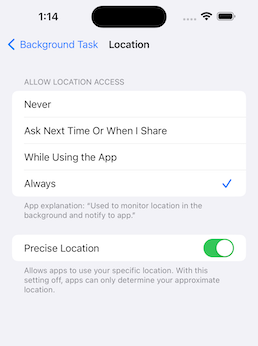
To get the latest location information in a task-killed status, set the app to Always.
This is an implementation for when you want to stop using the application when it is killed.
final status = awaitPermission.location.request();
final statusAlways = awaitPermission.locationAlways.request();
if (status.isGranted && statusAlways.isGranted) {
awaitBackgroundTask.instance.start();
}
Setup
pubspec.yaml
dependencies:background_task:
iOS: Info.plist
<key>NSLocationAlwaysAndWhenInUseUsageDescription</key><string>Used to monitor location in the background and notify to app.</string><key>NSLocationAlwaysUsageDescription</key><string>Used to monitor location in the background and notify to app.</string><key>NSLocationWhenInUseUsageDescription</key><string>Used to monitor location in the background and notify to app.</string><key>UIBackgroundModes</key><array><string>fetch</string><string>location</string></array>
To use an external package (shared_preference etc..) in callback handler, register DispatchEngine in AppDelegate.