
 v18.1.0
flutter_fast_forms
Flutter Fast Forms एकमात्र Dart पैकेज है जिसकी आपको Flutter फॉर्म बनाने के लिए आवश्यकता होती है।
91लाइक 35930-दिन डाउनलोड90Pub अंक
AndroidiOSWebmacOSWindowsLinux
Flutter Fast Forms एक Dart पैकेज है जिसका उपयोग फ्लटर फॉर्म तेजी से बनाने के लिए किया जाता है

{"sdk":"flutter"}^0.20.2{"sdk":"flutter"}^5.0.0^1.25.8यह अंग्रेज़ी मूल स्नैपशॉट है। नवीनतम सामग्री GitHub पर देखें।
Flutter Fast Forms is the only Dart package you need to build Flutter forms fast.
It adds these missing features to the Flutter SDK:
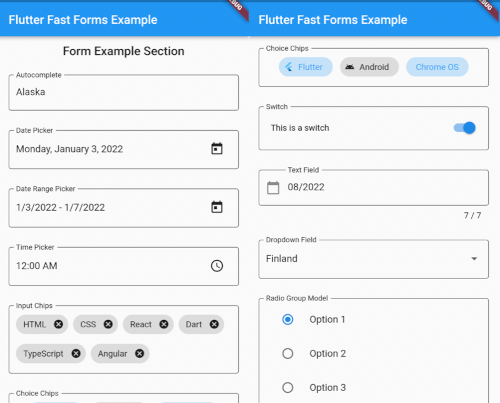
FastFormControl<T> convenience widgets that wrap Material / Cupertino form controls in a FormField<T> according to the already built-in TextFormField / DropdownButtonFormFieldFastForm widget that wraps the built-in Form widget for providing the current form field values in onChanged callbackFastFormArray widget that aggregates a flexible number of homogeneous controls in a single FormField<T>FastChipsInput widget that converts text input into chips as defined by Material Designtouched validation stateFormFieldValidator<T> functionshttps://github.com/udos86/flutter-fast-forms/assets/508325/13708c6d-ac19-4101-bb3a-2ef6fb6a8f54https://github.com/udos86/flutter-fast-forms/assets/508325/a5537d99-4eba-46ae-a716-d4623d88b714https://github.com/udos86/flutter-fast-forms/assets/508325/7855459f-d872-4524-8c29-0271e7f9630fhttps://github.com/udos86/flutter-fast-forms/assets/508325/efe8f17f-149a-4e99-aaa5-59ce7172ccfc
https://user-images.githubusercontent.com/508325/137577735-9733ebc2-d7e3-4566-b68f-b8cfbfb373ca.pnghttps://user-images.githubusercontent.com/508325/137577821-454f9bb8-aaf2-4dc5-82e4-c7d70b04f426.pnghttps://user-images.githubusercontent.com/508325/137577765-078ab415-8de3-4ad1-aa87-947603b8279b.png
1. Add a FastForm to your widget tree:
class MyFormPage extends StatelessWidget {
  MyFormPage({Key? key, required this.title}) : super(key: key);

  final formKey = GlobalKey<FormState>();
  final String title;

  @override
  Widget build(BuildContext context) {
    return Scaffold(
      appBar: AppBar(
        title: Text(title),
      ),
      body: SafeArea(
        child: SingleChildScrollView(
          child: FastForm(
            formKey: formKey,
            children: [],
          ),
        ),
      ),
    );
  }
}
2. Add FastFormControl<T> children to the FastForm:
FastForm(
  formKey: formKey,
  children: [
    const FastTextField(
      name: 'field_destination',
      labelText: 'Destination',
      placeholder: 'Where are you going?',
    ),
    FastDateRangePicker(
      name: 'field_check_in_out',
      labelText: 'Check-in - Check-out',
      firstDate: DateTime.now(),
      lastDate: DateTime.now().add(const Duration(days: 365)),
    ),
    const FastCheckbox(
      name: 'field_travel_purpose',
      labelText: 'Travel purpose',
      titleText: 'I am travelling for work',
    ),
  ],
),
3. Wrap the children in a FastFormSection for visual grouping and consistent padding:
FastForm(
  formKey: formKey,
  children: [
    FastFormSection(
      header: const Text('My Form'),
      padding: EdgeInsets.all(16.0),
      children: [
        const FastTextField(
          name: 'field_destination',
          labelText: 'Destination',
          placeholder: 'Where are you going?',
        ),
        // ...
      ],
    ),
  ]
),
FastFormControl<T> |
field value type | wraps Material widget | wraps Cupertino widget when adaptive: true |
|---|---|---|---|
FastAutocomplete<O> |
String |
Autocomplete<O> |
no |
FastCheckbox |
bool |
CheckboxListTile |
CupertinoCheckbox |
FastChoiceChips<T> |
Set<T> |
ChoiceChip |
no |
FastCalendar |
DateTime |
CalendarDatePicker |
no |
FastChipsInput |
List<String> |
RawAutocomplete<String> + InputChip |
no |
FastDatePicker |
DateTime |
showDatePicker |
CupertinoDatePicker |
FastDateRangePicker |
DateTimeRange |
showDateRangePicker |
no |
FastDropdown<T> |
T |
DropdownButtonFormField<T> |
no |
FastRadioGroup<T> |
T |
RadioListTile<T> |
no |
FastRangeSlider |
RangeValues |
RangeSlider |
no |
FastSegmentedButton<T> |
Set<T> |
SegmentedButton<T> |
no |
FastSegmentedControl<T> |
T extends Object |
no | CupertinoSlidingSegmentedControl<T> |
FastSlider |
double |
Slider.adaptive |
CupertinoSlider |
FastSwitch |
bool |
SwitchListTile |
CupertinoSwitch |
FastTextField |
String |
TextFormField |
CupertinoTextFormFieldRow |
FastTimePicker |
TimeOfDay |
showTimePicker |
no use FastDatePicker with CupertinoDatePickerMode.time |
While some form controls are unique to a certain platform, various others are present in multiple design languages.
By default, Flutter Fast Forms uses Material widgets on any platform.
This behavior is adjustable so that platform-specific Cupertino widgets are automatically rendered on iOS.
[!TIP] The widget catalog tells you which
FastFormControlis adaptive.
📓 Example: Always use Cupertino widgets on iOS in a FastForm.
FastForm(
  formKey: formKey,
  adaptive: true,
  children: [
    const FastSwitch(
      name: 'switch',
      titleText: 'Disable text field',
    ),
    FastTextField(
      name: 'text_field',
      labelText: 'Just some sample text field',
    ),
  ]
),
[!NOTE]
- When
adaptiveis set totrueany built-inFormFieldBuilderreturns a corresponding Cupertino widget on iOS, if it exists.
📓 Example: Only use the Cupertino widget on iOS for a dedicated FastSwitch.
FastForm(
  formKey: formKey,
  children: [
    const FastSwitch(
      name: 'switch',
      adaptive: true,
      titleText: 'Disable text field',
    ),
  ]
),
Not all controls in a form are autonomous and act independent of each other.
Occasionally, the state of a form field might be directly related to the state of some other form field as well.
Flutter Fast Forms allows you to define such conditions declaratively.
📓 Example: A FastTextField that is disabled when a FastSwitch is selected.
1. Add the conditions property to the conditional form field and assign an empty Map:
const FastSwitch(
  name: 'switch',
  titleText: 'Disable text field',
),
FastTextField(
  name: 'text_field',
  labelText: 'Just some sample text field',
  conditions: {},
),
2. Choose a suitable FastConditionHandler as Map key and assign a FastConditionList:
const FastSwitch(
  name: 'switch',
  titleText: 'Disable text field when selected',
),
FastTextField(
  name: 'text_field',
  labelText: 'Just some sample text field',
  conditions: {
    FastCondition.disabled: FastConditionList([]),
  },
)
[!NOTE] A
FastConditionHandleris a function that runs whenever aFastConditionListis checked and determines what happens when the condition is either met or not.
3. Add a FastCondition relating the field to another field:
const FastSwitch(
  name: 'switch',
  titleText: 'Disable text field when selected',
),
FastTextField(
  name: 'text_field',
  labelText: 'Just some sample text field',
  conditions: {
    FastCondition.disabled: FastConditionList([
      FastCondition(
        target: 'switch',
        test: (value, field) => value is bool && value,
      ),
    ]),
  },
),
[!NOTE]
targetis thenameof theFastFormFieldthat the form field depends on.
📓 Example: A FastTextField that is enabled when a FastSwitch or a FastCheckbox is selected.
const FastCheckbox(
  name: 'checkbox',
  titleText: 'Enable text field when selected',
),
const FastSwitch(
  name: 'switch',
  titleText: 'Enable text field when selected',
),
FastTextField(
  name: 'text_field',
  enabled: false,
  labelText: 'Just some sample text field',
  conditions: {
    FastCondition.enabled: FastConditionList([
      FastCondition(
        target: 'switch',
        test: (value, field) => value is bool && value,
      ),
      FastCondition(
        target: 'checkbox',
        test: (value, field) => value is bool && value,
      ),
    ]),
  },
),
📓 Example: A FastTextField that is disabled when both a FastSwitch and a FastCheckbox are selected.
const FastCheckbox(
  name: 'checkbox',
  titleText: 'Disable text field when selected',
),
const FastSwitch(
  name: 'switch',
  titleText: 'Disable text field when selected',
),
FastTextField(
  name: 'text_field',
  labelText: 'Just some sample text field',
  conditions: {
    FastCondition.enabled: FastConditionList(
      [
        FastCondition(
          target: 'switch',
          test: (value, field) => value is bool && value,
        ),
        FastCondition(
          target: 'checkbox',
          test: (value, field) => value is bool && value,
        ),
      ],
      match: FastConditionMatch.every,
    ),
  },
),
[!NOTE]
matchspecifies how all individual test results in the list are evaluated to determine whether the condition is met.
There are use cases where the widget catalog does not fully satisfy your individual requirements.
As a consequence you have to add non-standard controls to your form.
With Flutter Fast Forms you're free to wrap any custom widget into a form field.
📓 Example: A simple widget that provides a random integer whenever a button is pressed.
1. Create a stateful widget class extending FastFormField<T> with a corresponding FastFormFieldState<T>:
class MyCustomField extends FastFormField<int> {
  const MyCustomField({
    super.builder = myCustomFormFieldBuilder,
    super.key,
    required super.name,
  });

  @override
  MyCustomFieldState createState() => MyCustomFieldState();
}

class MyCustomFieldState extends FastFormFieldState<int> {
  @override
  MyCustomField get widget => super.widget as MyCustomField;
}
[!NOTE]
builderandnameare required constructor parameters ofFastFormField.builderis a standard FlutterFormFieldBuilder<T>.
2. Implement the FormFieldBuilder<T> returning your custom widget:
Widget myCustomFormFieldBuilder(FormFieldState<int> field) {
  field as MyCustomFieldState;
  final MyCustomFieldState(:decoration, :didChange, :value) = field;

  return InputDecorator(
    decoration: decoration,
    child: Row(
      children: [
        ElevatedButton(
          child: const Text('Create random number'),
          onPressed: () => didChange(Random().nextInt(1 << 32)),
        ),
        if (value is int)
          Padding(
            padding: const EdgeInsets.symmetric(horizontal: 12.0),
            child: Text(value.toString()),
          )
      ],
    ),
  );
}
[!NOTE]
- Casting
fieldis mandatory to accessFastFormFieldproperties and functions.- Always call
field.didChange()to update the value of the form field.
3. Add all super-initializer parameters that the form field should support:
class MyCustomField extends FastFormField<int> {
  const MyCustomField({
    super.builder = myCustomFormFieldBuilder,
    super.decoration,
    super.enabled,
    super.helperText,
    super.initialValue,
    super.key,
    super.labelText,
    required super.name,
    super.onChanged,
    super.onReset,
    super.onSaved,
    super.onTouched,
    super.validator,
  });

  @override
  MyCustomFieldState createState() => MyCustomFieldState();
}
[!NOTE] Always make sure that you apply certain super-initializer parameters like
decorationorenabledin your builder functions. Otherwise assigning those arguments when invoking the constructor won't have any effect.