सार्वजनिक जानकारी से बना चयन मार्गदर्शन। केवल संदर्भ हेतु।
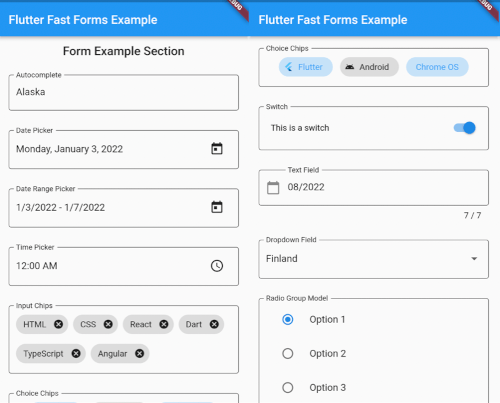
Flutter Fast Forms एक Dart पैकेज है जिसका उद्देश्य Flutter फॉर्म के निर्माण को सुगम बनाना है, जिससे डेवलपर्स तेजी से मजबूत और पुनर्उपयोगी फॉर्म कंपोनेंट बना सकते हैं। इसमें फॉर्म फील्ड, वैधता नियम और सबमिशन लॉजिक को परिभाषित करने के लिए एक सरल, घोषणात्मक API है जिसमें न्यूनतम बॉइलरप्लेट होता है। पैकेज सभी प्रमुख प्लेटफॉर्म जैसे Android, iOS, Web, macOS, Windows और Linux का समर्थन करता है, जिससे यह क्रॉस-प्लेटफॉर्म एप्लिकेशन के लिए आदर्श है। सामान्य इनपुट प्रकार और कस्टमाइज़ेबल वैलिडेटर्स के लिए एम्बेडेड सपोर्ट के साथ, यह लचीलापन या प्रदर्शन के बिना विकास को तेज करता है।
उपयोग
त्वरित फॉर्म प्रोटोटाइपिंग
क्रॉस-प्लेटफ़ॉर्म फॉर्म विकास
जटिल सत्यापन कार्यप्रवाह
पुनर्उपयोगी फॉर्म घटक
सरलीकृत उपयोगकर्ता पंजीकरण प्रवाह
मुख्य विशेषताएँ
घोषणात्मक फॉर्म सिंटैक्स
बिल्ट-इन वैधता सहायक कार्य
क्रॉस-प्लेटफ़ॉर्म संगतता
विस्तारयोग्य फ़ील्ड प्रकार
न्यूनतम बॉयलरप्लेट कोड
इनके लिए उपयुक्त
शुरुआती Flutter विकासकर्ता
गति पर ध्यान केंद्रित टीमें
गतिशील फॉर्म की आवश्यकता वाले ऐप्स
तीव्र मिति वाले प्रोजेक्ट
फॉर्म की जटिलता से बचने वाले विकासकर्ता
विचार योग्य बातें
डिफ़ॉल्ट विजेट्स के आगे सीमित कस्टमाइज़ेशन
नए DSL-जैसे सिंटैक्स सीखने की आवश्यकता हो सकती है
अत्यधिक अद्वितीय फॉर्म लेआउट के लिए आदर्श नहीं
पैकेज रखरखाव पर निर्भर करता है
मानक फॉर्म पैटर्न के लिए सबसे उपयुक्त
मूल README
संबंधित सोर्स रिपॉज़िटरी के मूल README का स्नैपशॉट। नवीनतम सामग्री के लिए रिपॉज़िटरी देखें।
Flutter Fast Forms
Flutter Fast Forms is the only Dart package you need to build Flutter forms fast.
It adds these missing features to the Flutter SDK:
Not all controls in a form are autonomous and act independent of each other.
Occasionally, the state of a form field might be directly related to the state of some other form field as well.
Flutter Fast Forms allows you to define such conditions declaratively.
📓 Example: A FastTextField that is disabled when a FastSwitch is selected.
1. Add the conditions property to the conditional form field and assign an empty Map:
constFastSwitch(
name: 'switch',
titleText: 'Disable text field',
),
FastTextField(
name: 'text_field',
labelText: 'Just some sample text field',
conditions: {},
),
2. Choose a suitable FastConditionHandler as Map key and assign a FastConditionList:
constFastSwitch(
name: 'switch',
titleText: 'Disable text field when selected',
),
FastTextField(
name: 'text_field',
labelText: 'Just some sample text field',
conditions: {
FastCondition.disabled: FastConditionList([]),
},
)
[!NOTE]
A FastConditionHandler is a function that runs whenever a FastConditionList is checked and determines what happens when the condition is either met or not.
3. Add a FastCondition relating the field to another field:
constFastSwitch(
name: 'switch',
titleText: 'Disable text field when selected',
),
FastTextField(
name: 'text_field',
labelText: 'Just some sample text field',
conditions: {
FastCondition.disabled: FastConditionList([
FastCondition(
target: 'switch',
test: (value, field) => value isbool && value,
),
]),
},
),
[!NOTE]
target is the name of the FastFormField that the form field depends on.
📓 Example: A FastTextField that is enabled when a FastSwitchor a FastCheckbox is selected.
constFastCheckbox(
name: 'checkbox',
titleText: 'Enable text field when selected',
),
constFastSwitch(
name: 'switch',
titleText: 'Enable text field when selected',
),
FastTextField(
name: 'text_field',
enabled: false,
labelText: 'Just some sample text field',
conditions: {
FastCondition.enabled: FastConditionList([
FastCondition(
target: 'switch',
test: (value, field) => value isbool && value,
),
FastCondition(
target: 'checkbox',
test: (value, field) => value isbool && value,
),
]),
},
),
📓 Example: A FastTextField that is disabled when both a FastSwitchand a FastCheckbox are selected.
constFastCheckbox(
name: 'checkbox',
titleText: 'Disable text field when selected',
),
constFastSwitch(
name: 'switch',
titleText: 'Disable text field when selected',
),
FastTextField(
name: 'text_field',
labelText: 'Just some sample text field',
conditions: {
FastCondition.enabled: FastConditionList(
[
FastCondition(
target: 'switch',
test: (value, field) => value isbool && value,
),
FastCondition(
target: 'checkbox',
test: (value, field) => value isbool && value,
),
],
match: FastConditionMatch.every,
),
},
),
[!NOTE]
match specifies how all individual test results in the list are evaluated to determine whether the condition is met.
Custom Form Fields
There are use cases where the widget catalog does not fully satisfy your individual requirements.
As a consequence you have to add non-standard controls to your form.
With Flutter Fast Forms you're free to wrap any custom widget into a form field.
📓 Example: A simple widget that provides a random integer whenever a button is pressed.
1. Create a stateful widget class extending FastFormField<T> with a corresponding FastFormFieldState<T>:
[!NOTE]
Always make sure that you apply certain super-initializer parameters like decoration or enabled in your builder functions.
Otherwise assigning those arguments when invoking the constructor won't have any effect.