
 v1.4.0
stepper_a
StepperA एक सरल और विश्वसनीय Flutter पैकेज है जो FormKey वैधता का उपयोग करने और अपने स्वयं के बटन दबाने नियंत्रण तक आसान पहुंच की अनुमति देता है।
39लाइक 5230-दिन डाउनलोड160Pub अंक
AndroidiOSWebmacOSWindowsLinux
स्टेपर के लिए नया फ्लटर पैकेज

{"sdk":"flutter"}{"sdk":"flutter"}^6.0.0यह अंग्रेज़ी मूल स्नैपशॉट है। नवीनतम सामग्री GitHub पर देखें।
Stepper A can easily build Stepper facility of you any flutter app.
StepA.fromTheme(context)StepperAController.jumpToStep()onStepChanged callbackstepper_a: <latest version>
import 'package:stepper_a/stepper_a.dart';
 StepperA(
        stepperSize: const Size(300, 90),
        borderShape: BorderShape.rRect,
        borderType: BorderType.straight,
        stepperAxis: Axis.horizontal,
        lineType: LineType.dotted,
        stepperBackgroundColor: Colors.transparent,
        stepperAController: controller,
        stepHeight: 40,
        stepWidth: 40,
        stepBorder: true,
        pageSwipe: false,
        formValidation: true,
        previousButton: (int index) => StepperAButton(
            width: 90,
            height: 40,
            onTap: (int currentIndex){

            },
            buttonWidget: const Icon(
            Icons.arrow_back,
            color: Colors.white,
           ),
        ),
        forwardButton: (index) => StepperAButton(
            width: index == 0 ? 200 : 90,
            height: 40,
            onTap: (int currentIndex){

            },
            onComplete: (){
              debugPrint("Forward Button click complete step call back!");
            },
            buttonWidget: index == 3
            ? const Text('Complete', style: TextStyle(fontSize: 14, color: Colors.white))
                : const Text('Next', style: TextStyle(fontSize: 14, color: Colors.white)),
        ),
        customSteps: [
            const CustomSteps(stepsIcon: Icons.login, title: "LogIn"),
            const CustomSteps(stepsIcon: Icons.home, title: "Home"),
            const CustomSteps(stepsIcon: Icons.account_circle, title: "Account"),
            CustomSteps(image: Image.asset("assets/pic/pay.png",color: Colors.white,), title: "Payment"),
        ],
        step: const StepA(
            currentStepColor: Colors.green,
            completeStepColor: Colors.indigo,
            inactiveStepColor: Colors.black45,
            // loadingWidget: CircularProgressIndicator(color: Colors.green,),
            margin: EdgeInsets.all(5)
      ),
      stepperBodyWidget: [
            StepOne(controller: controller),
            StepTwo(controller: controller),
            StepThree(controller: controller),
            StepFour(controller: controller),
      ]
)
Let the stepper pick up your app's ColorScheme automatically:
step: StepA.fromTheme(context),
Any color you still pass explicitly (e.g. StepA.fromTheme(context, currentStepColor: Colors.green)) overrides the theme default.
controller.jumpToStep(
    index: 2,
    onTap: (currentIndex) {
      // currentIndex is now 2
    },
);
StepperA(
  // ...
  onStepChanged: (currentIndex) {
    debugPrint('Now on step $currentIndex');
  },
)
CustomSteps(
  title: "Payment",
  builder: (context, index, isCompleted, isCurrent) => Icon(
    isCompleted ? Icons.check : Icons.payment,
    color: Colors.white,
  ),
)
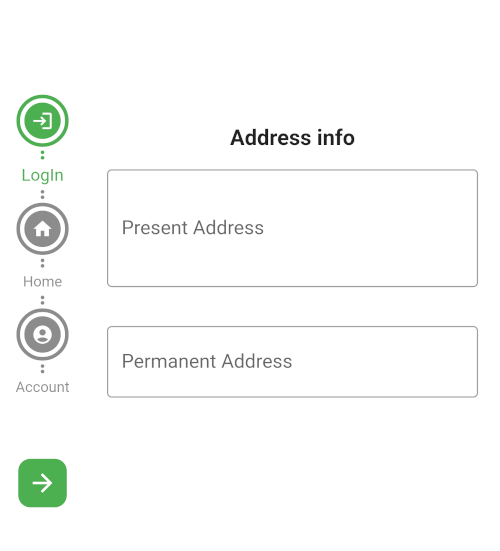
Horizontal rectangle
Screenshot_20230602_233154
vertical circle
vertical circle
Horizontal circle
Horizontal rectangle
If this package was useful to you, helped you to easily deliver your app, saved you a lot of time, or you just want to support the project, I would be grateful if you give us a rating.