पैकेज, रिपॉज़िटरी और ऐप श्रेणियाँ खोजें

stepper_a कवर
पैकेज विवरणv1.4.0

stepper_a

StepperA एक सरल और विश्वसनीय Flutter पैकेज है जो FormKey वैधता का उपयोग करने और अपने स्वयं के बटन दबाने नियंत्रण तक आसान पहुंच की अनुमति देता है।

AndroidiOSWebmacOSWindowsLinux
30-दिन डाउनलोड
78
लाइक
39
Pub अंक
160

पैकेज इंस्टॉल करें

flutter pub add stepper_a

पैकेज अवलोकन

सार्वजनिक जानकारी से बना चयन मार्गदर्शन। केवल संदर्भ हेतु।

StepperA एक हल्का Flutter पैकेज है जिसका उद्देश्य कदम-दर-कदम कार्यप्रवाह के साथ फॉर्म नेविगेशन को सरल बनाना है। यह FormKey वैधता के समग्र एकीकरण को सुगम बनाता है और बटन दबाने पर सीधे नियंत्रण प्रदान करता है, जिससे डेवलपर्स को कदमों के बीच संक्रमण को कुशलता से प्रबंधित करने में सहायता मिलती है। यह विश्वसनीयता के लिए विभिन्न प्लेटफॉर्मों पर समर्थन प्रदान करता है, जिसमें Android, iOS, Web, macOS, Windows और Linux शामिल हैं। इस पैकेज के माध्यम से बहु-कदम प्रक्रियाओं के दौरान भविष्यवान अवस्था प्रबंधन के माध्यम से उपयोगकर्ता अनुभव को बढ़ाया जाता है।

उपयोग

  • बहु-चरण फॉर्म निर्माण
  • क्रमिक चरणों में फॉर्म सत्यापन
  • विज़ार्ड में कस्टम बटन नियंत्रण
  • क्रॉस-प्लेटफॉर्म स्टेपर इंटरफेस
  • उपयोगकर्ता ऑनबोर्डिंग प्रवाह
  • डायनामिक फॉर्म प्रगति

मुख्य विशेषताएँ

  • निर्मित FormKey सत्यापन
  • सीधे बटन दबाने का नियंत्रण
  • क्रॉस-प्लेटफॉर्म संगतता
  • सरल API एकीकरण
  • चरणों के लिए अवस्था प्रबंधन
  • हल्का और तेज़

इनके लिए उपयुक्त

  • विकासक जादूगर बना रहे हैं
  • फॉर्म सत्यापन की आवश्यकता वाली टीमें
  • चरण-दर-चरण इनपुट की आवश्यकता वाले प्रोजेक्ट
  • ऑनबोर्डिंग या चेकआउट प्रवाह वाले ऐप्स
  • सरल स्टेपर समाधान खोज रहे Flutter शुरुआती लोग

विचार योग्य बातें

  • चरण स्थिति को हाथ से संभालने की आवश्यकता है
  • सीमित स्टाइल कस्टमाइजेशन
  • कोई निर्मित एनीमेशन नहीं है
  • बेसिक स्टेपर लॉजिक के लिए सबसे उपयुक्त
  • सही FormKey उपयोग पर निर्भर करता है
  • जटिल UI संक्रमण के लिए उपयुक्त नहीं

मूल README

संबंधित सोर्स रिपॉज़िटरी के मूल README का स्नैपशॉट। नवीनतम सामग्री के लिए रिपॉज़िटरी देखें।

Flutter StepperA

Key Features

Stepper A can easily build Stepper facility of you any flutter app.

  • Form Validation with FormKey [GlobalKey()]
  • Support Horizontal and Vertical Stepper
  • Customized Stepper step Shape [Rectangle, Circle,Diamond,Triangle]
  • Customized Stepper step border [Dash, Straight]
  • Customized Stepper line [Dash, Straight]
  • Smooth sliding with Animation
  • Number step text style provision added.
  • Stepper page swipe
  • Easily Customize Step [Image, IconData, or a fully custom widget builder]
  • Forward and previous button custom style .
  • Material 3 theming support via StepA.fromTheme(context)
  • Screen-reader friendly (Semantics labels on every step)
  • Jump directly to any step with StepperAController.jumpToStep()
  • Listen to step changes with the onStepChanged callback

package.yaml

stepper_a: <latest version>

Import

import 'package:stepper_a/stepper_a.dart';

Simple Example

 StepperA(
        stepperSize: const Size(300, 90),
        borderShape: BorderShape.rRect,
        borderType: BorderType.straight,
        stepperAxis: Axis.horizontal,
        lineType: LineType.dotted,
        stepperBackgroundColor: Colors.transparent,
        stepperAController: controller,
        stepHeight: 40,
        stepWidth: 40,
        stepBorder: true,
        pageSwipe: false,
        formValidation: true,
        previousButton: (int index) => StepperAButton(
            width: 90,
            height: 40,
            onTap: (int currentIndex){
            
            },
            buttonWidget: const Icon(
            Icons.arrow_back,
            color: Colors.white,
           ),
        ),
        forwardButton: (index) => StepperAButton(
            width: index == 0 ? 200 : 90,
            height: 40,
            onTap: (int currentIndex){
            
            },
            onComplete: (){
              debugPrint("Forward Button click complete step call back!");
            },
            buttonWidget: index == 3
            ? const Text('Complete', style: TextStyle(fontSize: 14, color: Colors.white))
                : const Text('Next', style: TextStyle(fontSize: 14, color: Colors.white)),
        ),
        customSteps: [
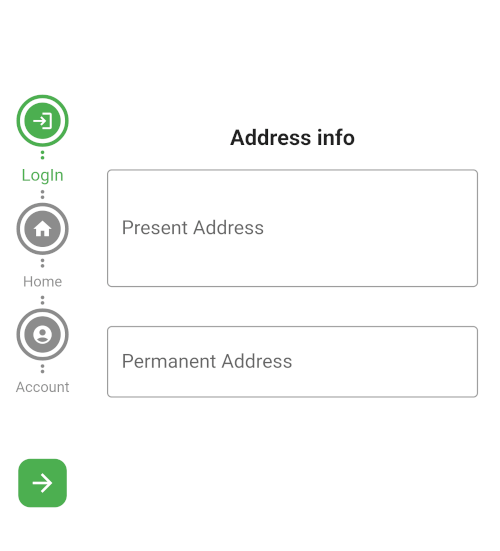
            const CustomSteps(stepsIcon: Icons.login, title: "LogIn"),
            const CustomSteps(stepsIcon: Icons.home, title: "Home"),
            const CustomSteps(stepsIcon: Icons.account_circle, title: "Account"),
            CustomSteps(image: Image.asset("assets/pic/pay.png",color: Colors.white,), title: "Payment"),
        ],
        step: const StepA(
            currentStepColor: Colors.green,
            completeStepColor: Colors.indigo,
            inactiveStepColor: Colors.black45,
            // loadingWidget: CircularProgressIndicator(color: Colors.green,),
            margin: EdgeInsets.all(5)
      ),
      stepperBodyWidget: [
            StepOne(controller: controller),
            StepTwo(controller: controller),
            StepThree(controller: controller),
            StepFour(controller: controller),
      ]
)

New in 1.4.0

Material 3 theming

Let the stepper pick up your app's ColorScheme automatically:

step: StepA.fromTheme(context),

Any color you still pass explicitly (e.g. StepA.fromTheme(context, currentStepColor: Colors.green)) overrides the theme default.

Jump to a step
controller.jumpToStep(
    index: 2,
    onTap: (currentIndex) {
      // currentIndex is now 2
    },
);
Listen for step changes
StepperA(
  // ...
  onStepChanged: (currentIndex) {
    debugPrint('Now on step $currentIndex');
  },
)
Fully custom step widget
CustomSteps(
  title: "Payment",
  builder: (context, index, isCompleted, isCurrent) => Icon(
    isCompleted ? Icons.check : Icons.payment,
    color: Colors.white,
  ),
)

ScreenShot

FormKey validation

Horizontal rectangle

Screenshot_20230602_233154

Custom Steps

vertical circle

Others

vertical circle

Horizontal circle

Horizontal rectangle

Support

If this package was useful to you, helped you to easily deliver your app, saved you a lot of time, or you just want to support the project, I would be grateful if you give us a rating.

श्रेणियाँ

सोर्स रिपॉज़िटरी

इस पैकेज का उपयोग करने वाले प्रोजेक्ट

अभी कोई डेटा उपलब्ध नहीं है।