


 v2.2.0
easy_rich_text
EasyRichText ウィジェットは、RichText を使うための簡単な方法を提供します。文字列を手動で分割する必要はありません。
250いいね 3.2万30日間ダウンロード130Pub ポイント
AndroidiOSWebmacOSWindowsLinux
EasyRichText ウィジェットは、RichText を使うための簡単な方法を提供します。

以下は英語原文のスナップショットです。最新版は GitHub をご覧ください。


The EasyRichText widget makes the RichText widget easy. You do not have to split the string manually.
This widget use regular expression to effectively split the string based on the patterns defined in the list of EasyRichTextPattern.
The EasyRichTextPattern is a class defines the text pattern you want to format.
targetString can be a String or a List<String>.
By default matchWordBoundaries:true is set to match the whole word. If you want to match substring in a word, set matchWordBoundaries:false
GestureRecognizer and url_launcher are integrated.
If you find this package useful, I would appreciate it if you can give me a star on Github and a like on pub.dev
dependencies:
  easy_rich_text: '^2.0.0'
Simple Example | Trademark Example | Default Style | Conditional Match | Match Option | Superscript and Subscript | Case Sensitivity | Selectable Text | Regular Expression | Url Launcher | GestureRecognizer | All RichText Properties | Special Characters | WhatsApp Like Text Formatter

EasyRichText(
  "I want blue font. I want bold font. I want italic font.",
  patternList: [
    EasyRichTextPattern(
      targetString: 'blue',
      style: TextStyle(color: Colors.blue),
    ),
    EasyRichTextPattern(
      targetString: 'bold',
      style: TextStyle(fontWeight: FontWeight.bold),
    ),
    EasyRichTextPattern(
      targetString: 'italic',
      style: TextStyle(fontStyle: FontStyle.italic),
    ),
  ],
),

EasyRichText(
  "ProductTM is a superscript trademark symbol. This TM is not a trademark.",
  patternList: [
    EasyRichTextPattern(
      targetString: 'TM',
      superScript: true,
      stringBeforeTarget: 'Product',
      matchWordBoundaries: false,
      style: TextStyle(color: Colors.blue),
    ),
  ],
),

EasyRichText(
  "This is a EasyRichText example with default grey font. I want blue font here.",
  defaultStyle: TextStyle(color: Colors.grey),
  patternList: [
    EasyRichTextPattern(
      targetString: 'blue',
      style: TextStyle(color: Colors.blue),
    ),
    EasyRichTextPattern(
      targetString: 'bold',
      style: TextStyle(fontWeight: FontWeight.bold),
    ),
  ],
),

EasyRichText(
  "I want blue color here. I want no blue font here. I want blue invalid here.",
  patternList: [
    EasyRichTextPattern(
      targetString: 'blue',
      stringBeforeTarget: 'want',
      stringAfterTarget: "color",
      style: TextStyle(color: Colors.blue),
    ),
  ],
),

EasyRichText(
  "blue 1, blue 2, blue 3, blue 4, blue 5",
  patternList: [
    EasyRichTextPattern(
      targetString: 'blue',
      //matchOption: 'all'
      matchOption: [0, 1, 'last'],
      style: TextStyle(color: Colors.blue),
    ),
  ],
),

EasyRichText(
  "I want superscript font here. I want subscript here",
  patternList: [
    EasyRichTextPattern(
        targetString: 'superscript', superScript: true),
    EasyRichTextPattern(
        targetString: 'subscript', subScript: true),
  ],
),

EasyRichText(
  "Case-Insensitive String Matching. I want both Blue and blue. This paragraph is selectable.",
  caseSensitive: false,
  selectable: true,
  patternList: [
    EasyRichTextPattern(
      targetString: 'Blue',
      style: TextStyle(color: Colors.blue),
    ),
  ],
),
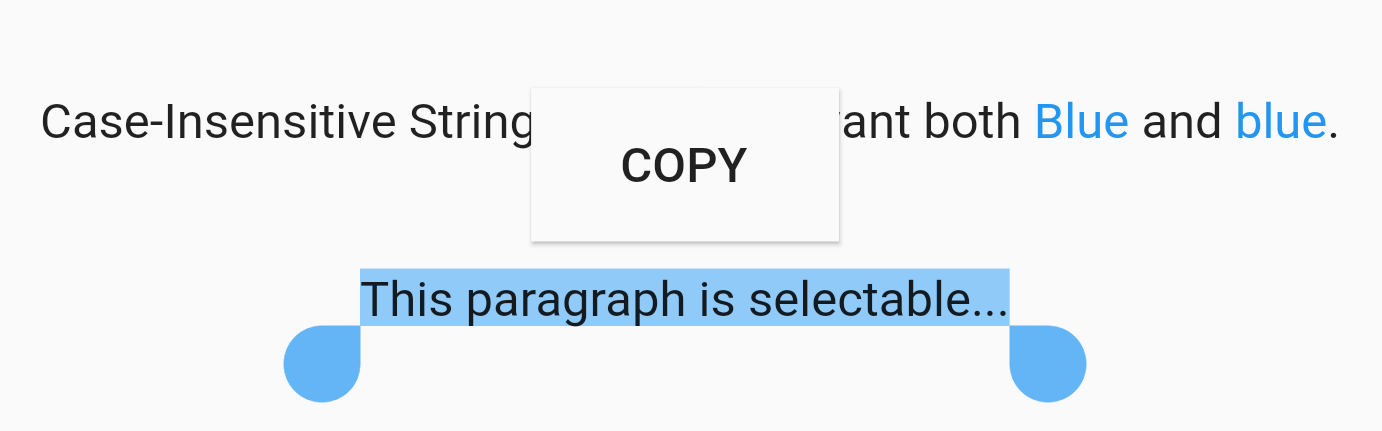
EasyRichText(
  "This paragraph is selectable...",
  selectable: true,
),

EasyRichText(
  "Regular Expression. I want blue bluea blue1 but not blueA",
  patternList: [
    EasyRichTextPattern(
      targetString: 'bl[a-z0-9]*',
      style: TextStyle(color: Colors.blue),
    ),
  ],
),
Integrated with url_launcher. Web url, email url, and telephone url are supported. Set urlType : 'web', 'email', or 'tel'. EasyRichText provides regular expression formula to match common urls.

EasyRichText(
  "Here is a website https://pub.dev/packages/easy_rich_text. Here is a email address test@example.com. Here is a telephone number +852 12345678.",
  patternList: [
    EasyRichTextPattern(
      targetString: 'https://pub.dev/packages/easy_rich_text',
      urlType: 'web',
      style: TextStyle(
        decoration: TextDecoration.underline,
      ),
    ),
    EasyRichTextPattern(
      targetString: EasyRegexPattern.emailPattern,
      urlType: 'email',
      style: TextStyle(
        decoration: TextDecoration.underline,
      ),
    ),
    EasyRichTextPattern(
      targetString: EasyRegexPattern.webPattern,
      urlType: 'web',
      style: TextStyle(
        decoration: TextDecoration.underline,
      ),
    ),
    EasyRichTextPattern(
      targetString: EasyRegexPattern.telPattern,
      urlType: 'tel',
      style: TextStyle(
        decoration: TextDecoration.underline,
      ),
    ),
  ],
),
///GestureRecognizer, not working when superscript, subscript, or urlType is set.
///TapGestureRecognizer, MultiTapGestureRecognizer, etc.
EasyRichText(
  "Tap recognizer to print this sentence.",
  patternList: [
    EasyRichTextPattern(
      targetString: 'recognizer',
      recognizer: TapGestureRecognizer()
        ..onTap = () {
          print("Tap recognizer to print this sentence.");
        },
      style: TextStyle(
        decoration: TextDecoration.underline,
      ),
    ),
  ],
),

EasyRichText(
  "TextOverflow.ellipsis, TextAlign.justify, maxLines: 1. TextOverflow.ellipsis, TextAlign.justify, maxLines: 1.",
  textAlign: TextAlign.justify,
  maxLines: 1,
  overflow: TextOverflow.ellipsis,
),

//if the targetString contains the following special characters \[]()^*+?
EasyRichText(
  "Received 88+ messages. Received 99+ messages",
  patternList: [
    //set hasSpecialCharacters to true
    EasyRichTextPattern(
      targetString: '99+',
      hasSpecialCharacters: true,
      style: TextStyle(color: Colors.blue),
    ),
    //or if you are familiar with regular expressions, then use \\ to skip it
    EasyRichTextPattern(
      targetString: '88\\+',
      style: TextStyle(color: Colors.blue),
    ),
  ],
),

///WhatsApp like text formatter
EasyRichText(
  "TEST *bold font*. test *boldfont*.",
  patternList: [
    ///bold font
    EasyRichTextPattern(
      targetString: '(\\*)(.*?)(\\*)',
      matchBuilder: (BuildContext context, RegExpMatch? match) {
        return TextSpan(
          text: match?[0]?.replaceAll('*', ''),
          style: const TextStyle(fontWeight: FontWeight.bold),
        );
      },
    ),
  ],
),
///add icon before/after targetString
EasyRichText(
  "Please contact us at +123456789",
  patternList: [
    EasyRichTextPattern(
      targetString: EasyRegexPattern.telPattern,
      prefixInlineSpan: WidgetSpan(
        child: Icon(Icons.local_phone),
      ),
      suffixInlineSpan: WidgetSpan(
        child: Icon(Icons.local_phone),
      ),
    )
  ],
),
依存関係一覧 3 件
{"sdk":"flutter"}^6.0.2{"sdk":"flutter"}用途で絞り込み、開発状況を比較し、採用前に元のリポジトリで要件を確認しましょう。
“A repository is the most basic element of GitHub.”
GitHub Docs — About repositories ↗