EasyRichText(
  "I want blue font. I want bold font. I want italic font.",
  patternList: [
    EasyRichTextPattern(
      targetString: 'blue',
      style: TextStyle(color: Colors.blue),
    ),
    EasyRichTextPattern(
      targetString: 'bold',
      style: TextStyle(fontWeight: FontWeight.bold),
    ),
    EasyRichTextPattern(
      targetString: 'italic',
      style: TextStyle(fontStyle: FontStyle.italic),
    ),
  ],
),
Trademark Example
EasyRichText(
  "ProductTM is a superscript trademark symbol. This TM is not a trademark.",
  patternList: [
    EasyRichTextPattern(
      targetString: 'TM',
      superScript: true,
      stringBeforeTarget: 'Product',
      matchWordBoundaries: false,
      style: TextStyle(color: Colors.blue),
    ),
  ],
),
Default Style:
EasyRichText(
  "This is a EasyRichText example with default grey font. I want blue font here.",
  defaultStyle: TextStyle(color: Colors.grey),
  patternList: [
    EasyRichTextPattern(
      targetString: 'blue',
      style: TextStyle(color: Colors.blue),
    ),
    EasyRichTextPattern(
      targetString: 'bold',
      style: TextStyle(fontWeight: FontWeight.bold),
    ),
  ],
),
Conditional Match
EasyRichText(
  "I want blue color here. I want no blue font here. I want blue invalid here.",
  patternList: [
    EasyRichTextPattern(
      targetString: 'blue',
      stringBeforeTarget: 'want',
      stringAfterTarget: "color",
      style: TextStyle(color: Colors.blue),
    ),
  ],
),
Match Option
matchOption can be a string or a list. default is 'all'.
string: 'all', 'first', 'last'
List:'first', 'last', and any integer index
For example, [0, 1, 'last'] will match the first, second, and last one.
EasyRichText(
  "blue 1, blue 2, blue 3, blue 4, blue 5",
  patternList: [
    EasyRichTextPattern(
      targetString: 'blue',
      //matchOption: 'all'
      matchOption: [0, 1, 'last'],
      style: TextStyle(color: Colors.blue),
    ),
  ],
),
Superscript and Subscript.
EasyRichText(
  "I want superscript font here. I want subscript here",
  patternList: [
    EasyRichTextPattern(
        targetString: 'superscript', superScript: true),
    EasyRichTextPattern(
        targetString: 'subscript', subScript: true),
  ],
),
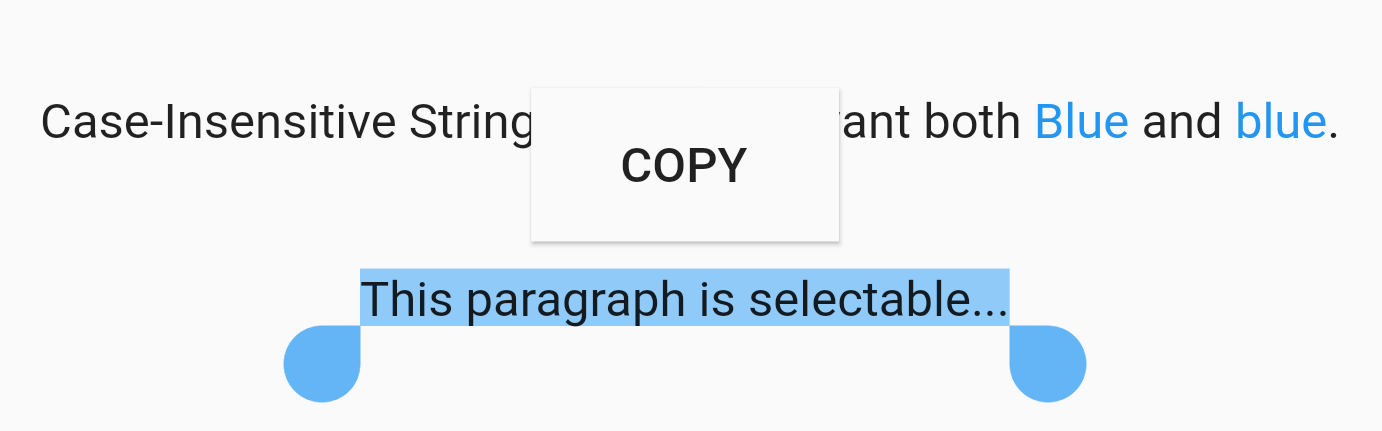
Case Sensitivity
EasyRichText(
  "Case-Insensitive String Matching. I want both Blue and blue. This paragraph is selectable.",
  caseSensitive: false,
  selectable: true,
  patternList: [
    EasyRichTextPattern(
      targetString: 'Blue',
      style: TextStyle(color: Colors.blue),
    ),
  ],
),
Selectable Text
EasyRichText(
  "This paragraph is selectable...",
  selectable: true,
),
Regular Expression
EasyRichText(
  "Regular Expression. I want blue bluea blue1 but not blueA",
  patternList: [
    EasyRichTextPattern(
      targetString: 'bl[a-z0-9]*',
      style: TextStyle(color: Colors.blue),
    ),
  ],
),
Url Launcher
Integrated with url_launcher. Web url, email url, and telephone url are supported.
Set urlType : 'web', 'email', or 'tel'.
EasyRichText provides regular expression formula to match common urls.
EasyRichText(
  "Here is a website https://pub.dev/packages/easy_rich_text. Here is a email address test@example.com. Here is a telephone number +852 12345678.",
  patternList: [
    EasyRichTextPattern(
      targetString: 'https://pub.dev/packages/easy_rich_text',
      urlType: 'web',
      style: TextStyle(
        decoration: TextDecoration.underline,
      ),
    ),
    EasyRichTextPattern(
      targetString: EasyRegexPattern.emailPattern,
      urlType: 'email',
      style: TextStyle(
        decoration: TextDecoration.underline,
      ),
    ),
    EasyRichTextPattern(
      targetString: EasyRegexPattern.webPattern,
      urlType: 'web',
      style: TextStyle(
        decoration: TextDecoration.underline,
      ),
    ),
    EasyRichTextPattern(
      targetString: EasyRegexPattern.telPattern,
      urlType: 'tel',
      style: TextStyle(
        decoration: TextDecoration.underline,
      ),
    ),
  ],
),
GestureRecognizer
///GestureRecognizer, not working when superscript, subscript, or urlType is set.///TapGestureRecognizer, MultiTapGestureRecognizer, etc.EasyRichText(
"Tap recognizer to print this sentence.",
patternList: [
EasyRichTextPattern(
targetString: 'recognizer',
recognizer: TapGestureRecognizer()
..onTap = () {
print("Tap recognizer to print this sentence.");
},
style: TextStyle(
decoration: TextDecoration.underline,
),
),
],
),
//if the targetString contains the following special characters \[]()^*+?EasyRichText(
"Received 88+ messages. Received 99+ messages",
patternList: [
//set hasSpecialCharacters to trueEasyRichTextPattern(
targetString: '99+',
hasSpecialCharacters: true,
style: TextStyle(color: Colors.blue),
),
//or if you are familiar with regular expressions, then use \\ to skip itEasyRichTextPattern(
targetString: '88\\+',
style: TextStyle(color: Colors.blue),
),
],
),