
 v2.0.0+1
swipe_cards
Tinder風のスワイプカード。
117いいね 9630日間ダウンロード130Pub ポイント
AndroidiOSWebmacOSWindowsLinux
Flutter用のTinder風スワイプカード。

{"sdk":"flutter"}{"sdk":"flutter"}以下は英語原文のスナップショットです。最新版は GitHub をご覧ください。
A Flutter widget for Tinder like swipe cards. The card can be swiped right, left and up for different responses. Currently it supports the following responses:
To install the package, add the following dependency to your pubspec.yaml
dependencies:
  swipe_cards: ^2.0.0+1
import 'package:swipe_cards/swipe_cards.dart';

SwipeCards(
            matchEngine: <MatchEngine>,
            itemBuilder: (BuildContext context, int index) {},
            onStackFinished: () {},
            itemChanged: (SwipeItem item, int index) {},
            upSwipeAllowed: <bool>,
            fillSpace: <bool>,
);
| Key | Description |
|---|---|
matchEngine |
An instance of MatchEngine that acts as controller for trigerring swipes manually. |
itemBuilder |
A function that returns the view inside a swipe card. |
likeTag |
Widget appears in like/right area during swipe. |
nopeTag |
Widget appears in nope/left area during swipe. |
superLikeTag |
Widget appears in super-like/up area during swipe. |
onStackFinished |
A function that is triggered as soon as all the cards have been swiped. |
itemChanged |
A function that is triggered when item in the stack changes (moves to next card). |
leftSwipeAllowed |
To enable/disable left swipe. (Default: true) |
rightSwipeAllowed |
To enable/disable right swipe. (Default: true) |
upSwipeAllowed |
To enable/disable up swipe. (Default: false) |
fillSpace |
Config weather to fill up the space or not. (Default: true) |
MatchEngine is the controller for the swipe cards. It takes swipeItems as an argument and is
used to trigger the swipes manually, for example on button press. The data type of swipeItems
is List<SwipeItem>.
MatchEngine _matchEngine = MatchEngine(swipeItems: List<SwipeItem>);
| Key | Description |
|---|---|
_matchEngine.currentItem.like(); |
To trigger right swipe manually. |
_matchEngine.currentItem.nope(); |
To trigger left swipe manually. |
_matchEngine.currentItem.superLike(); |
To trigger up swipe manually. |
SwipeItem contains the actual data that can be rendered in the swipe card. Actually it is a
wrapper over any dynamic object and just adds the functionality of like, nope and superlike to that
object.
SwipeItem(
            content: "Anup Kumar Panwar",
            likeAction: () {
                log("Like");
            },
            nopeAction: () {
                log("Nope");
            },
            superlikeAction: () {
                log("Superlike");
            },
            onSlideUpdate: (SlideRegion? region){
                log("Region $region");
            }
);
| Key | Description |
|---|---|
content |
An object that contains the actual data to be rendered in the swipe card. |
likeAction |
A function that is triggered when the card is liked. |
nopeAction |
A function that is triggered when the card is not liked / swiped left. |
superlikeAction |
A function that is triggered when the card is superliked. |
onSlideUpdate |
A function that is triggered when the card is being dragged and tells about the current region of the card. |
List<SwipeItem> _swipeItems = List<SwipeItem>();
  MatchEngine _matchEngine;
  GlobalKey<ScaffoldState> _scaffoldKey = GlobalKey();
  List<String> _names = ["Red", "Blue", "Green", "Yellow", "Orange"];
  List<Color> _colors = [
    Colors.red,
    Colors.blue,
    Colors.green,
    Colors.yellow,
    Colors.orange
  ];

  @override
  void initState() {
    for (int i = 0; i < _names.length; i++) {
      _swipeItems.add(SwipeItem(
          content: Content(text: _names[i], color: _colors[i]),
          likeAction: () {
            ScaffoldMessenger.of(context).showSnackBar(SnackBar(
              content: Text("Liked ${_names[i]}"),
              duration: Duration(milliseconds: 500),
            ));
          },
          nopeAction: () {
            ScaffoldMessenger.of(context).showSnackBar(SnackBar(
              content: Text("Nope ${_names[i]}"),
              duration: Duration(milliseconds: 500),
            ));
          },
          superlikeAction: () {
            ScaffoldMessenger.of(context).showSnackBar(SnackBar(
              content: Text("Superliked ${_names[i]}"),
              duration: Duration(milliseconds: 500),
            ));
          },
          onSlideUpdate: (SlideRegion? region) async {
            print("Region $region");
          }));
    }

    _matchEngine = MatchEngine(swipeItems: _swipeItems);
    super.initState();
  }

  @override
  Widget build(BuildContext context) {
    return Scaffold(
        key: _scaffoldKey,
        appBar: AppBar(
          title: Text(widget.title),
        ),
        body: Container(
            child: Column(children: [
          Container(
            height: 550,
            child: SwipeCards(
              matchEngine: _matchEngine,
              itemBuilder: (BuildContext context, int index) {
                return Container(
                  alignment: Alignment.center,
                  color: _swipeItems[index].content.color,
                  child: Text(
                    _swipeItems[index].content.text,
                    style: TextStyle(fontSize: 100),
                  ),
                );
                  },
                  onStackFinished: () {
                    ScaffoldMessenger.of(context).showSnackBar(SnackBar(
                      content: Text("Stack Finished"),
                      duration: Duration(milliseconds: 500),
                    ));
                  },
                  itemChanged: (SwipeItem item, int index) {
                    print("item: ${item.content.text}, index: $index");
                  },
                  upSwipeAllowed: true,
                  fillSpace: true,
                ),
              ),
              Row(
                mainAxisAlignment: MainAxisAlignment.spaceEvenly,
                children: [
                  RaisedButton(
                      onPressed: () {
                        _matchEngine.currentItem.nope();
                      },
                      child: Text("Nope")),
                  RaisedButton(
                      onPressed: () {
                        _matchEngine.currentItem.superLike();
                      },
                      child: Text("Superlike")),
                  RaisedButton(
                      onPressed: () {
                        _matchEngine.currentItem.like();
                      },
                      child: Text("Like"))
                ],
              )
            ])));
  }
  class Content {
    final String text;
    final Color color;

    Content({this.text, this.color});
  }
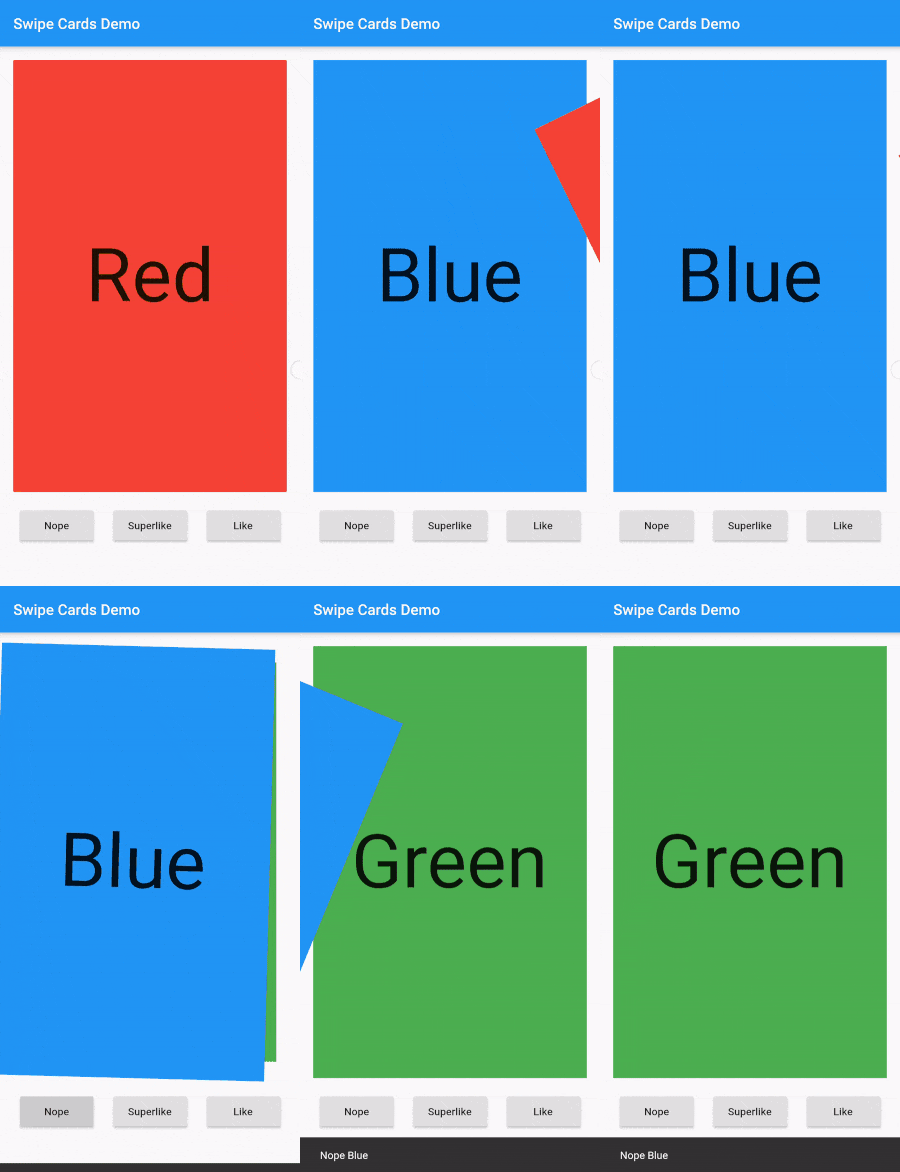
Screenshot