パッケージ、リポジトリ、アプリカテゴリを検索

swipe_cards のカバー
パッケージ詳細v2.0.0+1

swipe_cards

Tinder風のスワイプカード。

AndroidiOSWebmacOSWindowsLinux
30日間ダウンロード
64
いいね数
117
Pub ポイント
130

パッケージをインストール

flutter pub add swipe_cards

パッケージ概要

公開情報に基づく選定ガイドです。参考としてご利用ください。

Swipe Cards は、Flutter パッケージで、Tinder のようなスワイプ可能なカードインターフェースを作成できるようにします。直感的なジェスチャーによる水平スワイプをサポートしており、ユーザーがカードを左右にスワイプできます。シンプルさとカスタマイズ性を重視して設計されており、デートアプリやプロダクト紹介、コンテンツ発見機能など、カードベースのナビゲーションが必要なアプリに最適です。Android、iOS、Web、macOS、Windows、Linux などの複数のプラットフォームで動作します。

用途

  • デートアプリのインターフェース
  • 製品またはアイテムの発見
  • コンテンツの閲覧
  • ユーザーの好みの収集
  • インタラクティブなオンボーディング画面

主な機能

  • Tinder風のスワイプジェスチャー
  • カスタマイズ可能なカードの外観
  • クロスプラットフォーム対応
  • スムーズなアニメーションの遷移
  • ジェスチャー認識
  • Flutterとの簡単な統合

適している対象

  • スワイプベースのUIを構築している開発者
  • カードスワイプによるユーザー操作を必要とするアプリ
  • 複数のプラットフォームをターゲットにするプロジェクト

注意事項

  • 状態管理の処理が必要です
  • 制限された組み込みカードデータ処理
  • 複雑なレイアウトには追加のスタイルが必要になる場合があります
  • ページングなしの大規模カードデータセットに対して最適化されていない

元の README

関連するソースリポジトリの README 原文のスナップショットです。最新の内容はリポジトリをご覧ください。

swipe_cards pub package

A Flutter widget for Tinder like swipe cards. The card can be swiped right, left and up for different responses. Currently it supports the following responses:

  • Right swipe for like
  • Left swipe for nope
  • Up swipe for superlike

Install

To install the package, add the following dependency to your pubspec.yaml

dependencies:
  swipe_cards: ^2.0.0+1

Usage

Basic
import 'package:swipe_cards/swipe_cards.dart';

SwipeCards(
            matchEngine: <MatchEngine>,
            itemBuilder: (BuildContext context, int index) {},
            onStackFinished: () {},
            itemChanged: (SwipeItem item, int index) {},
            upSwipeAllowed: <bool>,
            fillSpace: <bool>,
);
Attributes of SwipeCards
Key Description
matchEngine An instance of MatchEngine that acts as controller for trigerring swipes manually.
itemBuilder A function that returns the view inside a swipe card.
likeTag Widget appears in like/right area during swipe.
nopeTag Widget appears in nope/left area during swipe.
superLikeTag Widget appears in super-like/up area during swipe.
onStackFinished A function that is triggered as soon as all the cards have been swiped.
itemChanged A function that is triggered when item in the stack changes (moves to next card).
leftSwipeAllowed To enable/disable left swipe. (Default: true)
rightSwipeAllowed To enable/disable right swipe. (Default: true)
upSwipeAllowed To enable/disable up swipe. (Default: false)
fillSpace Config weather to fill up the space or not. (Default: true)
MatchEngine

MatchEngine is the controller for the swipe cards. It takes swipeItems as an argument and is used to trigger the swipes manually, for example on button press. The data type of swipeItems is List<SwipeItem>.

MatchEngine _matchEngine = MatchEngine(swipeItems: List<SwipeItem>);
Functions in MatchEngine
Key Description
_matchEngine.currentItem.like(); To trigger right swipe manually.
_matchEngine.currentItem.nope(); To trigger left swipe manually.
_matchEngine.currentItem.superLike(); To trigger up swipe manually.
SwipeItem

SwipeItem contains the actual data that can be rendered in the swipe card. Actually it is a wrapper over any dynamic object and just adds the functionality of like, nope and superlike to that object.

SwipeItem(
            content: "Anup Kumar Panwar",
            likeAction: () {
                log("Like");
            },
            nopeAction: () {
                log("Nope");
            },
            superlikeAction: () {
                log("Superlike");
            },
            onSlideUpdate: (SlideRegion? region){
                log("Region $region");
            }
);
Attributes of SwipeItem
Key Description
content An object that contains the actual data to be rendered in the swipe card.
likeAction A function that is triggered when the card is liked.
nopeAction A function that is triggered when the card is not liked / swiped left.
superlikeAction A function that is triggered when the card is superliked.
onSlideUpdate A function that is triggered when the card is being dragged and tells about the current region of the card.
Example
List<SwipeItem> _swipeItems = List<SwipeItem>();
  MatchEngine _matchEngine;
  GlobalKey<ScaffoldState> _scaffoldKey = GlobalKey();
  List<String> _names = ["Red", "Blue", "Green", "Yellow", "Orange"];
  List<Color> _colors = [
    Colors.red,
    Colors.blue,
    Colors.green,
    Colors.yellow,
    Colors.orange
  ];

  @override
  void initState() {
    for (int i = 0; i < _names.length; i++) {
      _swipeItems.add(SwipeItem(
          content: Content(text: _names[i], color: _colors[i]),
          likeAction: () {
            ScaffoldMessenger.of(context).showSnackBar(SnackBar(
              content: Text("Liked ${_names[i]}"),
              duration: Duration(milliseconds: 500),
            ));
          },
          nopeAction: () {
            ScaffoldMessenger.of(context).showSnackBar(SnackBar(
              content: Text("Nope ${_names[i]}"),
              duration: Duration(milliseconds: 500),
            ));
          },
          superlikeAction: () {
            ScaffoldMessenger.of(context).showSnackBar(SnackBar(
              content: Text("Superliked ${_names[i]}"),
              duration: Duration(milliseconds: 500),
            ));
          },
          onSlideUpdate: (SlideRegion? region) async {
            print("Region $region");
          }));
    }

    _matchEngine = MatchEngine(swipeItems: _swipeItems);
    super.initState();
  }

  @override
  Widget build(BuildContext context) {
    return Scaffold(
        key: _scaffoldKey,
        appBar: AppBar(
          title: Text(widget.title),
        ),
        body: Container(
            child: Column(children: [
          Container(
            height: 550,
            child: SwipeCards(
              matchEngine: _matchEngine,
              itemBuilder: (BuildContext context, int index) {
                return Container(
                  alignment: Alignment.center,
                  color: _swipeItems[index].content.color,
                  child: Text(
                    _swipeItems[index].content.text,
                    style: TextStyle(fontSize: 100),
                  ),
                );
                  },
                  onStackFinished: () {
                    ScaffoldMessenger.of(context).showSnackBar(SnackBar(
                      content: Text("Stack Finished"),
                      duration: Duration(milliseconds: 500),
                    ));
                  },
                  itemChanged: (SwipeItem item, int index) {
                    print("item: ${item.content.text}, index: $index");
                  },
                  upSwipeAllowed: true,
                  fillSpace: true,
                ),
              ),
              Row(
                mainAxisAlignment: MainAxisAlignment.spaceEvenly,
                children: [
                  RaisedButton(
                      onPressed: () {
                        _matchEngine.currentItem.nope();
                      },
                      child: Text("Nope")),
                  RaisedButton(
                      onPressed: () {
                        _matchEngine.currentItem.superLike();
                      },
                      child: Text("Superlike")),
                  RaisedButton(
                      onPressed: () {
                        _matchEngine.currentItem.like();
                      },
                      child: Text("Like"))
                ],
              )
            ])));
  }
  class Content {
    final String text;
    final Color color;

    Content({this.text, this.color});
  }

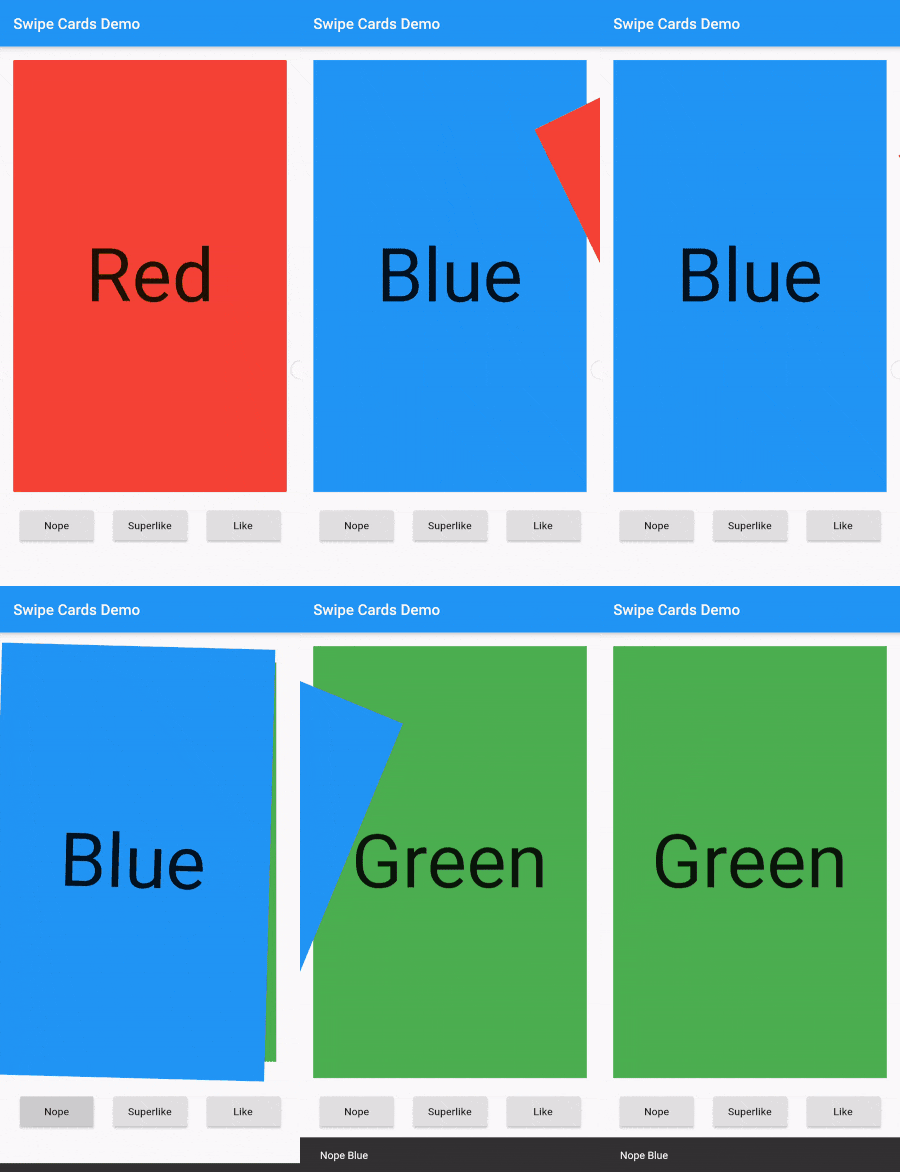
Screenshot

Screenshot

カテゴリー

ソースリポジトリ

このパッケージを使用しているプロジェクト

データはまだありません。