

v2.3.0
rx_notifier
ValueNotifier の拡張により、透明に関数型リアクティブプログラミング(TFRP)を適用する
82いいね 278030日間ダウンロード140Pub ポイント
AndroidiOSWebmacOSWindowsLinux
ValueNotifier の拡張により、透明に関数型リアクティブプログラミング(TFRP)を適用する

以下は英語原文のスナップショットです。最新版は GitHub をご覧ください。
The ValueNotifier is a simple, native form of Flutter reactivity. This extension aims to transparently apply functional reactive programming (TFRP).
It is possible to implement Recoil Atoms pattern using RxNotifier.
This pattern consists of the state being an object with its own reactivity.
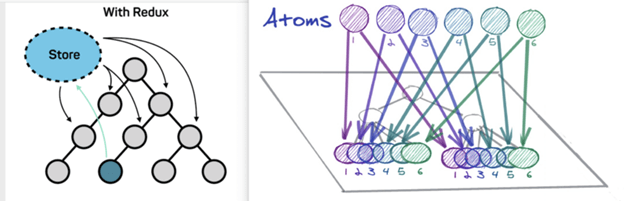
Developers still have trouble understanding state management in Flutter. We had this conclusion after several research in the community fluttering and also in partner companies. Atomic State is a noob-friendly state management approuch at the same time that maintains a reliable structure thinking of scalability and maintenance.
More details, read this Medium article on the subject.
We must take into account some architectural limits to execute this Approach:
RxNotifier instance).RxNotifier instance).Reducer and not in the Atom.We will have 3 main layers, they are: Atoms, Reducers and Views;
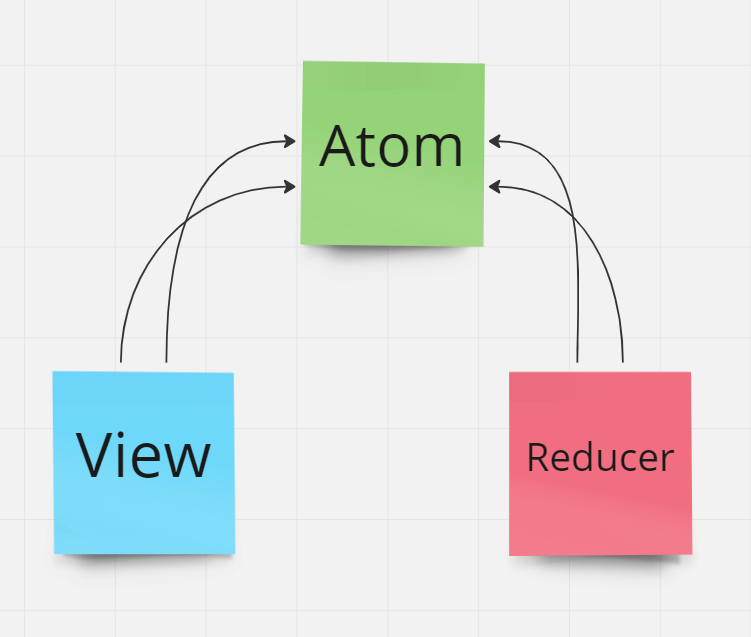
Note that the View (which is the presentation layer) does not know about the Reducer (which is the business rule execution layer). These two layers share atoms that in turn represent the state and the dispatch of state actions.
In Flutter these layers translate to Atom(RxNotifier), Reducer(RxReducer) and View(Widget):
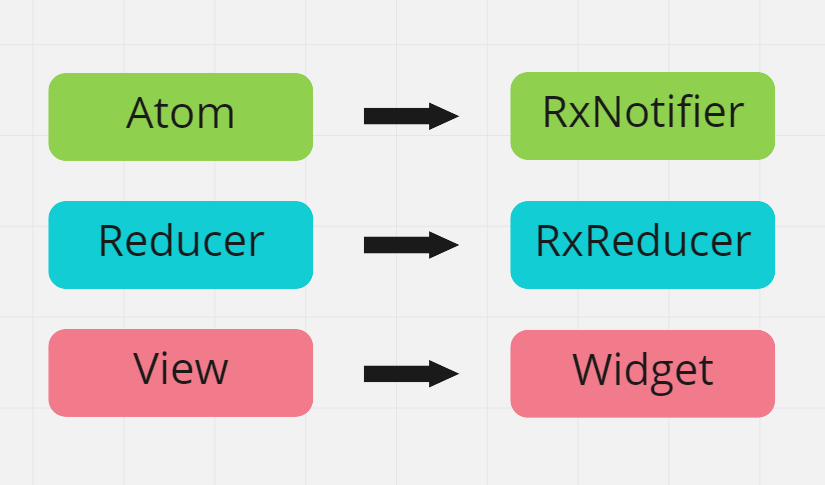
Atom represent the reactive state of an application. Each atom has its own reactivity.
// atoms
final productsState = <Product>[].asRx();
final productTextFilterState = RxNotifier<String>('');

// computed
List<Product> get filteredProductsState {
     if(productTextFilterState.value.isEmpty()){
         return productsState.value;
     }

     return productsState.where(
         (p) => p.title.contains(productTextFilterState.value),
     );
}

// actions
final selectedProductState = RxNotifier<Product?>(null);
final fetchProductsState = RxNotifier(null);
In this architecture you are forced to split state management
of business rules, which may seem strange at first when seen
that we are always managing and reducing state in the same layer as BLoC and ChangeNotifier for example.
However, dividing state management and business rule execution will help us distribute multiple states to the same widget, and these multiple states will not need to be concatenated beforehand through a facade or proxy.
The layer responsible for making business decisions will be called Reducer:
class ProductReducer extends RxReducer {

    ProductReducer(){
        on(() => [fetchProductsState.action], _fetchProducts);
        on(() => [selectedProductState.value], _selectProduct);
    }

    void _fetchProducts(){
        ...
    }

    void _selectProduct(){
        ...
    }
}
Reducers can register methods/functions that listen to the reactivity of an Atom(RxNotifier).
Any widget can listen to changes of one or many atoms,
provided they have the RxRoot widget as their ancestor.
For more details about RxRoot, Read the documentation.
The context.select() method is added via Extension to BuildContext and can be called on any type of Widget, StatefulWidget and StatelessWidget.
...
Widget build(BuildContext context){
     final products = context.select(
                 () => filteredProductsState.value
              );
     ...
}
Flutter projects using RxNotifier
用途で絞り込み、開発状況を比較し、採用前に元のリポジトリで要件を確認しましょう。
“A repository is the most basic element of GitHub.”
GitHub Docs — About repositories ↗