パッケージ、リポジトリ、アプリカテゴリを検索

パッケージ詳細v2.3.0

rx_notifier

ValueNotifier の拡張により、透明に関数型リアクティブプログラミング(TFRP)を適用する

AndroidiOSWebmacOSWindowsLinux
30日間ダウンロード
2780
いいね数
82
Pub ポイント
140

パッケージをインストール

flutter pub add rx_notifier

パッケージ概要

公開情報に基づく選定ガイドです。参考としてご利用ください。

RxNotifierは、ValueNotifierを透明な関数型リアクティブプログラミング(TFRP)で拡張するFlutter/Dartパッケージです。開発者が関数型演算子を使って状態変更を組み合わせたり変換したりできるようにすることで、リアクティブな状態管理を可能にしますが、ValueNotifierのシンプルさを維持しています。このパッケージは既存のFlutterアプリにシームレスに統合でき、ボイラープレートなしでリアクティブパターンによる状態管理の軽量な代替手段を提供します。すべての主要プラットフォームをサポートし、不変の更新とストリームのような変換を通じて、クリーンでテスト可能なコードを促進します。

用途

  • リアクティブUI状態の更新
  • 複雑な状態ロジックの構成
  • 複数の ValueNotifiers の置き換え
  • 状態変換の簡素化
  • リアクティブフォームの構築
  • 非同期状態の管理

主な機能

  • 関数型リアクティブプログラミング
  • 透過的な TFRP インテグレーション
  • 不変状態の更新
  • ストリームに似た演算子
  • 最小限のボイラープレート
  • クロスプラットフォーム対応

適している対象

  • リアクティブな状態管理を求める開発者
  • 合成可能な状態ロジックを必要とするアプリ
  • 関数型プログラミングを好むチーム
  • 重い状態マネージャーを避けるプロジェクト
  • Flutterの初心者が反応型パターンを学習中
  • 軽量な状態解決策を必要とするアプリ

注意事項

  • 関数型プログラミングの概念を理解している必要がある
  • 初心者にとって学習曲線を導入する可能性があります
  • ValueNotifier をベースとしたリアクティブパターンに限定
  • 非常に大規模な状態管理には適していない
  • 中程度の複雑さの状態要件に最適
  • RxDart のような完全なリアクティブフレームワークを置き換えるものではありません

元の README

関連するソースリポジトリの README 原文のスナップショットです。最新の内容はリポジトリをご覧ください。

rx_notifier

The ValueNotifier is a simple, native form of Flutter reactivity. This extension aims to transparently apply functional reactive programming (TFRP).

Implementing the Atomic State.

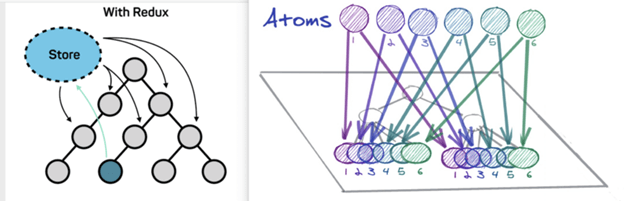
It is possible to implement Recoil Atoms pattern using RxNotifier. This pattern consists of the state being an object with its own reactivity.

atom

Motivation

Developers still have trouble understanding state management in Flutter. We had this conclusion after several research in the community fluttering and also in partner companies. Atomic State is a noob-friendly state management approuch at the same time that maintains a reliable structure thinking of scalability and maintenance.

More details, read this Medium article on the subject.

Rules

We must take into account some architectural limits to execute this Approach:

  1. All states must be an atom(RxNotifier instance).
  2. All actions must be an atom(RxNotifier instance).
  3. Business rules must be created in the Reducer and not in the Atom.

Layers

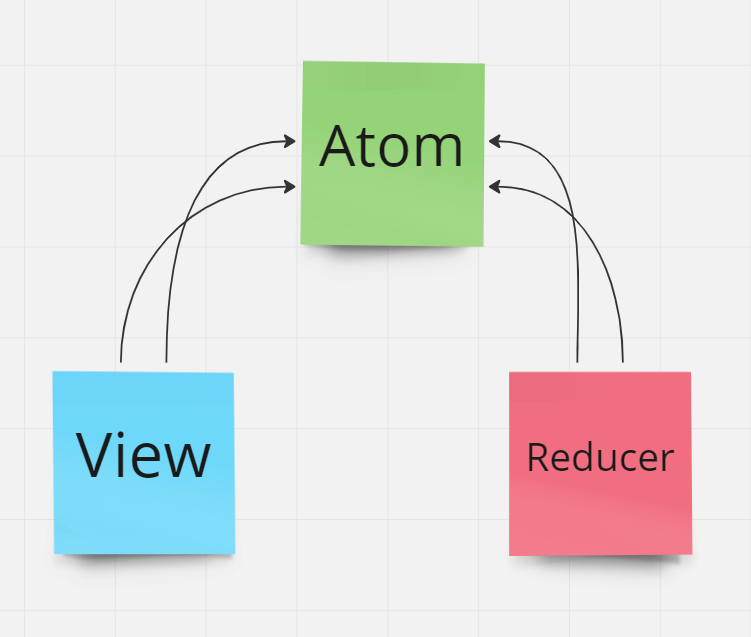
We will have 3 main layers, they are: Atoms, Reducers and Views;

atom

Note that the View (which is the presentation layer) does not know about the Reducer (which is the business rule execution layer). These two layers share atoms that in turn represent the state and the dispatch of state actions.

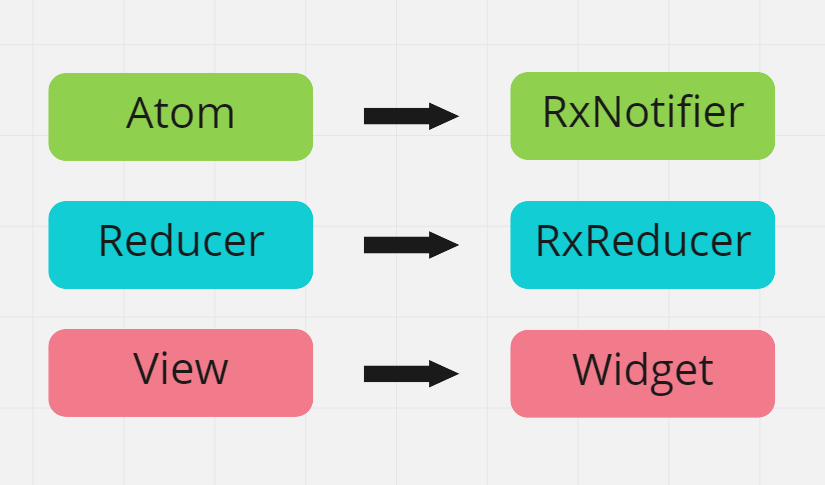
In Flutter these layers translate to Atom(RxNotifier), Reducer(RxReducer) and View(Widget):

atom

Atoms (RxNotifier)

Atom represent the reactive state of an application. Each atom has its own reactivity.

// atoms
final productsState = <Product>[].asRx();
final productTextFilterState = RxNotifier<String>('');

// computed
List<Product> get filteredProductsState {
     if(productTextFilterState.value.isEmpty()){
         return productsState.value;
     }

     return productsState.where(
         (p) => p.title.contains(productTextFilterState.value),
     );
}

// actions
final selectedProductState = RxNotifier<Product?>(null);
final fetchProductsState = RxNotifier(null);

Reducer (RxReducer)

In this architecture you are forced to split state management of business rules, which may seem strange at first when seen that we are always managing and reducing state in the same layer as BLoC and ChangeNotifier for example.
However, dividing state management and business rule execution will help us distribute multiple states to the same widget, and these multiple states will not need to be concatenated beforehand through a facade or proxy.

The layer responsible for making business decisions will be called Reducer:

class ProductReducer extends RxReducer {

    ProductReducer(){
        on(() => [fetchProductsState.action], _fetchProducts);
        on(() => [selectedProductState.value], _selectProduct);
    }

    void _fetchProducts(){
        ...
    }

    void _selectProduct(){
        ...
    }
}

Reducers can register methods/functions that listen to the reactivity of an Atom(RxNotifier).

View (Widget)

Any widget can listen to changes of one or many atoms, provided they have the RxRoot widget as their ancestor. For more details about RxRoot, Read the documentation.

The context.select() method is added via Extension to BuildContext and can be called on any type of Widget, StatefulWidget and StatelessWidget.

...
Widget build(BuildContext context){
     final products = context.select(
                 () => filteredProductsState.value
              );
     ...
}

Examples

Flutter projects using RxNotifier

Trivial Counter.

Shop Cart.

カテゴリー

依存関係

依存関係一覧 2 件

  • collection^1.17.0
  • rx_notifier_annotation>=1.0.0 <2.0.0

ソースリポジトリ

このパッケージを使用しているプロジェクト

データはまだありません。