
v4.1.0
brick_build
Brick コンポーネント用のコード生成ライブラリおよびインターフェース。アダプター用のシリアライズ/デシリアライズジェネレーターを作成する際に役立ちます。
1いいね 561030日間ダウンロード140Pub ポイント
AndroidiOSmacOSWindowsLinux
Dartで永続データを扱うための直感的な方法

Brick コンポーネント用のコード生成ライブラリおよびインターフェース。アダプター用のシリアライズ/デシリアライズジェネレーターを作成する際に役立ちます。
データ永続化ライブラリであるBrick用のGraphQLコネクタ。アノテーション、アダプタ、モデル、プロバイダを含む。
Brick の GraphQL プロバイダー、モデル、アダプター用のコード生成ライブラリ
Brick の JSON ベースのプロバイダーやモデル、アダプター用のコード生成ライブラリ
 v4.0.2
ローカルプロバイダーを経由してリモートプロバイダーの前にデータ取得をルーティングするBrickドメイン。
Brick オフラインファーストドメイン用のコード生成ライブラリ
ローカルプロバイダーを経由してGraphQLプロバイダーの前にデータ取得をルーティングするBrickドメイン。
GraphQL を使用した Brick オフラインファーストドメイン用のコード生成ライブラリ
ローカルプロバイダーを経由してRESTプロバイダーの前にデータ取得をルーティングするBrickドメイン。
REST を使用した Brick オフラインファーストドメイン用のコード生成ライブラリ
ローカルプロバイダーを経由してデータ取得をルーティングし、その後Supabaseプロバイダーに移行するBrickドメインです。
Brick(データ永続化ライブラリ)用のRESTful APIコネクタ。アノテーション、アダプター、モデル、プロバイダを含む。
以下は英語原文のスナップショットです。最新版は GitHub をご覧ください。
An intuitive way to work with persistent data
An intuitive way to work with persistent data in Dart.
Brick is an extensible query interface for Dart applications. It's an all-in-one solution responsible for representing business data in the application, regardless of where your data comes from. Using Brick, developers can focus on implementing the application, without concern for where the data lives. Brick was inspired by the need for applications to work offline first, even if an API represents your source of truth.
Add the packages:
dependencies:
  # Or brick_offline_first_with_graphql
  # Or brick_offline_first_with_supabase
  brick_offline_first_with_rest:
  sqflite: # optional
dev_dependencies:
  # Or brick_offline_first_with_graphql_build: any
  # Or brick_offline_first_with_supabase_build: any
  brick_offline_first_with_rest_build:
  build_runner:
Configure your app directory structure to match Brick's expectations:
mkdir -p lib/brick/adapters lib/brick/db;
Add models that contain your app logic. Models must be saved with the .model.dart suffix (i.e. lib/brick/models/person.model.dart).
Run dart run build_runner build to generate your models and sometimes migrations. Rerun after every new model change or dart run build_runner watch for automatic generations. You'll need to run this again after your first migration.
Extend an existing repository or create your own (Supabase has some exceptions):
// lib/brick/repository.dart
import 'package:brick_offline_first_with_rest/brick_offline_first_with_rest.dart';
import 'package:brick_rest/brick_rest.dart';
import 'package:brick_sqlite/brick_sqlite.dart';
import 'package:my_app/brick/brick.g.dart';
import 'package:sqflite/sqflite.dart' show databaseFactory;
import 'package:my_app/brick/db/schema.g.dart';
export 'package:brick_core/query.dart' show And, Or, Query, QueryAction, Where, WherePhrase;

class Repository extends OfflineFirstWithRestRepository {
  Repository()
      : super(
          migrations: migrations,
          restProvider: RestProvider(
            'http://0.0.0.0:3000',
            modelDictionary: restModelDictionary,
          ),
          sqliteProvider: SqliteProvider(
            _DB_NAME,
            databaseFactory: databaseFactory,
            modelDictionary: sqliteModelDictionary,
          ),
          offlineQueueManager: RestRequestSqliteCacheManager(
            'brick_offline_queue.sqlite',
            databaseFactory: databaseFactory,
          ),
        );
}
Profit.
Create a model as the app's business logic:
// brick/models/user.dart
@ConnectOfflineFirstWithRest()
class User extends OfflineFirstWithRestModel {}
And generate (de)serializing code to fetch to and from multiple providers:
$ (flutter) pub run build_runner build
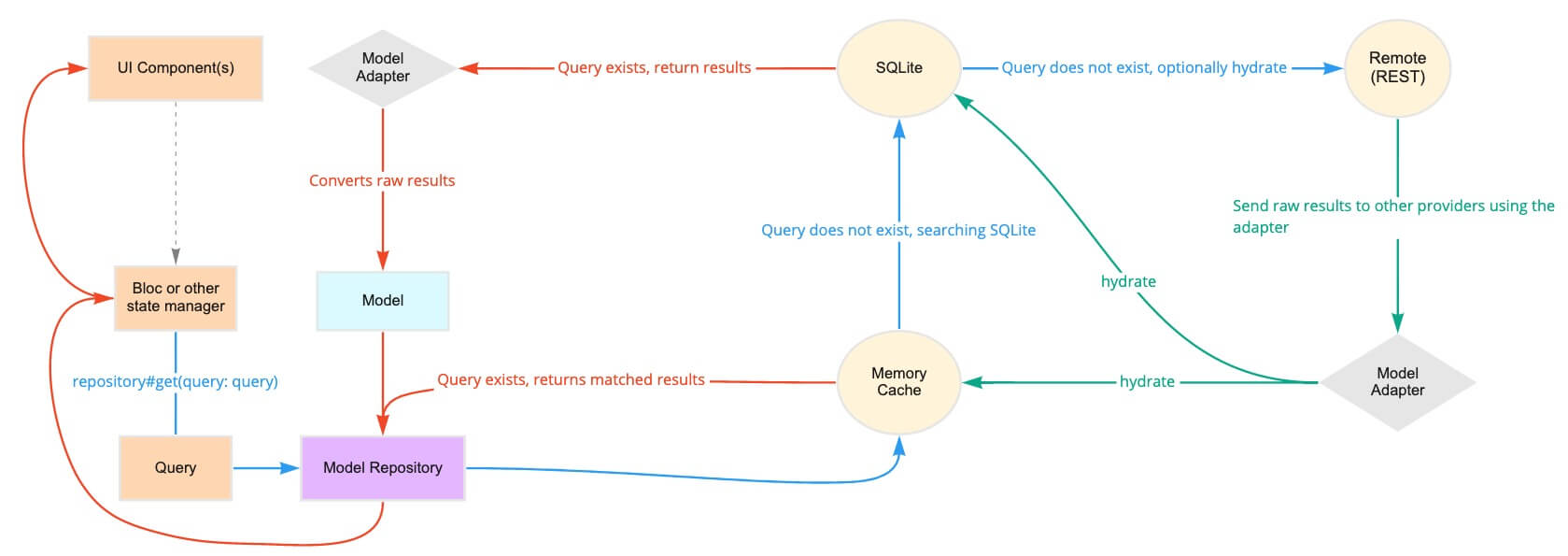
A repository fetches and returns data across multiple providers. It's the single access point for data in your app:
class MyRepository extends OfflineFirstWithRestRepository {
  MyRepository();
}

final repository = MyRepository();

// Now the models can be queried:
final users = await repository.get<User>();
Behind the scenes, this repository could poll a memory cache, then SQLite, then a REST API. The repository intelligently determines how and when to use each of the providers to return the fastest, most reliable data.
// Queries can be general:
final query = Query(where: [Where('lastName').contains('Muster')]);
final users = await repository.get<User>(query: query);

// Or singular:
final query = Query.where('email', 'user@example.com', limit1: true);
final user = await repository.get<User>(query: query);
Queries can also receive reactive updates. The subscribed stream receives all models from its query whenever the local copy is updated (e.g. when the data is hydrated in another part of the app):
final users = repository.subscribe<User>().listen((users) {})
Once a model has been created, it's sent to the repository and back out to each provider:
final user = User();
await repository.upsert<User>(user);
Repositories can support associations and automatic (de)serialization of child models.
class Hat extends OfflineFirstWithRestModel {
  final String color;
  Hat({this.color});
}
class User extends OfflineFirstWithRestModel {
  // user has many hats
  final List<Hat> hats;
}

final query = Query.where('hats', Where('color').isExactly('brown'));
final usersWithBrownHats = repository.get<User>(query: query);
Brick natively serializes primitives, associations, and more.
If it's still murky, check out Learn for videos, tutorials, and examples that break down Brick.