
 v0.0.8
stickereditor
境界に応じてテキストや画像を編集および移動できるウィジェットです。
58いいね 2030日間ダウンロード60Pub ポイント
プラットフォーム情報なし
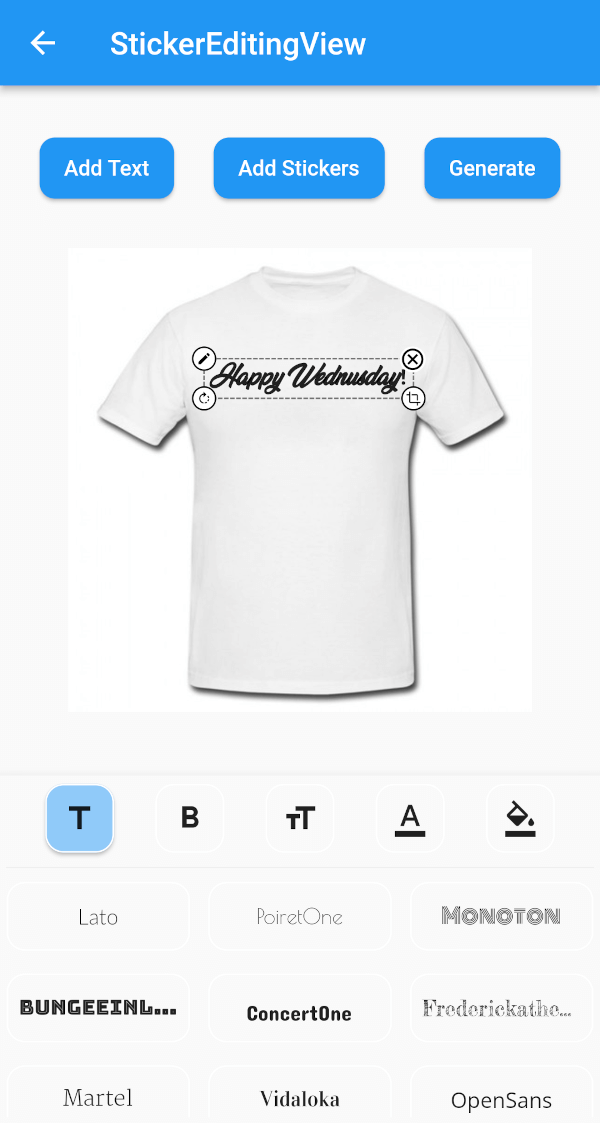
スクリーン上でドラッグして拡大・縮小できるステッカー用ウィジェットを作成するのに役立つFlutterパッケージです。

{"sdk":"flutter"}{"sdk":"flutter"}^4.3.8^2.0.0+1^1.2.3^2.0.5{"sdk":"flutter"}^1.0.0以下は英語原文のスナップショットです。最新版は GitHub をご覧ください。
A flutter plugin for iOS, Android and Mac for Rotate, Scaling, Moving and Editing Text, Photo, Stickers
https://github.com/Harsh-Radadiya/sticker_editor/raw/master/assets/readme/demo.gif
| Sticker Editor | |
|---|---|
| https://github.com/Harsh-Radadiya/sticker_editor/raw/master/assets/readme/text_editor_box.png | https://github.com/Harsh-Radadiya/sticker_editor/raw/master/assets/readme/sticker_editor_box.png |
| Only Text | Only Photo |
|---|---|
| https://github.com/Harsh-Radadiya/sticker_editor/raw/master/assets/readme/only_text.png | https://github.com/Harsh-Radadiya/sticker_editor/raw/master/assets/readme/only_picture.png |
A flutter package Sticker Editor which will help you to create editable and scalable text or sticker widget that can be dragged around the area you given in screen.
First, add stickereditor as a dependency in your pubspec.yaml file.
Fore NetworkImage, macOS needs you to request a specific entitlement in order to access the network. To do that open macos/Runner/DebugProfile.entitlements and add the following key-value pair.
<key>com.apple.security.network.client</key>
<true/>
StickerEditingView(
  isnetwork: false,
  height: 300,
  width: 300,
  imgUrl: backgroundImageUrl,
  fonts: fonts,
  palletColor: colorPallet,
  assetList: stickerList,
),
Container(
  height: 300,
  width: 300,
  color: Colors.blue,
  child: Stack(
    children: [
      TextEditingBox(
        fonts: fonts,
        boundHeight: 200,
        boundWidth: 100,
        isSelected: true,
        palletColor: colorPallet,
        newText: TextModel(
            name: 'Text EditingBox',
            textStyle:
                GoogleFonts.pacifico(fontSize: 25, color: Colwhite),
            top: top,
            isSelected: true,
            textAlign: TextAlign.center,
            scale: 1,
            left: left),
      ),
    ],
  ),
),
Container(
  height: 300,
  width: 300,
  color: Colors.blue,
  child: Stack(
    children: [
      StickerEditingBox(
          boundHeight: 200,
          boundWidth: 200,
          pictureModel: PictureModel(
            isNetwork: true,
            isSelected: false,
            left: 50,
            top: 50,
            scale: 1,
            stringUrl:
                'https://raw.githubusercontent.com/Harsh-Radadiya/sticker_editor/master/assets/t-shirt.jpeg',
          )),
    ],
  ),
)
Run the example app in the exmaple folder to find out more about how to use it.