
 v5.0.3
address_search_field
参照によって住所の自動補完を支援するアドレス検索フィールドです。2点間の経路情報を取得するために使用できます。
95いいね 22130日間ダウンロード60Pub ポイント
プラットフォーム情報なし
参照によって住所を自動補完するためのアドレス検索フィールドです。2つ(またはそれ以上)のポイント間の経路を取得するために使用できます。

{"sdk":"flutter"}{"sdk":"flutter"}^2.1.10^1.0.4^4.0.6{"sdk":"flutter"}^2.0.1以下は英語原文のスナップショットです。最新版は GitHub をご覧ください。
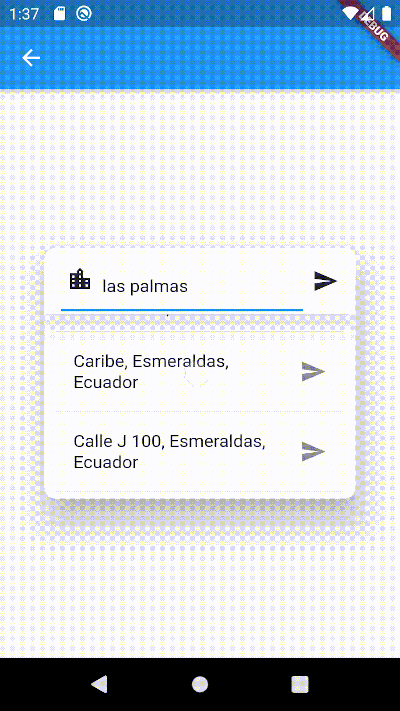
Widget builders to create 'address search widgets' which helps to autocomplete an address using a reference. They can be used to get Directions beetwen two places with optional waypoints. These widgets are made to be showed by onTap in a TextField with the showDialog function.
It uses Dio, Google Maps for Flutter, Flutter Riverpod plugins. (This last plugin is to use extended objects that can be usable with GoogleMap Widget).
https://raw.githubusercontent.com/JosLuna98/address_search_field/master/screenshot/address_search_field.gif
To use this plugin, add address_search_field as a dependency in your pubspec.yaml file. For example:
dependencies:
  address_search_field: ^5.0.3
On Android you'll need to add the internet permission to your Android Manifest file (located under android/app/src/main). To do so add next lines as direct child of the manifest> tag:
<uses-permission android:name="android.permission.INTERNET"/>
Import the package:
import 'package:address_search_field/address_search_field.dart';
GeoMethods(
  googleApiKey: String,
  language: String,
  countryCode: String?,
  countryCodes: List<String>?,
  country: String?,
  city: String?,
  mode: DirectionsMode?,
  units: DirectionsUnits?,
);
final geoMethods = GeoMethods(
  googleApiKey: 'GOOGLE_API_KEY',
  language: 'en',
  countryCode: 'us',
  countryCodes: ['us', 'es', 'co'],
  country: 'United States',
  city: 'New York',
);

// It will search in unite states, espain and colombia. It just can filter up to 5 countries.
geoMethods.autocompletePlace(query: 'place streets or reference');

geoMethods.geoLocatePlace(
    coords: Coords(0.10, 0.10,)
);

geoMethods.getPlaceGeometry(
    reference: 'place streets',
    placeId: 'ajFDN3662fNsa4hhs42FAjeb5n',
);

// It needs a specific region, it will search in unite states.
geoMethods.getDirections(
    origin: Address(coords: Coords(0.10, 0.10)),
    destination: Address(coords: Coords(0.10, 0.10))
);
This widget can search addresses and permits you to work with them using an Address object.
Example:
GeoMethods geoMethods;
TextEditingController controller;
Address destinationAddress;

TextField(
  controller: controller,
  onTap: () => showDialog(
    context,
    builder: (BuildContext context) => AddressSearchDialog(
      geoMethods: geoMethods,
      controller: controller,
      onDone: (Address address) => destinationAddress = address,
    )
  ),
);
AddressSearchDialog.customprovides you a widget builder with the parameters and methods to create your ownAddressSearchDialogand work with the addresses information.
Example:
GeoMethods geoMethods;
TextEditingController controller;
Address destinationAddress;

TextField(
  controller: controller,
  onTap: () => showDialog(
    context,
    builder: (BuildContext context) {
      return AddressSearchDialog.custom(
        geoMethods: geoMethods,
        builder: (
          BuildContext context,
          AsyncSnapshot<List<Address>> snapshot,
          Future<void> Function() searchAddress,
          Future<Address> Function(Address address) getGeometry,
          void Function() dismiss,
        ) {
          return MyCustomWidget(
            snapshot: snapshot,
            searchAddress: searchAddress,
            getGeometry: getGeometry,
            dismiss: dismiss,
            controller: controller,
            address: destinationAddress,
          );
        }
      );
    }
  ),
);
This widget is a simple way to get an address reference in a TextEditingController from coordinates when the AddressSearchDialog is not created into a RouteSearchBox.
Example:
Coords coords;
GeoMethods geoMethods;
TextEditingController controller;
Address initialAddress;

// using coordinates you can get an address reference to be predefined in the widget and save all the address data in a variable.
AddressLocator(
  coords: coords,
  geoMethods: geoMethods,
  controller: controller,
  child: TextField(
    controller: controller,
    onTap: () => showDialog(
      context: context,
      builder: (BuildContext context) => AddressSearchDialog(
        controller: controller,
        geoMethods: geoMethods,
        onDone: (Address address) => initialAddress = address;,
      ),
    ),
  ),
);
This widget helps you to works using a provider from flutter_riverpod. It permits you to work with AddressSearchDialog to search an origin Address, destination Address and optionally waypoints in a List<Address>. This widget is used to get directions from the addresses gotten by an AddressSearchDialog. provider.findRoute() function permits to set an address as origin or destination from a coordinates parameter.
A completed example of how to use this widget could be found here.
Example:
final routeProvider =
    ChangeNotifierProvider<RouteNotifier>((ref) => RouteNotifier());

GeoMethods geoMethods;
TextEditingController originCtrl;
TextEditingController destCtrl;
Coords initialCoords;

RouteSearchBox(
  provider: routeProvider,
  geoMethods: geoMethods,
  originController: originCtrl,
  destinationController: destCtrl,
  locationSetters: [
    LocationSetter(
      coords: initialCoords,
      addressId: AddressId.origin,
    ),
  ],
  child: Column(
    children: [
      TextField(
        controller: originCtrl,
        onTap: () => showDialog(
          context: context,
          builder:(context) =>
              AddressSearchDialog.withProvider(
            provider: routeProvider,
            addressId: AddressId.origin,
          ),
        ),
      ),
      TextField(
        controller: destCtrl,
        onTap: () => showDialog(
          context: context,
          builder:(context) =>
              AddressSearchDialog.withProvider(
            provider: routeProvider,
            addressId: AddressId.destination,
          ),
        ),
      ),
      Consumer(
        builder: (BuildContext context, WidgetRef ref, Widget? _) {
          return ElevatedButton(
            child: const Text('Search'),
            onPressed: () async {
              final route = await ref.read(routeProvider).findRoute();
            },
          );
        },
      ),
    ],
  )
);
MIT License
You can contact me if you have problems or ideas. Hablo español e inglés.
josluna1098@gmail.com