


 v1.0.2
flutter_gradient_animation_text
テキスト、色、アニメーションの期間を入力することで、非常に簡単にアニメーション付きグラデーションテキストを作成できます。
42いいね 105030日間ダウンロード140Pub ポイント
AndroidiOSWebmacOSWindowsLinux
Sahil Shahによって開発された、グラデーションアニメーションテキスト用のFlutterパッケージ

以下は英語原文のスナップショットです。最新版は GitHub をご覧ください。



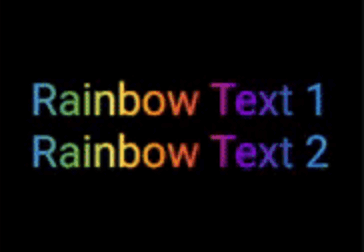
This package lets you make animated gradient texts without any hassle.
Just pass the text, colors, the duration of the animation and you're done!
Using the transform and reverse, you can achieve amazing effects.
For More info read the docs below.
Install the package using the following command:
flutter pub add flutter_gradient_animation_text
Import the package in your dart file using the following code:
import 'package:flutter_gradient_animation_text/flutter_gradient_animation_text.dart';
And you are good to go!
Create your animated gradient text. The 3 required arguments are:
text(Text): The text.colors(List<Colors>): List of colors you want in your gradient.duration(Duration): Duration for which a single gradient animation runs.// rainbow text
GradientAnimationText(
text: Text(
'Rainbow Text 1',
style: TextStyle(
fontSize: 50,
),
),
colors: [
Color(0xff8f00ff), // violet
Colors.indigo,
Colors.blue,
Colors.green,
Colors.yellow,
Colors.orange,
Colors.red,
],
duration: Duration(seconds: 5),
),

Reverse the animation.
This plays the animation backwards when a single iteration of the forward animation is completed.
You set reverse to true to enable this.
// rainbow text with reverse
GradientAnimationText(
    text: Text(
        'Rainbow Text 1',
        style: TextStyle(
            fontSize: 50,
        ),
    ),
    colors: [
        Color(0xff8f00ff),  // violet
        Colors.indigo,
        Colors.blue,
        Colors.green,
        Colors.yellow,
        Colors.orange,
        Colors.red,
    ],
    duration: Duration(seconds: 5),
    reverse: true,  // reverse
),

Play with colors.
It is possible to use the same color more than once to increase the area it covers.
Gold Text Example:
The following 2 Gold Text animations have different number of Colors.amber color.
// gold text 1
GradientAnimationText(
    text: Text(
        'Gold Text 1',
        style: TextStyle(
            fontSize: 50,
            fontWeight: FontWeight.bold,
        ),
    ),
    colors: [
        Colors.amber,   // 1
        Colors.white,
    ],
    duration: Duration(seconds: 5),
    reverse: true,
),
// gold text 2
GradientAnimationText(
    text: Text(
        'Gold Text 2',
        style: TextStyle(
            fontSize: 50,
            fontWeight: FontWeight.bold,
        ),
    ),
    colors: [
        Colors.amber,   // 1
        Colors.amber,   // 2
        Colors.amber,   // 3
        Colors.white,
    ],
    duration: Duration(seconds: 5),
    reverse: true,
),

Transform your gradient.
You can transform your gradient using transform property.
Use GradientTranform classes such as SweepGradient, and GradientRotation to tranform.
// Tranform Text
GradientAnimationText(
    text: Text(
    'Tranform Text',
        style: TextStyle(
            fontSize: 90,
            fontWeight: FontWeight.bold,
        ),
    ),
    colors: [
        Color(0xFF061A9C),
        Color(0xff92effd),
    ],
    duration: Duration(seconds: 5),
    transform: GradientRotation(math.pi / 4),   // tranform
),

| Property | Type | Description |
|---|---|---|
text |
Text | The text to be used in the animation. |
colors |
List | Colors of the animation. |
duration |
Duration | Duration for which a single gradient animation runs. |
reverse |
bool? | If you want to reverse the animation. |
transform |
GradientTransform? | You can transform your gradient. |
This package is developed by Sahil Shah.
依存関係一覧 3 件
{"sdk":"flutter"}{"sdk":"flutter"}^2.0.0用途で絞り込み、開発状況を比較し、採用前に元のリポジトリで要件を確認しましょう。
“A repository is the most basic element of GitHub.”
GitHub Docs — About repositories ↗