パッケージ、リポジトリ、アプリカテゴリを検索

flutter_gradient_animation_text のカバー
パッケージ詳細v1.0.2

flutter_gradient_animation_text

テキスト、色、アニメーションの期間を入力することで、非常に簡単にアニメーション付きグラデーションテキストを作成できます。

AndroidiOSWebmacOSWindowsLinux
30日間ダウンロード
1050
いいね数
42
Pub ポイント
140

パッケージをインストール

flutter pub add flutter_gradient_animation_text

パッケージ概要

公開情報に基づく選定ガイドです。参考としてご利用ください。

テキストコンテンツ、グラデーションカラー、アニメーション期間を指定することで、開発者が簡単にアニメーション付きのグラデーションテキストを作成できるFlutterパッケージです。複数のプラットフォームでアプリに視覚的に魅力的でダイナミックなテキストエフェクトを追加するプロセスを簡素化します。軽量で、最小限のセットアップで既存のFlutterプロジェクトにスムーズに統合できます。複雑なカスタムアニメーションなしでUIを魅力的なタイポグラフィで強化するのに最適です。

用途

  • アニメーショングラデーションタイトルの追加
  • 目を引くアプリヘッダーの作成
  • スプラッシュスクリーンの強化
  • インタラクティブなUI要素の設計
  • オンボーディングフローでのテキストのアニメーション

主な機能

  • テキストおよびカラー入力を持つシンプルな API
  • カスタマイズ可能なアニメーション期間
  • クロスプラットフォーム対応
  • スムーズなグラデーションの遷移
  • 最小限のボイラープレートコード

適している対象

  • 視覚的な魅力を求めるUIデザイナー
  • 現代的なアプリケーションインターフェースを構築する開発者
  • アニメーションタイプグラフィーを必要とするプロジェクト
  • Flutterアニメーションを学ぶ初心者
  • 動的またはインタラクティブなテキスト要素を備えたアプリ

注意事項

  • 多数のアニメーションテキストによるパフォーマンスへの影響
  • グラデーションと期間以外のカスタマイズは限定的
  • 低性能デバイス向けの最適化が必要になる場合があります
  • アニメーションの動作は、プラットフォームによってわずかに異なる場合があります
  • 静的テキストデザインには適していません

元の README

関連するソースリポジトリの README 原文のスナップショットです。最新の内容はリポジトリをご覧ください。

Static Badge Static Badge Static Badge Static Badge

This package lets you make animated gradient texts without any hassle. Just pass the text, colors, the duration of the animation and you're done! Using the transform and reverse, you can achieve amazing effects. For More info read the docs below.

Getting started

Install the package using the following command:

flutter pub add flutter_gradient_animation_text

Import the package in your dart file using the following code:

import 'package:flutter_gradient_animation_text/flutter_gradient_animation_text.dart';

And you are good to go!

Usage

Create your animated gradient text. The 3 required arguments are:

  1. text(Text): The text.
  2. colors(List<Colors>): List of colors you want in your gradient.
  3. duration(Duration): Duration for which a single gradient animation runs.
// rainbow text
GradientAnimationText(
    text: Text(
        'Rainbow Text 1',
        style: TextStyle(
            fontSize: 50,
        ),
    ),
    colors: [
        Color(0xff8f00ff),  // violet
        Colors.indigo,
        Colors.blue,
        Colors.green,
        Colors.yellow,
        Colors.orange,
        Colors.red,
    ],
    duration: Duration(seconds: 5),
),

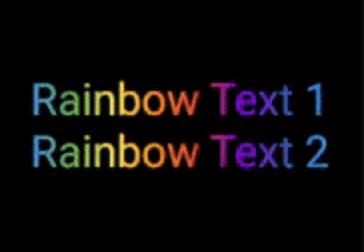
Rainbow Text 1

Reverse the animation. This plays the animation backwards when a single iteration of the forward animation is completed. You set reverse to true to enable this.

// rainbow text with reverse
GradientAnimationText(
    text: Text(
        'Rainbow Text 1',
        style: TextStyle(
            fontSize: 50,
        ),
    ),
    colors: [
        Color(0xff8f00ff),  // violet
        Colors.indigo,
        Colors.blue,
        Colors.green,
        Colors.yellow,
        Colors.orange,
        Colors.red,
    ],
    duration: Duration(seconds: 5),
    reverse: true,  // reverse
),

Rainbow Text 2

Play with colors. It is possible to use the same color more than once to increase the area it covers. Gold Text Example: The following 2 Gold Text animations have different number of Colors.amber color.

// gold text 1
GradientAnimationText(
    text: Text(
        'Gold Text 1',
        style: TextStyle(
            fontSize: 50,
            fontWeight: FontWeight.bold,
        ),
    ),
    colors: [
        Colors.amber,   // 1
        Colors.white,
    ],
    duration: Duration(seconds: 5),
    reverse: true,
),
// gold text 2
GradientAnimationText(
    text: Text(
        'Gold Text 2',
        style: TextStyle(
            fontSize: 50,
            fontWeight: FontWeight.bold,
        ),
    ),
    colors: [
        Colors.amber,   // 1
        Colors.amber,   // 2
        Colors.amber,   // 3
        Colors.white,
    ],
    duration: Duration(seconds: 5),
    reverse: true,
),

Gold Text

Transform your gradient. You can transform your gradient using transform property. Use GradientTranform classes such as SweepGradient, and GradientRotation to tranform.

// Tranform Text
GradientAnimationText(
    text: Text(
    'Tranform Text',
        style: TextStyle(
            fontSize: 90,
            fontWeight: FontWeight.bold,
        ),
    ),
    colors: [
        Color(0xFF061A9C),
        Color(0xff92effd),
    ],
    duration: Duration(seconds: 5),
    transform: GradientRotation(math.pi / 4),   // tranform
),

Tranform Text

Available Properties

Property Type Description
text Text The text to be used in the animation.
colors List Colors of the animation.
duration Duration Duration for which a single gradient animation runs.
reverse bool? If you want to reverse the animation.
transform GradientTransform? You can transform your gradient.

Author

This package is developed by Sahil Shah.

カテゴリー

ソースリポジトリ

このパッケージを使用しているプロジェクト

データはまだありません。