
 v3.3.1
radio_group_v2
ユーザーがアプリ内で選択を行う際に快適な体験を提供できるように、ラジオボタンをグループ化するウィジェットです。
32いいね 62130日間ダウンロード70Pub ポイント
プラットフォーム情報なし
ユーザーがアプリ内で選択を行う際に快適な体験を提供できるように、ラジオボタンをグループ化するウィジェットです。

{"sdk":"flutter"}^5.0.0{"sdk":"flutter"}^5.1.1以下は英語原文のスナップショットです。最新版は GitHub をご覧ください。
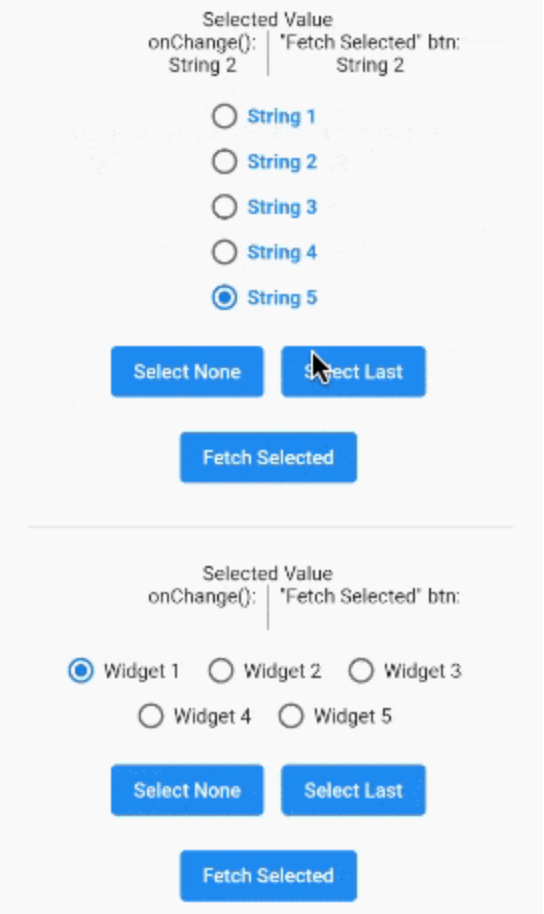
A widget that groups radio buttons so they can work together to give the user a pleasant experience when making selections within the app.
A gif demonstrating the radio group in action.
In the pubspec.yaml of your flutter project, add the following dependency:
dependencies:
  radio_group_v2: ^3.3.1
Import it to each file you use it in:
import 'package:radio_group_v2/radio_group_v2.dart';
This example is a very basic, vertical radio group.
RadioGroupController myController = RadioGroupController();

RadioGroup(
  controller: myController,
  values: ["Choice1", "Choice2", "Choice3"],
)
This example is a horizontal radio group with some decoration, and it starts with the first button selected.
RadioGroupController myController = RadioGroupController();

RadioGroup(
  controller: myController,
  values: ["Choice1", "Choice2", "Choice3"],
  indexOfDefault: 0,
  orientation: RadioGroupOrientation.Horizontal,
  decoration: RadioGroupDecoration(
    spacing: 10.0,
    labelStyle: TextStyle(
      color: Colors.blue,
    ),
    activeColor: Colors.amber,
  ),
)
This example shows how to programmatically select an item using two different methods.
RadioGroupController myController = RadioGroupController();

List<String> items = ["Choice1", "Choice2", "Choice3"];

RadioGroup(
  controller: myController,
  values: items,
)

// Method 1 - Selects a specific item from the list.
myController.value = items[1]; // Selects Choice2

// Method 2 - Selects whatever item is at the given
//            index in the list.
myController.selectAt(2); // Selects Choice3
This example shows how to programmatically select an item using two different silent methods. This means, when the new value in is selected in the list, the onChanged method will not be called.
RadioGroupController myController = RadioGroupController();

List<String> items = ["Choice1", "Choice2", "Choice3"];

RadioGroup(
  controller: myController,
  values: items,
)

// Method 1 - Selects a specific item from the list.
myController.setValueSilently(items[1]); // Selects Choice2

// Method 2 - Selects whatever item is at the given
//            index in the list.
myController.selectSilentlyAt(2); // Selects Choice3
This example shows how to retrieve the selected value.
RadioGroupController myController = RadioGroupController();

RadioGroup(
  controller: myController,
  values: ["Choice1", "Choice2", "Choice3"],
)

String selected = myController.value.toString();