
 v2.0.2
select_dialog
リストからアイテムを選択するためのパッケージで、フィルタリングやオンライン検索も可能です。
97いいね 315030日間ダウンロード150Pub ポイント
AndroidiOSWebmacOSWindowsLinux
リストからアイテムを選択するためのFlutterパッケージで、フィルタリングやオンライン検索も可能になっています。

依存関係一覧 2 件
{"sdk":"flutter"}^1.24.6以下は英語原文のスナップショットです。最新版は GitHub をご覧ください。
Package designed to select an item from a list, with the option to filter and even search the items online.
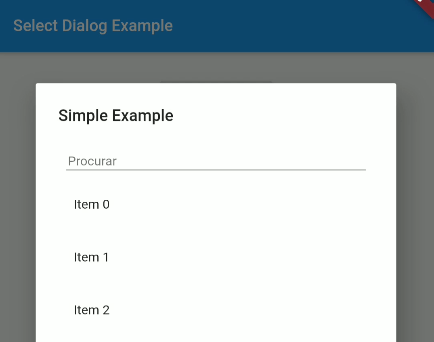
https://user-images.githubusercontent.com/16373553/94357714-95d4fc80-0071-11eb-8b99-9cff034a1ece.png https://user-images.githubusercontent.com/16373553/94357674-4098eb00-0071-11eb-8985-45edf99b9812.png
Non Null Safety Version: 1.2.3 or less
Null Safety Version: 2.0.0 or more
select_dialog: <last version>
import 'package:select_dialog/select_dialog.dart';
String ex1 = "No value selected";

SelectDialog.showModal<String>(
  context,
  label: "Simple Example",
  selectedValue: ex1,
  items: List.generate(50, (index) => "Item $index"),
  onChange: (String selected) {
    setState(() {
      ex1 = selected;
    });
  },
);
List<String> ex5 = [];

SelectDialog.showModal<String>(
  context,
  label: "Multiple Items Example",
  multipleSelectedValues: ex5,
  items: List.generate(50, (index) => "Item $index"),
  onMultipleItemsChange: (List<String> selected) {
    setState(() {
      ex5 = selected;
    });
  },
);
To use a template as an item type, you need to implement toString, equals and hashcode, as shown below:
class UserModel {
  final String id;
  final DateTime createdAt;
  final String name;
  final String avatar;

  UserModel({this.id, this.createdAt, this.name, this.avatar});

  @override
  String toString() => name;

  @override
  operator ==(o) => o is UserModel && o.id == id;

  @override
  int get hashCode => id.hashCode^name.hashCode^createdAt.hashCode;

}
This project is a starting point for a Dart package, a library module containing code that can be shared easily across multiple Flutter or Dart projects.
For help getting started with Flutter, view our online documentation, which offers tutorials, samples, guidance on mobile development, and a full API reference.