

 v2.0.0
christian_picker_image
AndroidおよびiOSの画像ライブラリから画像を選択し、カメラで新しい写真を撮影するためのFlutterプラグイン。
44いいね 13130日間ダウンロード140Pub ポイント
AndroidiOS
Flutter用の画像およびカメラ選択プラグイン

以下は英語原文のスナップショットです。最新版は GitHub をご覧ください。
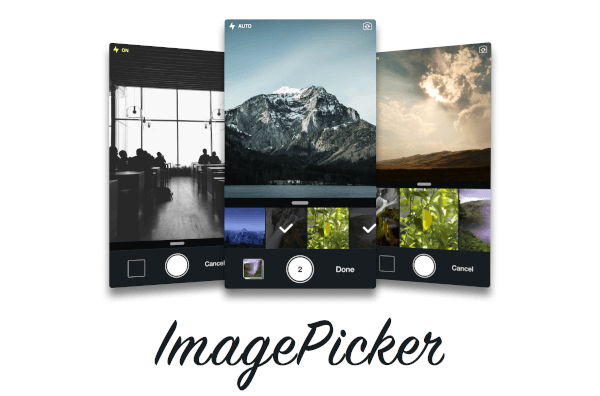
Flutter plugin that allows you to upload multi image picker on iOS & Android.
ChristianImagePicker is an all-in-one camera solution for your iOS app. It lets your users select images from the library and take pictures at the same time. As a developer you get notified of all the user interactions and get the beautiful UI for free, out of the box, it's just that simple.
ImagePicker has been optimized to give a great user experience, it passes around referenced images instead of the image itself which makes it less memory consuming. This is what makes it smooth as butter.

Add the following keys to your Info.plist file, located in <project root>/ios/Runner/Info.plist:
NSPhotoLibraryUsageDescription - describe why your app needs permission for the photo library. This is called Privacy - Photo Library Usage Description in the visual editor.NSCameraUsageDescription - describe why your app needs access to the camera. This is called Privacy - Camera Usage Description in the visual editor. visual editor.import 'package:christian_picker_image/christian_picker_image.dart';
class MyHomePage extends StatefulWidget {
@override
_MyHomePageState createState() => _MyHomePageState();
}
class _MyHomePageState extends State<MyHomePage> {
void takeImage(BuildContext context) async {
List<File> images = await ChristianPickerImage.pickImages(maxImages: 5);
print(images);
Navigator.of(context).pop();
}
Future _pickImage(BuildContext context) async {
showDialog<Null>(
context: context,
barrierDismissible: false,
builder: (BuildContext context) {
takeImage(context);
return Center();
});
}
@override
Widget build(BuildContext context) {
return MaterialApp(
home: Scaffold(
appBar: AppBar(
title: const Text('Plugin example app'),
),
body: Text("Christian Picker Image Demo"),
floatingActionButton: Column(
mainAxisAlignment: MainAxisAlignment.end,
children: <Widget>[
Padding(
padding: const EdgeInsets.only(top: 16.0),
child: FloatingActionButton(
onPressed: () {
_pickImage(context);
},
tooltip: 'Take a Photo',
child: const Icon(Icons.photo_library),
),
),
],
)
),
);
}
}
依存関係一覧 2 件
{"sdk":"flutter"}{"sdk":"flutter"}用途で絞り込み、開発状況を比較し、採用前に元のリポジトリで要件を確認しましょう。
“A repository is the most basic element of GitHub.”
GitHub Docs — About repositories ↗