パッケージ、リポジトリ、アプリカテゴリを検索

christian_picker_image のカバー
パッケージ詳細v2.0.0

christian_picker_image

AndroidおよびiOSの画像ライブラリから画像を選択し、カメラで新しい写真を撮影するためのFlutterプラグイン。

AndroidiOS
30日間ダウンロード
131
いいね数
44
Pub ポイント
140

パッケージをインストール

flutter pub add christian_picker_image

パッケージ概要

公開情報に基づく選定ガイドです。参考としてご利用ください。

Christian Picker Image は、Android および iOS の両方でデバイスのギャラリーから画像を選択したり、カメラを使って新しい写真を撮影できるようにする Flutter プラグインです。Flutter アプリケーション内の画像入力にシームレスなクロスプラットフォームソリューションを提供します。プラグインはネイティブの画像ピッカー機能とシンプルな API を統合しており、写真のアップロードやメディア収集が必要なアプリに簡単に実装できます。単一および複数の画像選択をサポートし、ピッカーインターフェースをカスタマイズするオプションも備えています。複雑なセットアップなしに信頼性の高い画像処理を求める開発者向けに設計されており、プラットフォーム間でのメディア統合を簡素化しています。

用途

  • 画像アップロードフォーム
  • ユーザーのプロフィール画像の選択
  • アプリ内の写真ドキュメンテーション
  • ソーシャルメディアコンテンツの共有
  • 文書スキャンワークフロー

主な機能

  • クロスプラットフォーム対応(Android および iOS)
  • カメラとギャラリーの統合
  • 複数の画像選択
  • 迅速な実装向けのシンプルな API
  • カスタマイズ可能なピッカー UI

適している対象

  • モバイルアプリ開発者
  • ユーザーの写真アップロードが必要なアプリ
  • メディア入力を必要とするフォーム
  • コンテンツ作成ツール
  • ユーザー認証フロー

注意事項

  • プラットフォーム固有の権限が必要です
  • iOS 用に追加の構成が必要になる場合があります
  • 画像のみの選択に制限
  • 組み込みの画像編集機能なし
  • ネイティブ画像ピッカーの動作に依存します

元の README

関連するソースリポジトリの README 原文のスナップショットです。最新の内容はリポジトリをご覧ください。

christian_picker_image

Flutter plugin that allows you to upload multi image picker on iOS & Android.

Getting Started

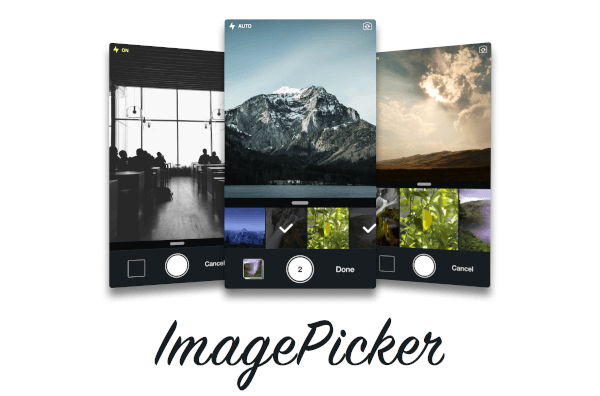
ChristianImagePicker is an all-in-one camera solution for your iOS app. It lets your users select images from the library and take pictures at the same time. As a developer you get notified of all the user interactions and get the beautiful UI for free, out of the box, it's just that simple.

ImagePicker has been optimized to give a great user experience, it passes around referenced images instead of the image itself which makes it less memory consuming. This is what makes it smooth as butter.

Demo

iOS

Add the following keys to your Info.plist file, located in <project root>/ios/Runner/Info.plist:

  • NSPhotoLibraryUsageDescription - describe why your app needs permission for the photo library. This is called Privacy - Photo Library Usage Description in the visual editor.
  • NSCameraUsageDescription - describe why your app needs access to the camera. This is called Privacy - Camera Usage Description in the visual editor. visual editor.
Example
import 'package:christian_picker_image/christian_picker_image.dart';

class MyHomePage extends StatefulWidget {
  @override
  _MyHomePageState createState() => _MyHomePageState();
}

class _MyHomePageState extends State<MyHomePage> {
  
  void takeImage(BuildContext context) async {
    List<File> images  = await ChristianPickerImage.pickImages(maxImages: 5);
    print(images);
    Navigator.of(context).pop();
  }

  Future _pickImage(BuildContext context) async {

    showDialog<Null>(
      context: context,
      barrierDismissible: false,
      builder: (BuildContext context) {
        takeImage(context);
        return Center();
    });

  }

  @override
  Widget build(BuildContext context) {
    return MaterialApp(
      home: Scaffold(
        appBar: AppBar(
          title: const Text('Plugin example app'),
        ),
        body: Text("Christian Picker Image Demo"),
        floatingActionButton: Column(
          mainAxisAlignment: MainAxisAlignment.end,
          children: <Widget>[
            Padding(
              padding: const EdgeInsets.only(top: 16.0),
              child: FloatingActionButton(
                onPressed: () {
                  _pickImage(context);
                },
                tooltip: 'Take a Photo',
                child: const Icon(Icons.photo_library),
              ),
            ),
          ],
        )
      ),
    );
  }

}

カテゴリー

ソースリポジトリ

このパッケージを使用しているプロジェクト

データはまだありません。