
 v1.1.0
textstyle_extensions
TextStyle を簡単に編集するための構文的糖衣。.bold、.italic、.size() などの textStyle のバリエーションを迅速に作成できます。
22いいね 130030日間ダウンロード40Pub ポイント
プラットフォーム情報なし
TextStyle を迅速に変更するための構文的甘さ

{"sdk":"flutter"}以下は英語原文のスナップショットです。最新版は GitHub をご覧ください。
Syntactic sugar for easily modifying TextStyles:
// Do this:
myTextStyle.bold.italic.size(16).letterSpace(1.6)

//Instead of this:
myTextStyle.copyWith(fontSize: 16, fontWeight: FontWeight.bold, fontStyle: FontStyle.italic, letterSpacing: 1.6,)
dependencies:
  textstyle_extensions: ^1.0.0
import 'package:textstyle_extensions/textstyle_extensions.dart';
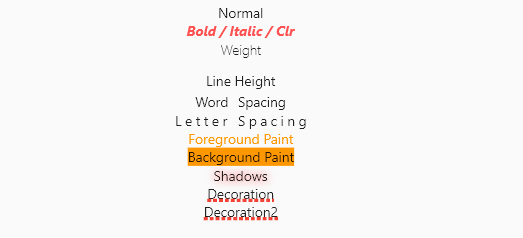
The entire TextStyle API is represented, plus a convenience method for quick scaling:
Widget build(BuildContext context) {
  Text t(String v, TextStyle t) => Text(v, style: t);
  TextStyle style = TextStyle(fontSize: 12);
  return Center(
    child: Column(
      crossAxisAlignment: CrossAxisAlignment.center,
      children: <Widget>[
        t("Normal", style),
        t("Bigger", style.scale(1.1)),
        t("Smaller Bold / Italic / Clr", style.bold.italic.textColor(Colors.redAccent).size(10)),
        t("Weight", style.weight(FontWeight.w100)),
        t("Line Height", style.textHeight(2.5)),
        t("Word Spacing", style.wordSpace(5)),
        t("Letter Spacing", style.letterSpace(3)),
        t("Foreground Paint", style.textForeground(Paint()..color = Colors.orange)),
        t("Background Paint", style.textBackground(Paint()..color = Colors.orange)),
        t("Shadows", style.textShadows([Shadow(color: Colors.redAccent, blurRadius: 4)])),
        t(
          "Decoration",
          style.textDecoration(TextDecoration.underline,
              color: Colors.red, thickness: 4, style: TextDecorationStyle.dotted),
        ),
      ],
    ),
  );
}
Shortcut method names are introduced where it makes sense. This is done both for brevity, and to reduce conflicts with the underlying TextStyle properties.
If you encounter any problems please open an issue. If you feel the library is missing a feature, please raise a ticket on Github and we'll look into it. Pull request are welcome.
MIT License