textstyle_extensions
Syntactic sugar for easily modifying TextStyles:
myTextStyle.bold.italic.size (16 ).letterSpace (1.6 )
myTextStyle.copyWith (fontSize: 16 , fontWeight: FontWeight .bold, fontStyle: FontStyle .italic, letterSpacing: 1.6 ,)
🔨 Installation
dependencies:
  textstyle_extensions: ^1.0.0
⚙ Import
import 'package:textstyle_extensions/textstyle_extensions.dart' ;
🕹️ Usage
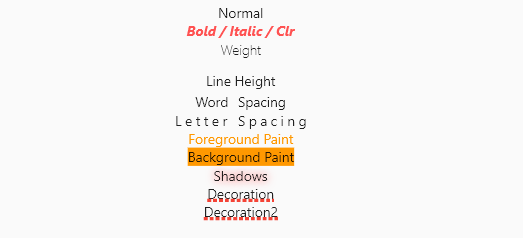
The entire TextStyle API is represented, plus a convenience method for quick scaling:
Widget build (BuildContext context) {
Text t (String v, TextStyle t) => Text (v, style: t);
TextStyle style = TextStyle (fontSize: 12 );
return Center (
child: Column (
crossAxisAlignment: CrossAxisAlignment .center,
children: <Widget >[
t ("Normal" , style),
t ("Bigger" , style.scale (1.1 )),
t ("Smaller Bold / Italic / Clr" , style.bold.italic.textColor (Colors .redAccent).size (10 )),
t ("Weight" , style.weight (FontWeight .w100)),
t ("Line Height" , style.textHeight (2.5 )),
t ("Word Spacing" , style.wordSpace (5 )),
t ("Letter Spacing" , style.letterSpace (3 )),
t ("Foreground Paint" , style.textForeground (Paint ()..color = Colors .orange)),
t ("Background Paint" , style.textBackground (Paint ()..color = Colors .orange)),
t ("Shadows" , style.textShadows ([Shadow (color: Colors .redAccent, blurRadius: 4 )])),
t (
"Decoration" ,
style.textDecoration (TextDecoration .underline,
color: Colors .red, thickness: 4 , style: TextDecorationStyle .dotted),
),
],
),
);
}
Shortcut method names are introduced where it makes sense. This is done both for brevity, and to reduce conflicts with the underlying TextStyle properties.
🐞 Bugs/Requests
If you encounter any problems please open an issue. If you feel the library is missing a feature, please raise a ticket on Github and we'll look into it. Pull request are welcome.
📃 License
MIT License