
 v1.3.0
steps_indicator
シンプルなステップインジケーターラインウィジェットを表示するためのFlutterプラグイン。
59いいね 148030日間ダウンロード150Pub ポイント
AndroidiOSWebmacOSWindowsLinux
シンプルなステップインジケーターラインウィジェットを表示するためのFlutterプラグイン

{"sdk":"flutter"}{"sdk":"flutter"}以下は英語原文のスナップショットです。最新版は GitHub をご覧ください。
A simple steps indicator widget
Add steps_indicator: ^1.3.0 in your pubspec.yaml dependencies. And import it:
import 'package:steps_indicator/steps_indicator.dart';
Simply create a StepsIndicator widget and pass the required params:
StepsIndicator(
  selectedStep: 1,
  nbSteps: 4
)
Do not forget to check that the selectedStep is not lower than 0 and is not higher than the total number of steps (nbSteps).
Animations are disabled by default if you want to enable them remember to pass properties to true.
StepsIndicator(
  selectedStep: 1,
  nbSteps: 4,
  selectedStepColorOut: Colors.blue,
  selectedStepColorIn: Colors.white,
  doneStepColor: Colors.blue,
  doneLineColor: Colors.blue,
  undoneLineColor: Colors.red,
  isHorizontal: true,
  lineLength: 40,
  doneStepSize: 10,
  unselectedStepSize: 10,
  selectedStepSize: 14,
  selectedStepBorderSize: 1,
  doneStepWidget: Container(), // Custom Widget
  unselectedStepWidget: Container(), // Custom Widget
  selectedStepWidget: Container(), // Custom Widget
  lineLengthCustomStep: [
    StepsIndicatorCustomLine(nbStep: 3, length: 80)
  ],
  enableLineAnimation: true,
  enableStepAnimation: true,
)
For a more detail example please take a look at the example folder.
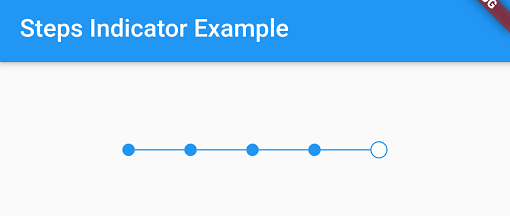
Steps indicator:
https://raw.githubusercontent.com/huextrat/steps_indicator/master/example/screenshot.pngIf something is missing, feel free to open a ticket or contribute!