
 v0.5.1
interactive_slider
Apple Musicで使用されているスライダーウィジェットを参考にした、Cupertinoスタイルのインタラクティブな連続スライダー小道具。
138いいね 182030日間ダウンロード160Pub ポイント
AndroidiOSWebmacOSWindowsLinux
カッパーティノ風のインタラクティブな連続スライダー小道具。

{"sdk":"flutter"}{"sdk":"flutter"}^5.0.0以下は英語原文のスナップショットです。最新版は GitHub をご覧ください。
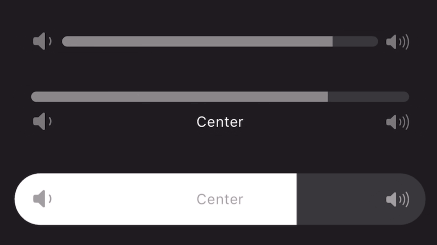
A continuous or segmented slider widget inspired by the volume slider in the Apple Music app. This widget can be used with little to no setup but is still fully customizable!
Animated gif of slider being used Animated gif of slider being used Animated gif of slider being usedUse the stock slider or customize:
Add to your dependencies:
dependencies:
  interactive_slider: ^0.5.0
Then import:
import 'package:interactive_slider/interactive_slider.dart';
InteractiveSlider(
  startIcon: const Icon(CupertinoIcons.volume_down),
  centerIcon: const Text('Center'),
  endIcon: const Icon(CupertinoIcons.volume_up),
  min: 1.0,
  max: 15.0,
  onChanged: (value) => setState(() => _value = value),
)
Please report any bugs and open any pull requests via GitHub.