パッケージ、リポジトリ、アプリカテゴリを検索

interactive_slider のカバー
パッケージ詳細v0.5.1

interactive_slider

Apple Musicで使用されているスライダーウィジェットを参考にした、Cupertinoスタイルのインタラクティブな連続スライダー小道具。

AndroidiOSWebmacOSWindowsLinux
30日間ダウンロード
2700
いいね数
139
Pub ポイント
160

パッケージをインストール

flutter pub add interactive_slider

パッケージ概要

公開情報に基づく選定ガイドです。参考としてご利用ください。

Apple Musicのスライダーインターフェースを彷彿とさせるCupertinoテーマのインタラクティブな連続スライダーウィジェットです。複数のプラットフォームでタッチおよびドラッグ操作に対応し、滑らかで視覚的に魅力的なスライド体験を提供します。メディア再生コントロールや連続値に対する直感的なユーザー入力が必要なアプリケーションに最適です。レスポンシブデザインをサポートしており、iOSおよびクロスプラットフォーム環境向けのFlutterアプリへの統合もスムーズです。

用途

  • メディア再生ボリューム制御
  • 再生速度の調整
  • カスタマイズ可能な範囲入力
  • ユーザーの好み設定
  • インタラクティブなフォーム要素

主な機能

  • Cupertino デザイン言語
  • 連続値のトラッキング
  • クロスプラットフォーム互換性
  • タッチとドラッグ操作
  • スムーズなアニメーション
  • 応答性レイアウト

適している対象

  • iOSスタイルのアプリインターフェース
  • 音楽およびメディアアプリケーション
  • スライダーが必要なフォーム入力
  • クロスプラットフォームのFlutterプロジェクト
  • デザイン重視のUIコンポーネント

注意事項

  • Flutter SDK 3.0 以上が必要です
  • テーマ以外のカスタマイズは限定的
  • Cupertino以外のコンテキストでは追加のスタイルが必要になる場合があります
  • 高頻度の更新には最適化されていません
  • 単一値の連続入力に最適

元の README

関連するソースリポジトリの README 原文のスナップショットです。最新の内容はリポジトリをご覧ください。

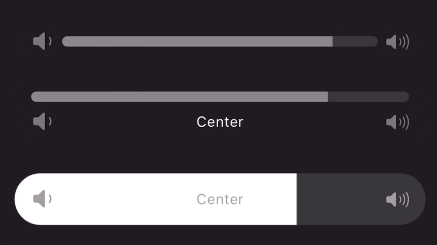
A continuous or segmented slider widget inspired by the volume slider in the Apple Music app. This widget can be used with little to no setup but is still fully customizable!

Animated gif of slider being used Animated gif of slider being used Animated gif of slider being used

Features

Use the stock slider or customize:

  • Built in padding for convenience
  • Adjustable size transition
  • Use any widget for a start/end icon and center label
  • Use any transition duration and curve
  • Provide any shape border for the progress bar
  • Use the normalized progress value or easily provide a min/max to be automatically transformed
  • Animate start and end icons using slider progress
  • Color the slider's porgress with a gradient
  • Create any number of discrete segments to slide through

Getting started

Add to your dependencies:

dependencies:
  interactive_slider: ^0.5.0

Then import:

import 'package:interactive_slider/interactive_slider.dart';

Usage

InteractiveSlider(
  startIcon: const Icon(CupertinoIcons.volume_down),
  centerIcon: const Text('Center'),
  endIcon: const Icon(CupertinoIcons.volume_up),
  min: 1.0,
  max: 15.0,
  onChanged: (value) => setState(() => _value = value),
)

Additional information

Please report any bugs and open any pull requests via GitHub.

カテゴリー

ソースリポジトリ

このパッケージを使用しているプロジェクト