


v1.1.1
awesome_shake_widget
Flutterウィジェットで、振動アニメーションとオプションのバイブレーション効果を提供し、無効なフォームや注意喚起、ユーザーインタラクションフィードバックに最適です。
21いいね 105030日間ダウンロード160Pub ポイント
AndroidiOS
juanmadelboca/awesome_shake_widget open-source repository details.

以下は英語原文のスナップショットです。最新版は GitHub をご覧ください。
A customizable Flutter widget that adds shake animations with haptic and vibration feedback. Perfect for invalid forms, error indicators, or drawing attention to UI components.


light, medium, heavyGlobalKeydependencies:
awesome_shake_widget: ^1.0.1
Run:
flutter pub get
By using the built-in presets — light, medium, heavy and custom — you can quickly apply different vibration intensities and patterns, perfectly paired with UI shake animations for a dynamic and responsive user experience.
final shakeKey = GlobalKey<ShakeWidgetState>();

ShakeWidget(
  key: shakeKey,
  preset: ShakePreset.medium,
  child: Text("Tap Me"),
);

// Somewhere else, e.g., on button press:
shakeKey.currentState?.shake();
If you only want the visual shake effect without vibration, you can set vibrationType to VibrationType.none using the ShakeConfig. To customize the intensity of the shake, adjust the offset value — higher values will produce a stronger visual effect.
ShakeWidget(
  key: shakeKey,
  customConfig: ShakeConfig(
    offset: 20,
    vibrationType: VibrationType.none,
  ),
  child: Icon(Icons.info),
);
You can also create custom vibration patterns by setting vibrationType to VibrationType.custom, and providing your own pattern and intensities. This gives you full control over the vibration behavior.
ShakeWidget(
key: shakeKey,
customConfig: ShakeConfig(
offset: 32,
pattern: [0, 50, 100, 50],
intensities: [255, 0, 255, 0],
vibrationType: VibrationType.custom,
),
child: Text("Custom Shake!"),
);
Trigger it via:
shakeKey.currentState?.shake();
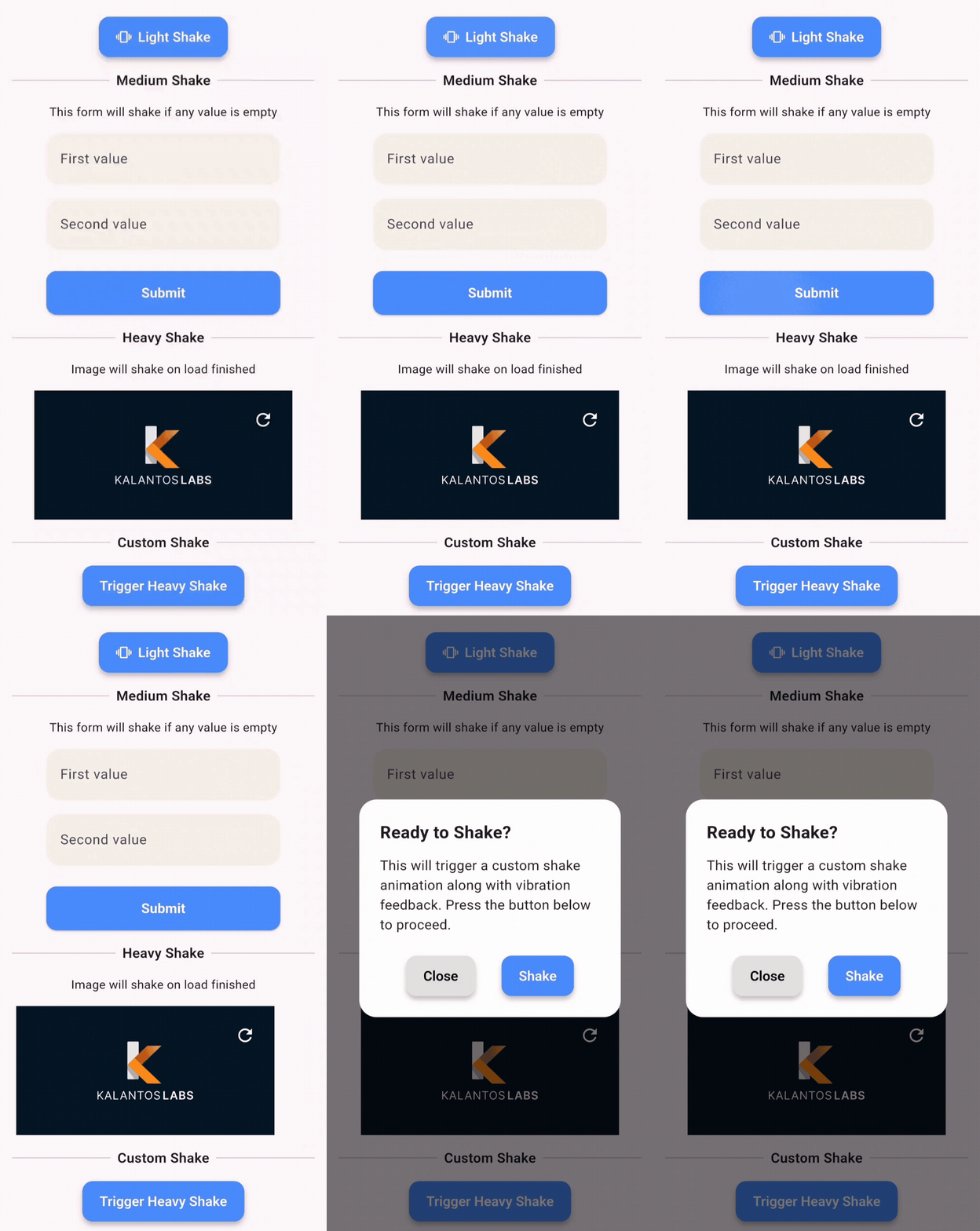
This demo shows how you can apply shake animations to:
ShakePreset| Value | Offset | Vibration |
|---|---|---|
| light | 8 | Haptic |
| medium | 16 | Haptic |
| heavy | 24 | Patterned Vibe |
| custom | User-defined | Custom |
VibrationTypenone – no vibrationhaptic – system haptic feedbackcustom – vibration with pattern/intensity (Android only)ShakeConfigShakeConfig({
required double offset,
List<int>? pattern,
List<int>? intensities,
VibrationType vibrationType = VibrationType.haptic,
});
Clone and run the example:
cd example
flutter run
Example main.dart:
import 'package:flutter/material.dart';
import 'package:awesome_shake_widget/shake_widget.dart';

void main() => runApp(const MyApp());

class MyApp extends StatelessWidget {
  const MyApp({super.key});

  @override
  Widget build(BuildContext context) {
    return MaterialApp(
      home: ShakeDemo(),
    );
  }
}

class ShakeDemo extends StatelessWidget {
  final shakeKey = GlobalKey<ShakeWidgetState>();

  @override
  Widget build(BuildContext context) {
    return Scaffold(
      appBar: AppBar(title: const Text('Shake Demo')),
      body: Center(
        child: Column(
          mainAxisAlignment: MainAxisAlignment.center,
          children: [
            ShakeWidget(
              key: shakeKey,
              preset: ShakePreset.heavy,
              child: const Icon(Icons.warning, size: 64),
            ),
            const SizedBox(height: 32),
            ElevatedButton(
              onPressed: () => shakeKey.currentState?.shake(),
              child: const Text("Shake it!"),
            ),
          ],
        ),
      ),
    );
  }
}
MIT © Juanma Del Boca
依存関係一覧 4 件
{"sdk":"flutter"}^3.1.8{"sdk":"flutter"}^6.0.0用途で絞り込み、開発状況を比較し、採用前に元のリポジトリで要件を確認しましょう。
“A repository is the most basic element of GitHub.”
GitHub Docs — About repositories ↗