

v1.0.4
animated_float_action_button
浮き気なボタンの折りたたみリストを作成できるようにします。
40いいね 126030日間ダウンロード140Pub ポイント
AndroidiOSWebmacOSWindowsLinux
macielcr7/animated_float_action_button open-source repository details.

以下は英語原文のスナップショットです。最新版は GitHub をご覧ください。
This project is a starting point for a Dart package, a library module containing code that can be shared easily across multiple Flutter or Dart projects.
For help getting started with Flutter, view our online documentation, which offers tutorials, samples, guidance on mobile development, and a full API reference.
##Screenshots
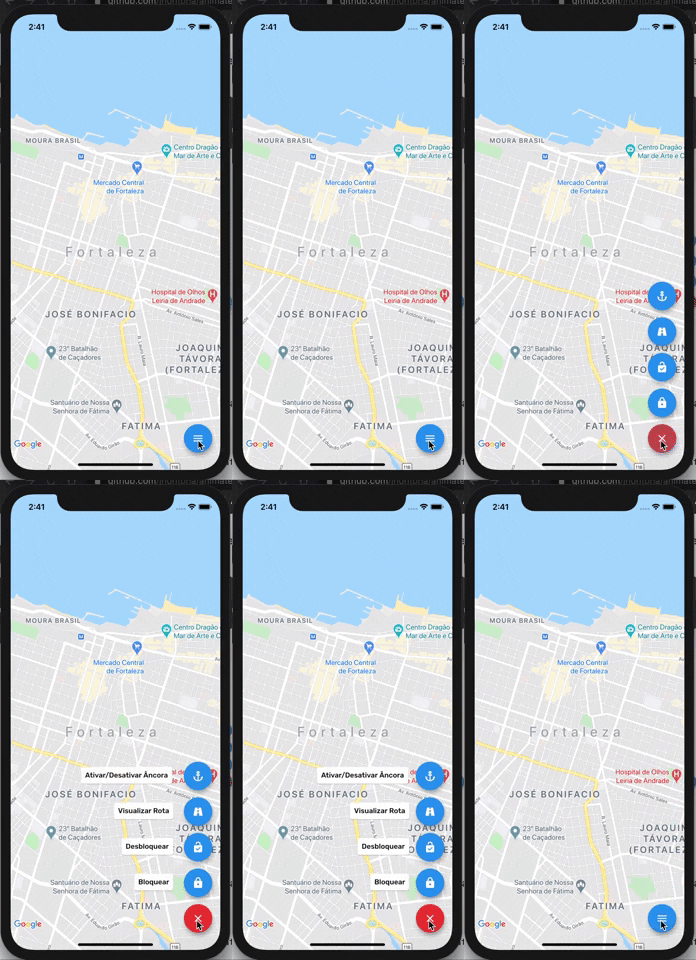
To use this plugin:
In your flutter project add the dependency:
dependencies:
    ...
    animated_float_action_button: ^1.0.3
//Import package
import 'package:animated_float_action_button/animated_floating_action_button.dart';
...
final GlobalKey<AnimatedFloatingActionButtonState> fabKey = GlobalKey();

Widget add() {
    return FloatActionButtonText(
      onPressed: (){
        fabKey.currentState.animate();
      },
      icon: Icons.add,
      text: "Ativar/Desativar Âncora",
      textLeft: -215,
    );
  }

  Widget image() {
    return FloatActionButtonText(
      onPressed: (){
        fabKey.currentState.animate();
      },
      icon: Icons.image,
      textLeft: -150,
      text: "Visualizar Rota",
    );
  }

  Widget inbox() {
    return FloatActionButtonText(
      onPressed: (){
        fabKey.currentState.animate();
      },
      icon: Icons.inbox,
      textLeft: -135,
      text: "Desbloquear",
    );
  }
...
Scaffold(
    floatingActionButton: AnimatedFloatingActionButton(
        key: fabKey,
        fabButtons: <Widget>[
            add(),
            image(),
            inbox(),
        ],
        colorStartAnimation: Colors.blue,
        colorEndAnimation: Colors.red,
        animatedIconData: AnimatedIcons.menu_close //To principal button
    ),
)
Complete example here
依存関係一覧 2 件
{"sdk":"flutter"}{"sdk":"flutter"}用途で絞り込み、開発状況を比較し、採用前に元のリポジトリで要件を確認しましょう。
“A repository is the most basic element of GitHub.”
GitHub Docs — About repositories ↗