パッケージ、リポジトリ、アプリカテゴリを検索

パッケージ詳細v1.0.4

animated_float_action_button

浮き気なボタンの折りたたみリストを作成できるようにします。

AndroidiOSWebmacOSWindowsLinux
30日間ダウンロード
1260
いいね数
40
Pub ポイント
140

パッケージをインストール

flutter pub add animated_float_action_button

パッケージ概要

公開情報に基づく選定ガイドです。参考としてご利用ください。

Flutterパッケージで、1つの展開可能なボタンを通じて複数の操作にアクセスできる折りたたみ可能なフローティングアクションボタンメニューの作成を可能にします。Android、iOS、Web、macOS、Windows、Linuxに対応し、スムーズなアニメーションとカスタマイズ可能なレイアウトを提供します。コンパクトでありながらアクセスしやすいナビゲーションオプションが必要なアプリに最適です。このパッケージは、ボタンの動的な追加や外観・挙動のカスタマイズをサポートしています。

用途

  • マルチアクションフローティングメニューの作成
  • UIのスペース効率の向上
  • モバイルアプリのナビゲーションの向上
  • インタラクティブなジェスチャーに基づくインターフェースの設計
  • アニメーション付きアクションパネルの実装
  • 補助機能へのアクセスを簡素化

主な機能

  • スムーズな展開/折りたたみアニメーション
  • カスタマイズ可能なボタンレイアウト
  • 複数プラットフォームのサポート
  • 動的ボタン管理
  • アニメーションの持続時間の設定可能
  • 応答性のあるタッチ操作

適している対象

  • モバイルアプリ開発者
  • UI/UXデザイナー
  • クロスプラットフォームアプリケーション
  • 複雑なナビゲーションを持つアプリ
  • 洗練されたフローティングボタンを探している開発者
  • アニメーション付きユーザーインターフェースを必要とするプロジェクト

注意事項

  • 多数のボタンがあるとパフォーマンスに影響する可能性があります
  • 使いやすさのために注意深い設計が必要です
  • アニメーションの設定は調整が必要な場合があります
  • 単一のアクションに適していない
  • 制限された組み込みテーマオプション
  • 小さな画面におけるアクセシビリティの課題

元の README

関連するソースリポジトリの README 原文のスナップショットです。最新の内容はリポジトリをご覧ください。

Getting Started

This project is a starting point for a Dart package, a library module containing code that can be shared easily across multiple Flutter or Dart projects.

For help getting started with Flutter, view our online documentation, which offers tutorials, samples, guidance on mobile development, and a full API reference.

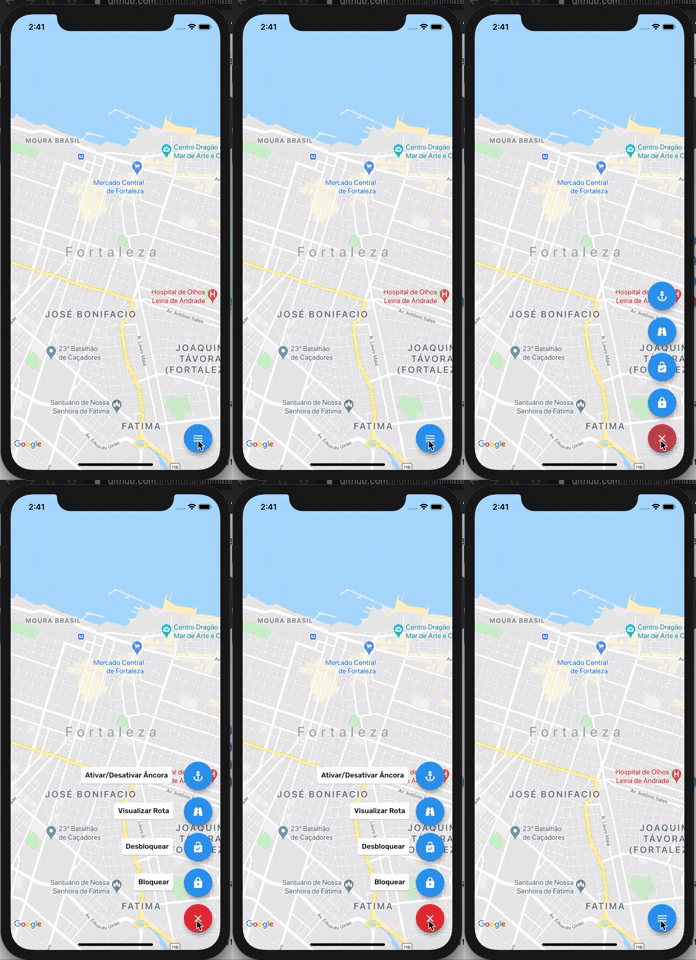
##Screenshots

Usage

To use this plugin:

In your flutter project add the dependency:

dependencies:
    ...
    animated_float_action_button: ^1.0.3

Example

//Import package
import 'package:animated_float_action_button/animated_floating_action_button.dart';
...
final GlobalKey<AnimatedFloatingActionButtonState> fabKey = GlobalKey();

Widget add() {
    return FloatActionButtonText(
      onPressed: (){
        fabKey.currentState.animate();
      },
      icon: Icons.add,
      text: "Ativar/Desativar Âncora",
      textLeft: -215,
    );
  }

  Widget image() {
    return FloatActionButtonText(
      onPressed: (){
        fabKey.currentState.animate();
      },
      icon: Icons.image,
      textLeft: -150,
      text: "Visualizar Rota",
    );
  }

  Widget inbox() {
    return FloatActionButtonText(
      onPressed: (){
        fabKey.currentState.animate();
      },
      icon: Icons.inbox,
      textLeft: -135,
      text: "Desbloquear",
    );
  }
...
Scaffold(
    floatingActionButton: AnimatedFloatingActionButton(
        key: fabKey,
        fabButtons: <Widget>[
            add(), 
            image(),
            inbox(),
        ],
        colorStartAnimation: Colors.blue,
        colorEndAnimation: Colors.red,
        animatedIconData: AnimatedIcons.menu_close //To principal button
    ),
)

Complete example here

カテゴリー

ソースリポジトリ

このパッケージを使用しているプロジェクト

データはまだありません。