

 v0.0.4
dragsheet
物理的で弾性があり、ドラッグ可能なシートおよびモーダル用のFlutter。自らのアプリで直面したギャップを埋めるために作成されました。
4いいね 5330日間ダウンロード160Pub ポイント
AndroidiOSWebmacOSWindowsLinux
物理的で弾性があり、ドラッグ可能なシートおよびモーダル用のFlutter。自らのアプリで直面したギャップを埋めるために作成されました。

以下は英語原文のスナップショットです。最新版は GitHub をご覧ください。
Simple Flutter package for creating bouncy, fun, and most importantly draggable sheets.
Developed because I wanted this for my own app, was familiar with the React Native versions of this, but couldn't find a matching one in the Flutter ecosystem.

|

|

|
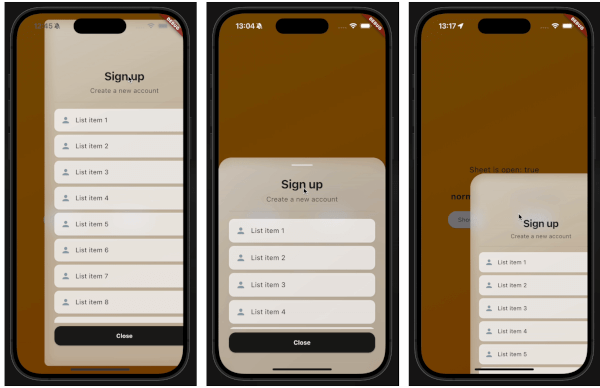
This demo "sign up" blurry sheet is not included with the package. I created it to demonstrate what you are capable of doing with the dragsheet package.
Initialize the controller.
final controller = DragSheetController();
Open YourWidget via the controller.
controller.show(
    context,
    (ctx) => YourWidget(),
),
If you want to close the sheet, use the controller.
controller.close();
If you want to listen to the state of the sheet, use the controller.
controller.addListener(() {
    print(controller.isOpen);
});
Remember to dispose of the controller when you're done with it.
@override
void dispose() {
    super.dispose();
    controller.dispose();
}
If you care about customization, you won't be disapointed. However, the defaults should be solid enough. The main properties to know about are shrinkWrap, which will make the dragsheet shrink to the size of the child you provide it, and if shrinkWrap is true, closeOnShrinkWrapTap, which will close the sheet when you tap outside of the sheet.
void show(
    BuildContext context,
    WidgetBuilder builder, {
    bool shrinkWrap = false,
    bool closeOnShrinkWrapTap = true,
    double minScale = 0.85,
    double maxScale = 1.0,
    double minRadius = 0.0,
    double maxRadius = 30.0,
    double minOpacity = 0.0,
    double maxOpacity = 0.5,
    Duration entranceDuration = const Duration(milliseconds: 200),
    Duration exitDuration = const Duration(milliseconds: 200),
    Duration gestureFadeDuration = const Duration(milliseconds: 200),
    Duration programmaticFadeDuration = const Duration(milliseconds: 200),
    double effectDistance = 220.0,
    BgOpacity? bgOpacity,
    double swipeVelocityMultiplier = 2.5,
    double swipeAccelerationThreshold = 50.0,
    double swipeAccelerationMultiplier = 12.0,
    double swipeMinVelocity = 1000.0,
    double swipeMaxVelocity = 10000.0,
    double swipeFriction = 0.09,
    VoidCallback? onShow,
    VoidCallback? onDismiss,
    Duration opacityDuration = const Duration(milliseconds: 200),
    ApplyBorderRadius applyBorderRadius = ApplyBorderRadius.toTop,
})
依存関係一覧 3 件
{"sdk":"flutter"}{"sdk":"flutter"}^5.0.0用途で絞り込み、開発状況を比較し、採用前に元のリポジトリで要件を確認しましょう。
“A repository is the most basic element of GitHub.”
GitHub Docs — About repositories ↗